Zero-Trust Secret Retrieval: Implementing Vault Agent Sidecars with Kubernetes IAM Roles for Service Accounts (IRSA)
A production-ready guide to implementing zero-trust secret retrieval on AWS EKS using Vault Agent sidecars federated via EKS IAM Roles for Service Accounts (IRSA).
Statically mounted Kubernetes Secrets are a security vulnerability hiding in plain sight. They are merely base64-encoded strings, stored unencrypted in etcd by default, and accessible to anyone with broad namespace read permissions or access to backup snapshots. In high-velocity production environments, exposing database credentials, third-party API tokens, or encryption keys via environment variables or static volume mounts creates a fragile security model where a single container compromise or process inspection (such as reading /proc/1/environ or scraping metrics endpoints) exposes the entire database fleet. To achieve a zero-trust security posture, secrets must remain virtualized—cached solely in memory, restricted to micro-second lifecycles, and pulled dynamically from an external authority like HashiCorp Vault. However, standard Vault Kubernetes authentication patterns rely on long-lived ServiceAccount tokens, which introduces token exposure vectors and burdens application code with Vault API clients, token renewal loops, and manual secret rotation logic. This post provides an in-depth, production-focused blueprint for implementing zero-trust secret retrieval using Vault Agent sidecars and EKS IAM Roles for Service Accounts (IRSA), configuring federated token exchanges, and implementing zero-downtime database connection rotation in Go.
The Core Vulnerability of Static Secrets
In standard Kubernetes deployments, secrets are injected as environment variables or mounted files directly from v1/Secret resources. This pattern violates the principle of least privilege at multiple levels:
- etcd Storage Exposure: Unless KMS Envelope Encryption is explicitly configured (a feature absent in approximately 60% of self-managed or legacy clusters), secrets are stored in plaintext inside the etcd key-value store. Anyone with root access to the master nodes can extract the entire secret catalog.
- Namespace Privilege Escalation: RBAC policies often grant developers or monitoring utilities broad
get,list, orwatchaccess to a namespace. An operator who only requires access to pod logs can easily query the API server to read database passwords. - Environment Leakage: Injecting secrets as environment variables is an anti-pattern. Unix processes pass their environment to child processes, leak them in stack traces during unhandled exceptions, and display them globally in process debugging logs.
Zero-trust secret management dictates three strict requirements:
- Storage Isolation: Secrets must never be persisted to physical disk inside the application container or written to the Kubernetes control plane database.
- Short-Lived Leases: Credentials should expire dynamically (e.g., every 60 minutes) to render leaked keys useless.
- Federated Identity: Authentication must rely on cryptographic identity assertion rather than static, shared API tokens.
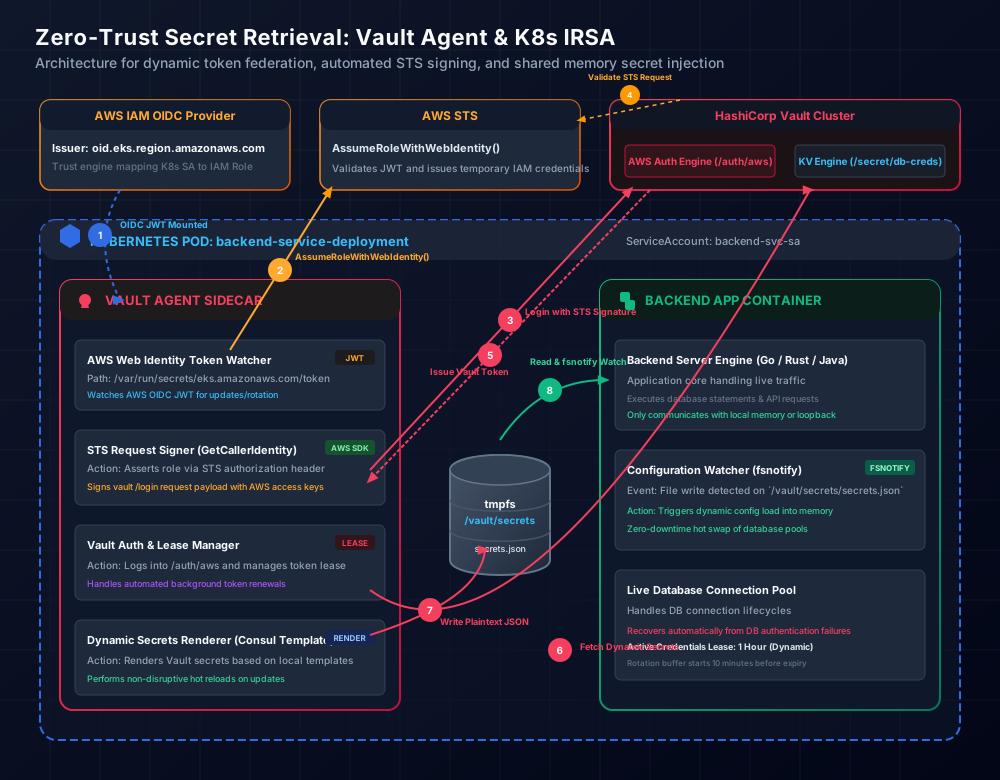
By combining EKS IAM Roles for Service Accounts (IRSA) with Vault Agent sidecars, we eliminate static credentials entirely. Vault Agent handles the authentication protocol and secret leases, writing the plaintext credentials to a shared tmpfs (memory-only) volume, while the application reads them from memory and monitors them for updates.
Architecture of Federated Authentication via IRSA
AWS IRSA leverages OpenID Connect (OIDC) federation to allow Kubernetes pods to assume AWS IAM roles. Instead of using static AWS credentials (AWS_ACCESS_KEY_ID and AWS_SECRET_ACCESS_KEY) or node-level instance profile roles (which grant every pod on a node the same AWS permissions), EKS acts as an OIDC identity provider.
When a pod is annotated with an IAM role ARN, the EKS Pod Identity Webhook intercepts the pod creation request and injects:
- An OIDC JSON Web Token (JWT): Projected into a volume mount at
/var/run/secrets/eks.amazonaws.com/serviceaccount/token. This token is signed by the EKS OIDC provider and expires every 24 hours. - Environment Variables: Injected as
AWS_ROLE_ARNandAWS_WEB_IDENTITY_TOKEN_FILE.
To authenticate with Vault under a zero-trust model, we choose the Vault AWS Auth Engine over the standard Kubernetes Auth Engine. The Kubernetes auth engine requires Vault to query the Kubernetes API server’s TokenReview endpoint to validate service account tokens. This forces you to grant Vault cluster-wide administrative permissions, creating cross-system coupling.
Conversely, AWS IAM authentication is fully federated. When the Vault Agent starts up, it reads the EKS-projected OIDC JWT and invokes AWS STS AssumeRoleWithWebIdentity to obtain temporary IAM role credentials. The Vault Agent then uses these credentials to sign an STS GetCallerIdentity request. It sends this signed request header to the Vault Server as its authentication payload. Vault Server forwards the signature to AWS STS to verify the identity of the presenting IAM Role. Once verified, Vault issues a short-lived Vault client token to the Agent. Vault does not need to communicate with your EKS cluster to verify the caller’s identity.
Bootstrapping AWS EKS OIDC and IAM Role Policies
To construct the federation path, you must establish trust between EKS, AWS IAM, and the Vault Server. First, the IAM role assumed by the Vault Agent must contain a trust relationship permitting the EKS OIDC issuer to perform sts:AssumeRoleWithWebIdentity.
Once the IAM trust relationship is established, you configure the Vault Server to enable the AWS authentication endpoint, configure the regional STS client parameters, and map the EKS IAM Role to a Vault policy.
Vault Agent Configuration: Auto-Auth and Templates
The Vault Agent runs as a sidecar process within the application pod. It manages the token lifecycle, handles authentication retries, and uses Consul Template formatting to render dynamic secrets to disk.
The following vault-agent-config.hcl configuration instructs the agent to authenticate via the AWS method using the IRSA credentials, manage the client token lease in memory, and render database credentials to /vault/secrets/db-creds.json.
The Vault template configuration defines how the secret values are structured when written. Using Consul Template markup, we retrieve dynamic database credentials from Vault’s database secrets engine (database/creds/prod-db-role). The engine automatically creates a unique database user with a 1-hour lease on PostgreSQL, eliminating shared passwords.
Injecting Vault Agent Sidecars in Kubernetes Manifests
In Kubernetes 1.28 and later, native sidecar containers are supported via the restartPolicy: Always directive on init containers. This solves a historical race condition where the application container started before the Vault Agent could initialize and render the secret file, resulting in bootstrap crashes.
With native sidecars, Kubernetes guarantees that the vault-agent init container completes its initial auth loop and writes the secrets file before the application container begins its startup sequence, while still allowing the vault-agent to continue running as a daemon for the life of the pod.
The deployment manifest below mounts a shared memory tmpfs volume (shared-secrets) to both containers. Setting medium: Memory ensures the secrets file resides solely in RAM, preventing the credentials from ever touching the host’s underlying storage media.
Application Integration: Zero-Downtime Secret Hot Reloading in Go
Having Vault Agent rotate database credentials every hour is useless if the backend application must be restarted to read the new password. To avoid service disruptions, the application must monitor the secrets file, parse the rotated credentials, and update its active database connection pool dynamically.
The following Go code uses fsnotify to monitor the shared memory directory. When the Vault Agent rotates the database credential lease and updates the file, the application interceptor triggers, opens a new database connection pool with the new credentials, verifies the connections via Ping(), and swaps the pointer atomically.
Production Failure Modes and Hardening Strategies
Decentralizing secret management to the sidecar pattern removes centralized coordination. Therefore, you must construct robust code-level protections to handle edge-case failure modes in production.
1. Zombie Database Connections
When the Go application swaps connection pools, active database connections tied to the old credential set will remain open until closed. Simply executing oldDB.Close() does not immediately destroy active connections if they are in the middle of executing slow transactions.
Furthermore, if your application generates high query volumes, connections might linger. To prevent connection exhaustion on the database cluster, you must set maximum lifetime limits on your SQL driver configurations. This forces the driver to retire connections naturally before their credentials expire.
2. OIDC Token Expiry & Sync Racing
EKS OIDC projection refreshes /var/run/secrets/eks.amazonaws.com/serviceaccount/token every 24 hours. The AWS SDK handles this seamlessly, but if Vault Agent fails to read the refreshed file due to file lock contention or system io delay, authentication failures will accumulate.
To mitigate this:
- Ensure Vault Agent’s file read operations include built-in retry mechanisms (
-retry=trueflag inside entrypoints). - Run Vault Agent with adequate resource reservations. Under extreme CPU throttling (such as sharing resources with a heavy JVM application container), Vault Agent may fail to complete the cryptographic calculations required for the STS signing handshake before the Vault auth TTL expires.
3. Vault Cluster Outages & Graceful Degradation
If your Vault cluster undergoes a regional failover, Vault Agent cannot renew token leases or fetch new secrets. If a credential lease expires during an outage, the database engine will terminate the connection, crashing your backend.
To enforce graceful degradation:
- Configure Vault dynamic credentials with a sufficient grace period (e.g., 24 hours max TTL with 1-hour renewal intervals). This gives your security operations team 23 hours to restore Vault access before the application connection pool expires.
- Implement structured logging inside the Go watcher (
Snippet 6) to trigger PagerDuty alerts the moment a secret reload fails, allowing engineers to intervene before active leases expire.