Optimizing PostgreSQL Connection Overhead: Session Multiplexing in Advanced pgcat Configurations
An in-depth, production-focused guide to mitigating PostgreSQL connection overhead using advanced PgCat configurations, transaction pooling, and driver-side optimizations.
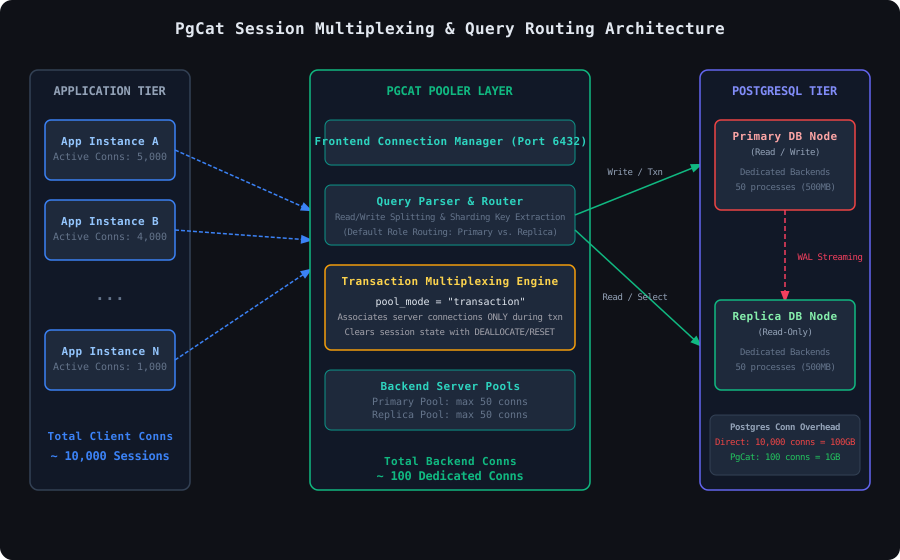
When user traffic scales from hundreds to tens of thousands of concurrent users, database connection starvation is often the first bottleneck that brings a backend system to its knees. In a standard PostgreSQL deployment, each new client connection spawns a dedicated operating system process on the database host. Under sudden load spikes, the overhead of forking processes, managing connection-specific state, and handling kernel-level context switching causes database CPU utilization to spike to 100% while throughput drops off a cliff. Traditional connection poolers like PgBouncer mitigate this by offering transaction-level pooling, but they fall short in modern cloud-native environments that demand automatic read/write splitting, database sharding, and native multi-user authentication routing. PgCat, a lightweight and high-performance connection pooler written in Rust, solves these challenges by providing advanced transaction multiplexing and query parsing. This post explores the mechanics of PostgreSQL connection overhead, outlines the architectural differences between session and transaction pooling, and details how to implement and optimize session multiplexing using advanced PgCat configurations.
The High Cost of PostgreSQL Connections
To understand why connection pooling is mandatory at scale, we must examine the architecture of a PostgreSQL backend. PostgreSQL does not use a multi-threaded architecture to serve incoming connections; instead, it relies on a process-per-connection model. When a client establishes a connection, the postmaster process forks a new backend helper process (a postgres backend).
Each backend process is expensive. It consumes:
- Memory Overhead: Every backend process requires a baseline memory allocation for catalog cache, private plan caches, and process-specific memory contexts. This baseline typically ranges from 10MB to 20MB per connection. If you configure
work_memto 64MB for complex queries, a single process executing a query with multiple sort or hash operations can easily consume hundreds of megabytes. With 1,000 idle connections, your database node wastes 10GB to 20GB of RAM just keeping sockets open. - Fork Latency: Forking an operating system process is a heavy system call (
cloneunder Linux). Spawning a connection dynamically in response to incoming HTTP requests introduces 5ms to 20ms of latency before a single query is even executed. - Context Switching and Scheduling Thrashing: As the number of active processes exceeds the physical CPU core count of the database host, the Linux kernel scheduler spends a massive amount of time context-switching between processes. The CPU spends more cycles saving and restoring CPU registers and parsing page tables than doing actual query execution.
For applications requiring high-concurrency connections—such as serverless architectures (AWS Lambda) or microservice environments with hundreds of application pods—direct connection models scale poorly. Multiplexing client connections onto a tiny pool of dedicated backend connections is the only way to sustain high throughput and low latency.
Session vs. Transaction Pooling Modes
Connection poolers operate in one of two primary modes: session mode or transaction mode. Deciding which mode to deploy requires balancing database feature compatibility against connection efficiency.
Session Pooling Mode
In session mode, a client is assigned a server connection from the pool when it connects. The client keeps this specific server connection until it disconnects.
- Benefits: 100% compatibility with all PostgreSQL features. Since the connection is dedicated to a single client session, features like temporary tables, prepared statements, session parameters (
SET timezone = 'UTC'), andLISTEN/NOTIFYwork exactly as they would when connecting directly to PostgreSQL. - Drawbacks: Negligible multiplexing efficiency. If you have 5,000 application threads, you still need 5,000 database connections to PostgreSQL. The pooler only saves the overhead of repeatedly establishing and breaking down TCP handshakes.
Transaction Pooling Mode
In transaction mode, the pooler assigns a server connection to a client only for the duration of a single transaction block (e.g., between BEGIN and COMMIT/ROLLBACK). As soon as the transaction finishes, the server connection is returned to the pool, allowing another client’s transaction to execute on the same connection.
- Benefits: Maximum multiplexing efficiency. Since web application requests spend the majority of their lifecycle parsing JSON, validating inputs, and calling downstream APIs rather than querying the database, a single database connection can easily serve 50 to 100 client connections.
- Drawbacks: Loss of session-state persistence. If a client executes a
SETcommand, a named prepared statement, or creates a temporary table, that state is bound to the server connection. When the transaction ends, the next client using that server connection inherits that state, leading to silent data corruption, permission errors, or application crashes.
Advanced Configuration: The pgcat.toml Setup
PgCat allows developers to define pools with transaction mode multiplexing while simultaneously handling read/write routing and user credential mapping. The following configuration defines a pool named app_db_pool operating in transaction mode. It configures query parsing to route writes to the primary server and reads to a pool of replica servers, with automatic fallback and failover.
Under this configuration:
pool_mode = "transaction"instructs PgCat to multiplex client connections.query_parser_enabled = trueforces PgCat to parse incoming SQL statements. SimpleSELECTstatements are automatically routed to the replica nodes (replica-db-01andreplica-db-02), whereasINSERT,UPDATE,DELETE, and explicit transaction blocks (BEGIN) are routed to theprimarynode.load_balancing_mode = "loc"ensures replica load is distributed based on the least-connections algorithm, preventing any single replica from becoming a bottleneck.
Driver-Side Optimization for Transaction Pooling (Go with pgx)
When configuring your application to connect to PgCat in transaction pooling mode, the most common issue you will encounter is prepared statement failure. By default, many ORMs and database drivers (like Go’s pgx or database/sql) automatically prepare statements under the hood to optimize execution plans and protect against SQL injection.
Because PgCat swaps the physical database backend between transactions, the driver will issue an EXECUTE command for a statement that was prepared on a completely different physical database connection. This results in the infamous error: ERROR: prepared statement "..." does not exist.
To run Go services against a transaction-pooled PgCat instance, you must configure the connection pool driver to disable named prepared statements on the server side. You can achieve this in the popular jackc/pgx/v5 driver by using the QueryExecModeCacheDescribe execution mode. This configuration caches the statement metadata (the parameter types) on the client side using the Describe protocol message without creating persistent named statements on the Postgres server.
Session-State Sanitization
If your application code absolute requires setting session-level configurations or using database-level parameters inside transaction boundaries, you must use transaction-scoped constructs. Instead of setting parameters using the session-scoped SET timezone = 'UTC', you must use SET LOCAL timezone = 'UTC' within an explicit transaction block.
SET LOCAL ensures that the configuration is automatically rolled back and cleared from the connection when the current transaction commits or aborts. If your driver does leak session state, you can manually trigger cleanups, or configure PgCat to issue state-cleaning queries on connection checkout/checkin.
Here is a comparison of session-scoped configurations that break transaction pools versus transaction-scoped alternatives that work cleanly:
-- snippet-3
-- DANGER: This command attaches to the physical backend process.
-- The next client reusing this connection will inherit this timezone setting.
SET timezone = 'Asia/Jakarta';

-- SAFE ALTERNATIVE: Scopes the timezone setting strictly to the transaction block.
BEGIN;
SET LOCAL timezone = 'Asia/Jakarta';
SELECT current_setting('timezone');
COMMIT;

-- DANGER: Named prepared statement is bound to the connection's session.
PREPARE get_users_by_role (text) AS
  SELECT id, email, created_at FROM users WHERE role = $1;
EXECUTE get_users_by_role('admin');

-- SAFE ALTERNATIVE: Explicit cleanup before completing transaction
-- or relying on pgx client-side caching mode.
DEALLOCATE ALL;
Read/Write Splitting & Replica Fallback Configurations
A major advantage of PgCat over standard PgBouncer configurations is its built-in SQL parsing engine. When query_parser_enabled is set to true, PgCat intercepts raw SQL queries and determines the transaction write status. This allows PgCat to handle read/write splitting transparently without requiring the application layer to maintain separate read and write connection pools.
If a replica server dies, PgCat handles automatic failover. By default, PgCat marks the replica as unhealthy for ban_time seconds, routing all read queries to healthy replicas. If all replicas fail, PgCat can be configured to route reads to the primary server as a fallback, ensuring maximum system availability.
PgCat Administration and Live Reloading
Managing database configurations in dynamic cloud environments requires the ability to adjust pool configurations, rotate database passwords, and add new replica nodes without dropping active client connections. PgCat provides a dedicated administration console listening on the same port, accessible via standard PostgreSQL clients.
Using the administration console, you can dynamically hot-reload the pgcat.toml file or inspect the pool performance metrics.
Monitoring Connection Pool Health
To ensure your PgCat multiplexing setup operates optimally in production, you must monitor internal queuing metrics and backend resource allocations. Since PgCat exposes standard PostgreSQL-compatible system views on its admin console, you can easily query stats programmatically or integrate them with Prometheus exporters.
The following SQL queries allow you to trace active connections, check queue times, and verify if your backend pool is saturated.
Production Troubleshooting and Failure Modes
Operating a connection pooler in transaction mode changes system failure modes. When tuning configurations, look out for the following critical gotchas:
1. Replication Lag during Read/Write Splitting
Because PgCat routes write queries to the primary database and read queries to the replicas, your application is vulnerable to replication lag. If a user writes data (UPDATE users SET name = 'John') and immediately refreshes the page (SELECT name FROM users), PgCat will route the write query to the primary and the subsequent read query to a replica. If the replication lag is higher than a few milliseconds, the user will see stale data.
- Resolution: For critical workflows where read-after-write consistency is mandatory, encapsulate both queries within an explicit transaction block (
BEGIN; SELECT ...; COMMIT;). PgCat routes all statements inside a transaction block to the primary node, guaranteeing consistency at the cost of additional load on the primary.
2. Transaction Lock Contention and Connection Pinning
If your application executes long-running transactions that include heavy computations or external API requests, the backend connection is held (“pinned”) by PgCat for the duration of the entire block. If all backend connections are pinned, new client transactions are queued, leading to a cascading latency spike across your entire application.
- Resolution: Keep transaction scopes as tight as possible. Never invoke external HTTP APIs, serialize large files, or perform intensive CPU calculations inside a database transaction. Execute updates quickly, commit, and release the connection.
3. Connection Leakage and Timeouts
In high-throughput environments, network interruptions between PgCat and PostgreSQL can leave orphaned backend processes running on the database host. To prevent connection leakage, configure sensible timeouts inside PgCat.
- Resolution: Adjust
query_timeoutandconnect_timeoutparameters inpgcat.tomlto prevent queries from hanging indefinitely. Ensure your database driver matches these timeout profiles to handle clean terminations.
By applying these advanced PgCat configurations, tuning driver execution modes, and structuring application query patterns for transaction boundaries, backend engineers can scale PostgreSQL deployments to handle tens of thousands of concurrent users while keeping server resource utilization low and predictable.