Navigating Legacy System Deprecations: A Technical and Leadership Runbook for Multi-Team Migrations
A comprehensive guide for tech leads to execute zero-downtime legacy system deprecations, orchestrate multi-team migrations, and manage organizational alignment.
Every senior backend engineer knows the cold dread of inheriting a critical legacy system. It is a service that handles 15,000 requests per second (RPS), connects to a Postgres database with 450 tables and zero foreign key constraints, and runs on an end-of-life runtime version. It costs $42,000 a month in over-provisioned infrastructure, yet nobody wants to touch it because it is the linchpin of the company’s core checkout flow. Deprecating this system isn’t just a technical challenge of database schemas and network protocols; it is a complex distributed systems problem compounded by human scheduling constraints. When the system is consumed by 14 downstream microservices owned by 6 different engineering teams with their own competing product roadmaps, a naive approach will stall for years, leaving the organization with half-migrated “zombie” services. This runbook details the concrete technical strategies and organizational leadership frameworks necessary to orchestrate a zero-downtime, multi-team migration from discovery to final decommissioning.
The Cost of Inertia: Why Migrations Stall
Legacy systems linger because they are perceived as stable, but their true cost is hidden in developer friction, operational risk, and cloud spend. In production, this inertia manifests in several ways:
- The Maintenance Tax: Dependencies cannot be upgraded because the legacy codebase relies on libraries that are no longer maintained. Vulnerability scanners (e.g., Snyk or Trivy) flags hundreds of CVEs, leading to security compliance issues.
- Performance Degradation: Older systems often lack modern concurrency controls or use inefficient serialization protocols (e.g., heavy XML or bloated JSON schemas). This bloats p99 response times to 250ms, compared to the 15ms target of modern microservices.
- Infrastructure Overhead: A legacy monolith frequently requires massive VM instances to absorb memory leaks or sub-optimal database queries, directly inflating the monthly cloud bill.
The primary reason migrations stall is not technical capability; it is a failure of leadership alignment. Engineering leads often treat a deprecation as a backend ticket, expecting downstream teams to voluntarily prioritize migration work. In reality, product managers will always prioritize feature delivery over technical debt unless the migration is framed as an organizational enabler that directly impacts system reliability and feature velocity.
Phase 1: Technical Discovery and Mapping
Before writing a single line of code, you must identify every system, client, and asynchronous consumer interacting with the legacy service. Do not rely on wiki pages or architectural diagrams; they are static representations of a system that has since evolved. Instead, rely on dynamic tracing and telemetry.
1. Header Sniffing and OpenTelemetry Trace Propagation
To track down all API consumers, you must analyze incoming request traffic. If your services are integrated with OpenTelemetry (OTel), you can leverage baggage propagation and trace context. By injecting a unique client ID header (e.g., x-client-id) or trace baggage into all downstream calls, you can generate a real-time dependency graph.
If tracing is not fully implemented, deploy an Envoy filter or an Nginx log parser to capture the HTTP User-Agent and Authorization headers. The following Envoy configuration fragment shows how to log requests lacking the updated identification headers, allowing you to isolate anonymous consumers:
http_filters:
  - name: envoy.filters.http.router
    typed_config:
      "@type": type.googleapis.com/envoy.extensions.filters.http.router.v3.Router
route_config:
  name: legacy_route
  virtual_hosts:
    - name: legacy_service
      domains: ["legacy.internal"]
      routes:
        - match: { prefix: "/" }
          route:
            cluster: legacy_cluster
            request_headers_to_add:
              - header:
                  key: "x-deprecation-warning"
                  value: "deprecated-v1-api-use-v2"
2. Schema Pinning and Contract Establishment
Once clients are identified, define the exact schema of the legacy endpoint. If the endpoint is undocumented, use traffic capture tools (such as Speakeasy or Optic) to observe production traffic and generate an OpenAPI v3 spec. This schema represents the contract you must maintain or map to the new service.
3. Database Dependency Audits
Many legacy services suffer from “database sharing,” where external applications query the legacy database directly instead of going through the service API. Check the PostgreSQL pg_stat_activity view or MySQL processlist to identify unauthorized IP addresses querying your tables:
SELECT usename, client_addr, application_name, count(*)
FROM pg_stat_activity
WHERE datname = 'legacy_db'
GROUP BY usename, client_addr, application_name;
If external clients are querying the database directly, these must be treated as API consumers and migrated to API calls before the legacy database is retired.
Phase 2: Zero-Downtime Data & Traffic Migration Strategies
Migrating active traffic and stateful data requires a structured, multi-phase rollout. A common mistake is attempting a “big bang” cutover, which almost always results in data corruption, out-of-order writes, or extended downtime.
Phase 2.1: The Double-Write / Shadow-Read Pattern
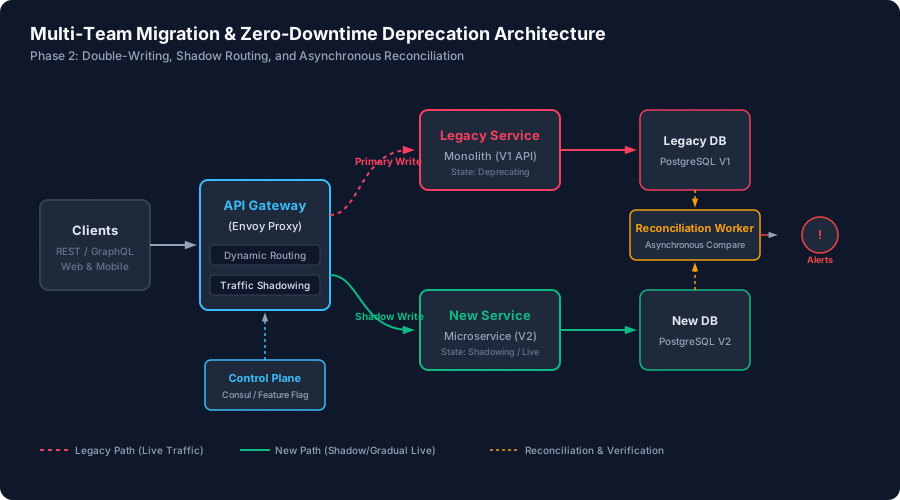
To migrate write-heavy workloads safely, implement the double-write pattern. In this phase, the primary database remains the legacy datastore, but writes are also mirrored to the new system.
                  ┌──────────────────────┐
                  │     API Gateway      │
                  └──────────┬───────────┘
                             │
            ┌────────────────┴────────────────┐
     Write  │ (Primary)                Write  │ (Shadow / Async)
            ▼                                 ▼
   ┌─────────────────┐               ┌─────────────────┐
   │ Legacy Service  │               │   New Service   │
   └────────┬────────┘               └────────┬────────┘
            │                                 │
            ▼                                 ▼
   ┌─────────────────┐               ┌─────────────────┐
   │    Legacy DB    │               │     New DB      │
   └─────────────────┘               └─────────────────┘
- Application-Level Double Writes: The calling code or intermediate gateway writes to both the old and new endpoints. The write to the new system must be asynchronous (e.g., using a background thread pool or a message queue like Apache Kafka) to prevent latency regressions on the client.
- Handling Write Failures: If the write to the legacy system fails, the transaction is rolled back. If the write to the new system fails, it must be logged and sent to a Dead Letter Queue (DLQ) for retries. It must not block the legacy response.
- Idempotency: The new system must support idempotent writes (using unique transaction UUIDs) to ensure that retries do not result in duplicate records.
Here is an example of an application-level double-write middleware implemented in Go:
func DoubleWriteMiddleware(next http.Handler) http.Handler {
	return http.HandlerFunc(func(w http.ResponseWriter, r *http.Request) {
		// Read body once for replication
		bodyBytes, _ := io.ReadAll(r.Body)
		r.Body = io.NopCloser(bytes.NewBuffer(bodyBytes))

		// 1. Execute primary write to legacy system
		rec := httptest.NewRecorder()
		next.ServeHTTP(rec, r)

		// If legacy write succeeded (2xx), trigger async write to new system
		if rec.Code >= 200 && rec.Code < 300 {
			go func(payload []byte, headers http.Header) {
				req, _ := http.NewRequest("POST", "http://new-service.internal/v2/orders", bytes.NewReader(payload))
				// Copy headers (correlation ID, trace context, etc.)
				for k, vv := range headers {
					for _, v := range vv {
						req.Header.Add(k, v)
					}
				}
				client := &http.Client{Timeout: 500 * time.Millisecond}
				resp, err := client.Do(req)
				if err != nil || resp.StatusCode >= 400 {
					log.Printf("ERROR: Shadow write failed: %v", err)
					// Push to Kafka/SQS for asynchronous reconciliation
					publishToDLQ(payload)
				} else {
					resp.Body.Close()
				}
			}(bodyBytes, r.Header)
		}

		// Write legacy response to client
		for k, vv := range rec.Header() {
			for _, v := range vv {
				w.Header().Add(k, v)
			}
		}
		w.WriteHeader(rec.Code)
		w.Write(rec.Body.Bytes())
	})
}
Phase 2.2: Asynchronous Reconciliation (The “Verifier”)
Even with double writes, data drift will occur due to race conditions, network partitions, or transient database errors. To guarantee data integrity before making the new system the primary source of truth, run a continuous reconciliation worker.
- Change Data Capture (CDC): Set up Debezium or AWS Database Migration Service (DMS) to stream changes from the legacy database to a Kafka topic.
- Reconciler Logic: A consumer service reads from the CDC topic, queries both the legacy and new databases for the corresponding record, and compares the fields.
- Eventual Consistency Grace Period: Databases often have replication lag. The reconciler should introduce a delay (e.g., 5 seconds) before comparing records to prevent false positives caused by transient states.
- Resolution: When a mismatch is detected, the reconciler updates the new database with the data from the legacy system (the source of truth) and publishes an alert metric. Do not send Slack alerts for every mismatch; instead, alert on the rate of mismatches (e.g., if discrepancies exceed 0.01% of total writes over a 15-minute window).
-- Reconciler check query example to identify drifted payloads
SELECT
    l.id,
    l.updated_at AS legacy_updated,
    n.updated_at AS new_updated,
    l.payload_hash AS legacy_hash,
    n.payload_hash AS new_hash
FROM legacy_orders l
LEFT JOIN new_orders n ON l.id = n.legacy_id
WHERE l.updated_at < NOW() - INTERVAL '5 seconds'
  AND (n.id IS NULL OR l.payload_hash != n.payload_hash);
Phase 3: The Human Element — Managing Multi-Team Backlogs
The hardest part of a migration is persuading other teams to dedicate sprint capacity to your deprecation project. If you simply ask teams to update their code, the ticket will sit at the bottom of their backlogs. You must lower the integration friction and establish clear organizational boundaries.
1. Build the Migration SDK or Pull Requests Yourself
Do not expect downstream teams to write the integration code for the new API. Instead, build a client library or SDK that abstracts the transition. Better yet, clone their repositories, write the migration code yourself, and submit a pull request. This changes their task from a multi-day engineering effort to a code review and validation task.
2. Define the Deprecation SLA Policy
Implement a strict deprecation policy backed by leadership. This policy should define clear milestones:
- Beta Phase (Day 1 - 30): The new API is available. Early adopters migrate.
- Brownout Phase (Day 31 - 45): Legacy endpoints are intentionally degraded to expose unmigrated dependencies.
- Hard Cutoff (Day 60): The legacy service is turned off.
3. The Brownout Strategy
A brownout is a controlled, temporary disruption of the legacy service designed to detect undocumented dependencies before they cause an outage. It is the most effective tool to get downstream teams to prioritize migration work.
Plan and execute brownouts using this progression:
| Phase | Duration | Degradation Method | Objective |
|---|---|---|---|
| Stage 1 | 1 Hour (Scheduled) | Inject 200ms latency to 10% of legacy calls. | Identify latency-sensitive consumers. |
| Stage 2 | 4 Hours (Scheduled) | Return HTTP 429 Too Many Requests to 5% of calls. |
Test client resiliency and retry mechanisms. |
| Stage 3 | 24 Hours | Return HTTP 503 Service Unavailable to 100% of calls. |
Final validation that no critical production traffic remains. |
Important Rules for Brownouts:
- Always coordinate brownouts with business stakeholders and publish the schedule in advance.
- Configure the API gateway to easily enable or disable the degradation via feature flags or dynamic routing rules.
- Monitor error rates and downstream system health. If a critical business metric (e.g., checkout conversion rate) drops, abort the brownout immediately and investigate.
Here is an Envoy virtual host configuration template to execute a Stage 2 brownout (injecting a 429 rate limit to a percentage of traffic):
routes:
  - match: { prefix: "/v1/legacy-endpoint" }
    route:
      cluster: legacy_cluster
      rate_limits:
        - actions:
            - destination_cluster: {}
    typed_per_filter_config:
      envoy.filters.http.fault:
        "@type": type.googleapis.com/envoy.extensions.filters.http.fault.v3.HTTPFault
        abort:
          http_status: 429
          percentage:
            numerator: 5
            denominator: HUNDRED
Phase 4: The Cutover and Decommissioning Checklist
When the verification loop shows zero mismatches and all clients have migrated, you are ready for the final cutover.
1. Canary Traffic Shifting
Use your API gateway (e.g., Kong, Envoy, or AWS ALB) to shift read traffic from the legacy service to the new service. Use a linear progression:
- 1% Canary: Send 1% of read traffic to the new service. Monitor for anomalies in error rates (
5xx) and p99 latency. - 10% Routing: Scale up to 10%. Monitor database connection pool usage on the new database.
- 50% Routing: Shift half the traffic. Check for replication lag on the new database.
- 100% Routing: Complete the read migration. The new service is now the system of record for reads.
2. Promoting the New System as Primary Write
Flip the write architecture:
- Configure the new service to write directly to the new database (Primary Write).
- Optionally, configure the new service to write back to the legacy system (Reverse Double-Write) for a 48-hour safety window. This allows you to roll back instantly to the legacy system if the new database exhibits unpredicted bottleneck issues under load.
- Disable the reverse double-write once the new system proves stable.
3. Safe Decommissioning Steps
Do not delete the legacy database or terminate the VM instances immediately. Follow this decommissioning sequence:
- Step 1: Soft Shutdown (Day 1): Stop the legacy service containers or scale the VM instances to zero. Keep the database running. If an overlooked system attempts to connect, you will see immediate connection errors in your alerts, which can be quickly resolved by restarting the legacy service.
- Step 2: Database Table Rename (Day 15): Instead of dropping tables, rename them to break active connections:
ALTER TABLE orders RENAME TO orders_deprecated_20260710;This acts as a secondary gate. If a background batch job or cron task attempts to run against the table, it will fail with a “table not found” error, pointing directly to the offending job without losing data.
- Step 3: Database Snapshot and Terminate (Day 30): Take a final snapshot of the legacy database, archive it to cold storage (e.g., AWS S3 Glacier), and terminate the database instances. Delete the legacy application container images from your registry and remove the legacy code paths from the codebase.
Summary Runbook Checklist
Use this checklist to track your migration progress:
- Discovery: Identify all consumers using tracing, logs, and
pg_stat_activity. - Schema Definition: Lock down the API contract and document the mapping layer.
- Double-Writing: Implement asynchronous writes to the new system, keeping the legacy system as primary.
- Reconciliation: Build a background worker to continuously verify and repair data drift.
- Client SDKs: Provide pre-built client libraries or pull requests to downstream teams.
- Brownouts: Run scheduled latency/error injections to catch undocumented clients.
- Canary Cutover: Shift read traffic gradually (1% -> 10% -> 50% -> 100%).
- Cutover writes: Make the new system the primary write path.
- Decommissioning: Stop services, rename database tables, archive snapshots, and reclaim infrastructure costs.