Migrating Monolithic Databases to Microservices: Implementing the Strangler Fig Pattern with Debezium and Kafka Connect
A production-grade blueprint for migrating monolithic databases to isolated microservices using Strangler Fig, Debezium CDC, and Kafka Connect.
Imagine walking into a post-mortem where the root cause is a silent, multi-million dollar data corruption bug that slipped past staging. This is the reality for teams attempting to split a monolithic database using naive application-level dual-writes, or teams forced into a weekend-long, high-stress “Big Bang” migration window that inevitably rolls back after twelve hours of downtime. When you partition a monolithic database—say, extracting an orders table processing 12,000 transactions per second (TPS) out of a 5TB PostgreSQL instance—network latency, transaction boundaries, and the raw scale of your data work against you. To decouple database domains without taking your business hostage, you must adopt the Strangler Fig pattern for data tiers. By leveraging log-based Change Data Capture (CDC) via Debezium and Apache Kafka Connect, you can build an asynchronous, transactional, and resilient data replication pipeline that enables zero-downtime microservice database migrations.
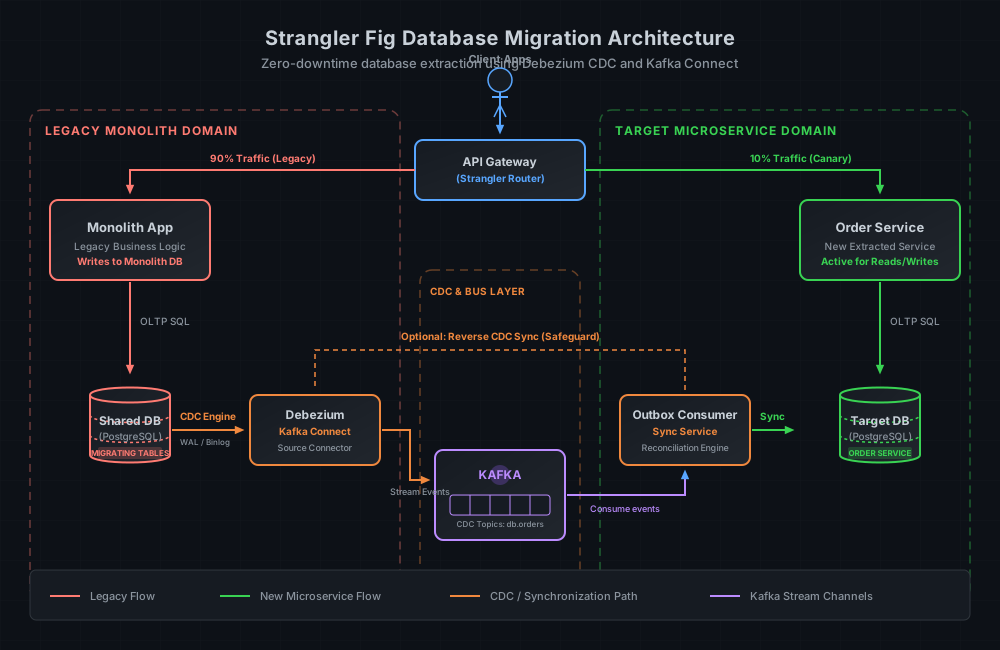
The Fatal Attraction of Dual-Writes and Big Bang Migrations
When engineering teams decide to split a database, they typically gravitate toward one of two strategies: the “Big Bang” cutover or application-level dual-writes. Both are architectural traps in high-throughput production environments.
The Big Bang Cutover
In a Big Bang migration, you schedule a maintenance window, stop all write traffic to the monolith, run a dump-and-restore tool (like pg_dump or mydumper), point the application to the new database, and restart services. At a scale of 100GB, this might work. At 5TB, it is a non-starter.
Restoring 5TB of data, rebuilding indexes, and validating foreign keys can easily take 12 to 24 hours of total downtime. In modern e-commerce, logistics, or fintech systems, a multi-hour outage costs millions of dollars in lost revenue. Worse, if a critical bug is discovered three hours after the migration window closes, rolling back to the monolith is impossible without losing all the new records written to the target database in those three hours. You are effectively trapped.
Application-Level Dual-Writes
To avoid downtime, engineers often modify their application code to write to both the old database and the new database simultaneously.
   [ Application Client ]
        /           \
  (Write 1)       (Write 2)
      /               \
[ Monolith DB ]   [ Target DB ]
This model introduces a distributed systems transaction problem without a coordinator. If the write to the Monolith DB succeeds but the write to the Target DB fails due to a network partition, timeout, or application crash, your databases are now out of sync.
Implementing a two-phase commit (2PC) or a saga pattern at the application level to guarantee consistency is incredibly complex, adds massive latency to every write operation, and degrades system availability. Furthermore, if two instances of the application update the same record concurrently, network latency can cause the updates to arrive at the Target DB in a different order than they arrived at the Monolith DB, resulting in silent data drift that can go unnoticed for weeks.
The Strangler Fig Pattern for Database Extraction
The Strangler Fig pattern, originally coined by Martin Fowler, describes a method of incrementally replacing a legacy system by building new features around the edges until the old system is completely “strangled.” When applied to monolithic databases, it provides a structured, multi-phase pathway to decouple tables without downtime.
Phase 1: Shadow Replication (CDC Sync)
The legacy monolith remains the source of truth for all read and write operations. The new microservice database is provisioned, but no application traffic points to it. Behind the scenes, a Change Data Capture (CDC) pipeline reads the transaction logs of the monolith database and streams every insertion, update, and deletion to the new microservice database in near-real-time. This phase must run for several days to warm caches, validate replication latency, and prove the stability of the sync pipeline.
Phase 2: Route Read Traffic
Once the target database is fully synchronized, the API Gateway or routing layer is configured to direct read queries (e.g., GET /orders/{id}) to the new microservice, which queries its own database. Write operations (e.g., POST /orders or PATCH /orders/{id}) continue to go to the monolith. This reduces the read load on the monolith and validates the read performance of the new database schema under production conditions.
Phase 3: Route Write Traffic and Reverse CDC
This is the critical transition phase. Write traffic is routed to the new microservice. The new microservice database becomes the primary source of truth for the extracted domain.
Importantly, to mitigate risk, you must configure a reverse CDC pipeline. Every write to the new database is streamed back to the monolith database. If the new service fails or exhibits unexpected behavior, you can instantly route traffic back to the monolith without losing a single write.
Phase 4: Deprecation and Clean-Up
Once the new microservice has run stably for a designated period (typically 7 to 14 days) and the rollback window has closed, the reverse CDC pipeline is deactivated. The extracted tables in the monolith database are dropped, freeing up storage and fully separating the databases.
Change Data Capture (CDC) Architecture with Debezium and Kafka
To implement the Strangler Fig pattern without performance degradation, you cannot rely on query-based replication (such as polling an updated_at column). Query-based polling fails to capture hard deletes, consumes significant database CPU due to repeated table scans, and introduces polling lag.
Instead, you must use log-based CDC. In a log-based architecture, Debezium reads the database transaction logs—the Write-Ahead Log (WAL) in PostgreSQL or the Binary Log (binlog) in MySQL—directly from disk.
[ Monolith DB ] ---> (WAL Logs) ---> [ Debezium / Kafka Connect ] ---> [ Kafka Topic ] ---> [ Consumer ] ---> [ Target DB ]
Because Debezium reads these sequential log files asynchronously, it bypasses the SQL query engine entirely. The performance overhead on the source database is negligible—typically less than a 2% CPU utilization penalty.
Why Apache Kafka?
Kafka acts as the buffer and transport layer. If your target microservice DB experiences transient downtime during migration, Kafka persists the change events. When the target DB recovered, the consumer resumes reading from its last committed offset, ensuring zero data loss. Furthermore, Kafka’s message keying ensures that all events for a specific primary key (e.g., order_id = 998877) are written to the same partition, guaranteeing in-order processing.
Step-by-Step Implementation Blueprint
Let’s walk through a concrete implementation using PostgreSQL as the monolith database, Debezium on Kafka Connect, and a target PostgreSQL database for the new microservice.
Step 1: Prepare the Source PostgreSQL Database
First, PostgreSQL must be configured to write logical replication events to the WAL. Modify the postgresql.conf file on your monolith database server:
# postgresql.conf
wal_level = logical
max_replication_slots = 8
max_wal_senders = 8
You must restart PostgreSQL to apply these changes. Next, create a dedicated replication user with the narrowest permissions possible:
-- Run on Monolith Database
CREATE ROLE debezium_replication_user WITH REPLICATION LOGIN PASSWORD 'Prod_Sec_Pass_2026';

-- Grant access to the schema and table to replicate
GRANT USAGE ON SCHEMA public TO debezium_replication_user;
GRANT SELECT ON public.orders TO debezium_replication_user;
GRANT SELECT ON public.order_items TO debezium_replication_user;

-- Create PostgreSQL publication for the extracted tables
CREATE PUBLICATION orders_migration_pub FOR TABLE public.orders, public.order_items;
Step 2: Configure the Debezium Source Connector
Post a configuration JSON payload to your Kafka Connect cluster to instantiate the source connector. We will configure it to use the pgoutput logical decoding plugin native to PostgreSQL 10+.
curl -X POST -H "Content-Type: application/json" \
  --data @debezium-postgres-source.json \
  http://kafka-connect-host:8083/connectors
The debezium-postgres-source.json configuration file:
{
  "name": "monolith-postgres-source",
  "config": {
    "connector.class": "io.debezium.connector.postgresql.PostgresConnector",
    "tasks.max": "1",
    "plugin.name": "pgoutput",
    "database.hostname": "monolith-db.internal",
    "database.port": "5432",
    "database.user": "debezium_replication_user",
    "database.password": "Prod_Sec_Pass_2026",
    "database.dbname": "monolith_production",
    "database.server.name": "monolith_cdc",
    "table.include.list": "public.orders,public.order_items",
    "publication.autocreate.mode": "disabled",
    "publication.name": "orders_migration_pub",
    "slot.name": "debezium_orders_migration_slot",
    "slot.drop.on.stop": "false",
    "key.converter": "io.confluent.connect.avro.AvroConverter",
    "key.converter.schema.registry.url": "http://schema-registry.internal:8081",
    "value.converter": "io.confluent.connect.avro.AvroConverter",
    "value.converter.schema.registry.url": "http://schema-registry.internal:8081",
    "decimal.handling.mode": "double",
    "time.precision.mode": "connect",
    "tombstones.on.delete": "true"
  }
}
Key configuration details to note:
"slot.drop.on.stop": "false": Ensures that if Kafka Connect stops for updates or maintenance, the PostgreSQL replication slot is preserved and continues to buffer WAL changes."tombstones.on.delete": "true": Instructs Debezium to emit a tombstone event (a message with a null payload) after a delete event. This is required if you are using Kafka’s log compaction.
Step 3: Implement the Consumer Sync Service
While a JDBC Sink connector can write events directly to a replica database, migrating to a microservice often involves schema changes, column renaming, or data enrichment. In production, it is safer to implement a custom consumer sync service that consumes the CDC topics, executes domain logic, and writes to the new target database.
Below is a production-grade consumer logic implementation pattern in Go:
package main

import (
	"context"
	"database/sql"
	"encoding/json"
	"log"
	"time"

	"github.com/segmentio/kafka-go"
	_ "github.com/lib/pq"
)

type CDCPayload struct {
	Before    *OrderRecord `json:"before"`
	After     *OrderRecord `json:"after"`
	Op        string       `json:"op"` // 'c' (create), 'u' (update), 'd' (delete)
	Timestamp int64        `json:"ts_ms"`
}

type OrderRecord struct {
	ID        int64     `json:"id"`
	Status    string    `json:"status"`
	Total     float64   `json:"total_amount"`
	UpdatedAt int64     `json:"updated_at"`
}

func main() {
	// Initialize Target Database Connection
	db, err := sql.Open("postgres", "postgres://service_user:SecureTargetPass@target-db.internal:5432/order_service?sslmode=verify-full")
	if err != nil {
		log.Fatalf("Failed to connect to target DB: %v", err)
	}
	defer db.Close()

	// Configure Kafka Consumer
	reader := kafka.NewReader(kafka.ReaderConfig{
		Brokers:   []string{"kafka-broker-1:9092", "kafka-broker-2:9092"},
		Topic:     "monolith_cdc.public.orders",
		GroupID:   "order-migration-sync-group",
		MinBytes:  10e3, // 10KB
		MaxBytes:  10e6, // 10MB
		MaxWait:   100 * time.Millisecond,
	})
	defer reader.Close()

	log.Println("CDC Consumer Sync started...")

	for {
		msg, err := reader.ReadMessage(context.Background())
		if err != nil {
			log.Printf("Error reading message: %v", err)
			continue
		}

		var payload CDCPayload
		if err := json.Unmarshal(msg.Value, &payload); err != nil {
			log.Printf("Serialization error: %v", err)
			continue
		}

		// Implement Idempotent Upsert pattern
		switch payload.Op {
		case "c", "u":
			record := payload.After
			if record == nil {
				continue
			}

			// Use UPSERT with an epoch check to ensure out-of-order execution protection
			query := `
				INSERT INTO orders (id, order_status, total_amount, updated_at)
				VALUES ($1, $2, $3, $4)
				ON CONFLICT (id) DO UPDATE
				SET order_status = EXCLUDED.order_status,
				    total_amount = EXCLUDED.total_amount,
				    updated_at = EXCLUDED.updated_at
				WHERE EXCLUDED.updated_at >= orders.updated_at;`

			updatedTime := time.UnixMilli(record.UpdatedAt)
			_, err = db.Exec(query, record.ID, record.Status, record.Total, updatedTime)
			if err != nil {
				log.Printf("Write failed for record ID %d: %v", record.ID, err)
				// Trigger alerting / Dead Letter Queue routing here in production
			}

		case "d":
			record := payload.Before
			if record == nil {
				continue
			}
			query := `DELETE FROM orders WHERE id = $1;`
			_, err = db.Exec(query, record.ID)
			if err != nil {
				log.Printf("Delete failed for record ID %d: %v", record.ID, err)
			}
		}
	}
}
Production Failure Modes and Hard-Won Mitigations
Operating log-based CDC in high-throughput production environments will expose infrastructure vulnerabilities. Below are the key failure modes you must design for before launching.
1. WAL Bloat and Disk Capacity Failures
In PostgreSQL, a replication slot pins the WAL. PostgreSQL will not delete any WAL segments that contain changes that have not yet been consumed and acknowledged by your replication slot.
- The Failure: If Kafka Connect crashes, or if network connectivity between the DB and your Kafka brokers is disrupted, the replication slot
debezium_orders_migration_slotbecomes inactive. Write operations to the monolith continue. WAL files accumulate on the database primary storage. If unchecked, the database disk reaches 100% capacity within hours, causing a hard crash of your monolith. - The Mitigation:
- Set a hard limit on WAL retention for replication slots. In PostgreSQL 13+, configure
max_slot_wal_keep_sizeinpostgresql.conf:max_slot_wal_keep_size = 102400 # 100GB limitIf the CDC connector lag exceeds 100GB, PostgreSQL will drop the replication slot to protect the system. This invalidates the CDC slot and requires you to rebuild the snapshot, but it prevents a production outage.
- Implement a high-priority alert in Prometheus monitoring replication slot lag bytes:
pg_replication_slots_lag_bytes = pg_wal_lsn_diff(pg_current_wal_lsn(), confirmed_flush_lsn) > 53687091200 # 50GB
- Set a hard limit on WAL retention for replication slots. In PostgreSQL 13+, configure
2. Schema Evolution Collisions
- The Failure: A developer deploys a schema migration to the monolith DB (e.g., executing
ALTER TABLE orders RENAME COLUMN status TO order_status;). When Debezium reads the WAL record, it attempts to write the new schema to the Schema Registry. Downstream consumer groups, expecting the old field name, begin throwing deserialization errors, stalling the entire replication pipeline. - The Mitigation:
- Configure your Schema Registry with
FULL_TRANSITIVEcompatibility rules. This guarantees that new schemas can read older messages and old schemas can read newer messages. - Enforce schema check integrations in your CI/CD pipelines. Monolith database migrations must be audited for breaking CDC changes. New columns must always be nullable or have a default value in the first migration phase.
- Configure your Schema Registry with
3. The Initial Snapshot Trap
When Debezium starts up on a table, its default behavior is to perform an initial snapshot to read the existing records.
- The Failure: For a table with hundreds of millions of records, Debezium performs a massive table scan (
SELECT * FROM orders). This places shared locks on the source tables, exhausts PostgreSQL worker memory, spikes disk read IOPS, and increases query latency for live application users. - The Mitigation: Use Debezium’s incremental snapshot feature. Instead of scanning the entire table at once, Debezium reads the table in small chunks (e.g., primary key ranges of 10,000 rows), interleaving the snapshot query reads with active WAL streaming logs.
To configure this, enable signaling tables in your connector configuration:
"signal.data.collection": "public.debezium_signals"
You can then trigger an incremental snapshot dynamically by inserting a command row:
INSERT INTO public.debezium_signals (id, type, data)
VALUES ('snapshot-request-1', 'execute-snapshot', '{"data-collections": ["public.orders"], "type": "incremental"}');
Data Reconciliation: The Ultimate Safety Net
In database migrations, you cannot rely entirely on log streams. Distributed tracing, offset states, and CDC engines can occasionally lose synchronization due to edge cases (e.g., unhandled network socket drops or serialization errors). You need an out-of-band verification process to guarantee 100% data consistency.
Running a simple row count comparison (SELECT COUNT(*)) is not sufficient; it will miss cases where the totals match but specific record fields (e.g., total_amount) differ. Conversely, performing a complete diff of every cell across the network will exhaust database bandwidth and crash production databases.
The production-proven solution is Chunk-Based Hashing. By dividing your table into primary key ranges (e.g., blocks of 100,000 rows) and calculating an MD5/SHA256 hash of the concatenated columns, you can quickly isolate divergent rows.
Here is the SQL query schema to run on both the Monolith and Target databases to generate a block checksum:
SELECT
  COUNT(*),
  md5(string_agg(row_hash, '' ORDER BY id)) AS block_checksum
FROM (
  SELECT
    id,
    md5(concat(id, order_status, total_amount, updated_at)) AS row_hash
  FROM orders
  WHERE id BETWEEN 5000000 AND 5100000
) sub;
Execute this verification programmatically via a cron job. If the block_checksum matches on both databases, that chunk is consistent. If they do not match, perform a binary search within that specific range to identify and resolve the mismatch.
Conclusion
Migrating a monolithic database to isolated microservices is not an application routing exercise; it is an exercise in distributed systems data management. Utilizing the Strangler Fig pattern supported by Debezium CDC and Kafka Connect avoids the latency and consistency pitfalls of dual-writes and the downtime requirements of Big Bang migrations.
By treating data replication as a transaction log stream and implementing strict monitors for replication slot lag, schema changes, and data discrepancies, you can decouple database systems while maintaining normal business operations.