Mitigating SSRF in Serverless: Designing a Dynamic Envoy Proxy Sidecar for AWS ECS Tasks
Secure AWS ECS Fargate tasks against SSRF attacks by intercepting egress traffic with a dynamic Envoy proxy sidecar acting as a Zero-Trust network boundary.
In modern cloud-native architectures, applications frequently fetch remote resources: webhooks, external APIs, payment processing endpoints, or metadata. If your application container accepts user-supplied URLs and fetches them directly, it is highly susceptible to Serverless Server-Side Request Forgery (SSRF). In an AWS ECS Fargate environment, a successful SSRF attack is catastrophic: an attacker can query the Link-Local IMDSv2 endpoint (169.254.169.254) to extract the ECS Task IAM Role credentials, immediately gaining unauthorized access to S3 buckets, RDS databases, or KMS keys. Blindly trusting application-level URL validation—like regular expressions or manual DNS lookups—fails in production due to DNS rebinding, HTTP redirections, and parsing discrepancies. Resolving this threat permanently requires moving egress control out of the application code and enforcing it at the network layer using a dynamic Envoy proxy sidecar.
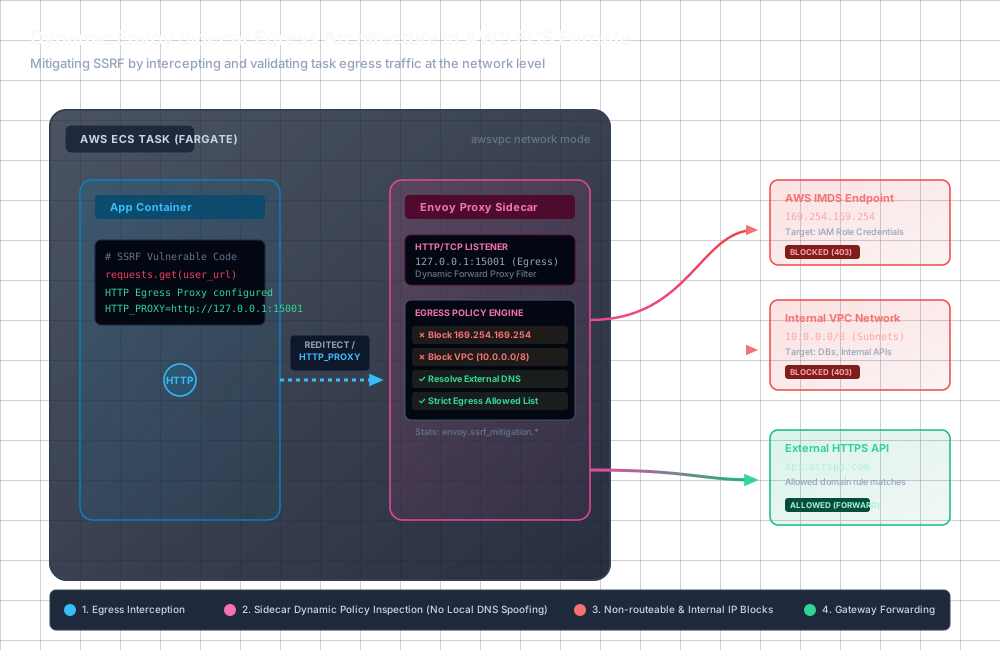
The Fallacy of Application-Level SSRF Mitigation
Many engineering teams attempt to mitigate SSRF by wrapping outgoing HTTP calls with validation logic. They parse the user-provided URL, perform a DNS lookup, check if the resolved IP belongs to a private range (such as RFC 1918 CIDRs or the AWS link-local metadata address), and proceed with the request if the validation passes. This approach is fundamentally broken due to three production-proven failure modes:
- DNS Rebinding (TOCTOU): The DNS resolution during validation is decoupled from the resolution during the actual HTTP request. An attacker registers a domain name (e.g.,
rebound.attacker.com) and configures a malicious DNS server. For the first query (validation), the DNS server returns a benign public IP (e.g.,8.8.8.8). For the second query (the actual fetch milliseconds later), the DNS server returns169.254.169.254. Because the DNS TTL is set to 0, the application client re-resolves the domain and fetches the private metadata endpoint. - HTTP Redirect Bypasses: If the application-level validation only checks the initial URL, an attacker can supply a benign URL that responds with an HTTP
301,302, or307redirect pointing tohttp://169.254.169.254/latest/meta-data/. Most HTTP clients automatically follow redirects, leading to an out-of-band request to the forbidden metadata service. - Parser Discrepancies: URL parsing libraries conform to standard specifications (like RFC 3986) with varying degrees of compliance. A validator might interpret a URL host in one way, while the HTTP client library interprets it differently. Attackers exploit these differences using host-obfuscation patterns, such as userinfo blocks
http://expected.com@169.254.169.254or mixed decimal/octal/hex IP representations (e.g.,http://2852039166/which evaluates to169.254.169.254).
To illustrate the vulnerability, snippet-1 shows a common, flawed attempt in Go to validate outgoing requests.
Designing the Envoy Egress Sidecar Architecture
To eliminate SSRF entirely, egress validation must be decoupled from the application and handled transparently at the network level. In AWS ECS Fargate, we deploy a dual-container architecture inside a single Task using the awsvpc network mode. In awsvpc mode:
- Both the Application container and the Envoy proxy container share the same Elastic Network Interface (ENI).
- They share the same network namespace, loopback interface (
lo), and IP address. - They can communicate with each other over
127.0.0.1.
There are two primary paradigms for intercepting outbound traffic: Transparent Proxying and Explicit Proxying.
Transparent Proxying (iptables Redirection)
In this model, all outbound TCP traffic originating from the Application container is intercepted at the kernel level using iptables and redirected to Envoy’s local listening port (typically 15001). This is implemented via a startup container or an init script that runs with CAP_NET_ADMIN privileges.
This approach is highly secure because it is transparent to the application. Developers cannot bypass the proxy, and any HTTP or raw TCP connection attempting to access an IP address is intercepted.
When the application tries to resolve a hostname (e.g., attacker.com), it performs a DNS query. Once it gets the IP (even if it’s rebound to 169.254.169.254), it attempts to open a TCP socket to that target IP. The iptables rules catch this packet and route it to Envoy. Envoy recovers the original destination IP using the original_dst listener filter and blocks it immediately if it matches the forbidden range.
Explicit Proxying (HTTP/HTTPS Proxy Config)
If your organization does not allow running containers with CAP_NET_ADMIN in Fargate tasks, you must use explicit proxying. The application is configured to route all outbound HTTP/HTTPS traffic through Envoy using the standard environment variables: HTTP_PROXY, HTTPS_PROXY, and ALL_PROXY pointing to http://127.0.0.1:15001.
Under explicit proxying, the application does not resolve the DNS name locally. Instead, it delegates DNS resolution to Envoy by sending HTTP requests with absolute URLs (e.g., GET http://api.stripe.com/v1/...) or tunnel requests (e.g., CONNECT api.stripe.com:443). Envoy must act as a Dynamic Forward Proxy (DFP), dynamically resolving the target domain names, checking the resolved IPs, and enforcing the access policies.
Configuring Envoy as a Secure Egress Gatekeeper
To defend against SSRF in an explicit proxy model, Envoy’s bootstrap configuration must set up a listener on port 15001 that uses the dynamic_forward_proxy filter. We then configure Envoy’s RBAC (Role-Based Access Control) HTTP filter to block forbidden domains, private IPs, and the metadata service.
The critical security advantage here is that Envoy performs the DNS lookup inside its internal DNS cache. The lookup, validation, and connection phases happen sequentially within Envoy’s memory space, eliminating the TOCTOU rebinding window completely.
Here is a hardened Envoy bootstrap configuration (envoy.yaml) that runs as the sidecar config:
Deep-Dive: Hardening against DNS Rebinding in the Proxy
Even when proxying, if Envoy resolves a domain name that maps to a private address, Envoy must fail the connection. Because Envoy’s Dynamic Forward Proxy caches DNS results, we must ensure that the IP addresses it connects to are strictly validated.
For explicit proxying of HTTPS traffic using the HTTP CONNECT tunnel method, Envoy parses the initial host header. However, to ensure that the resolved IP address is verified, we configure an upstream network filter chain. In the secure_egress_cluster, we bind a network RBAC filter to validate the destination IP address of the established TCP connection. If the resolved IP address is private, the connection is instantly closed before any bytes are transmitted.
Integrating the Sidecar in AWS ECS Task Definitions
To deploy this in production, you must define both containers in your ECS Task Definition. To make this setup work seamlessly in Fargate:
- Container Ordering: The application container must wait until Envoy is healthy before it starts. This prevents startup race conditions where the application makes outbound network calls before the sidecar listener is ready.
- Environment Configuration: The application container is injected with proxy environment variables.
- IAM Permissions: Ensure the task execution role has access to pull the Envoy image and write to CloudWatch Logs.
Note: In the NO_PROXY environment variable, we explicitly include 169.254.170.2 (the AWS ECS Task Metadata endpoint used for task credentials retrieval by the AWS SDK). If this goes through the proxy, it could get blocked by the internal IP rules. However, we want to block the general EC2 metadata service (169.254.169.254) while ensuring the SDK can query the local task metadata endpoint to retrieve its valid IAM execution credentials.
Client-Side Application Configuration
For applications utilizing the explicit proxy model, you must ensure that HTTP client instances honor the standard proxy configuration settings. Go’s default HTTP transport automatically reads from environment variables, but if your service creates custom transport instances, proxy configuration must be explicitly defined.
Below is a production-hardened Go implementation configuring a secure, explicit HTTP client to communicate with the local Envoy sidecar:
Performance Overhead and Production Metrics
Deploying Envoy as a sidecar inside an ECS Fargate task introduces minor overheads that must be quantified and managed:
- Latency: Envoy is written in C++ and handles traffic with extremely high performance. The latency penalty for routing traffic locally over
127.0.0.1through the Envoy pipeline is typically under1.5 millisecondsfor the handshake and data transfer. - Resource Consumption: The CPU footprint of Envoy sidecars is negligible (under
1%of a typical Fargate virtual CPU). Memory footprint varies with DNS cache sizes and active connections but generally stabilizes around35MB to 50MBof RAM under moderate workloads. - Observability: Envoy exposes a wealth of Prometheus-compatible metrics. You should actively monitor the following counters to identify security anomalies or malicious SSRF attempts:
http.egress_http.rbac.allowed: Counts legitimate egress calls that matched configuration rules.http.egress_http.rbac.denied: Indicates blocked SSRF attempts. Set up alerts on values exceeding0to instantly flag potential attacks.dns_cache.secure_dns_cache.dns_query_failure: Measures lookup anomalies or potential DNS attacks.
By moving egress logic out of your application and onto the Envoy network proxy layer, you implement a robust, maintainable security policy. The application developer can focus on writing features, while the security controls are baked directly into the deployment infrastructure.