Mitigating Kafka Consumer Lag Spikes: Dynamic Rebalancing and Rate-Limiting
Solve Kafka consumer lag spikes and prevent infinite rebalance storms using Cooperative Sticky Assignors, adaptive rate-limiting, and KEDA telemetry autoscaling.
It is 3:00 AM on a Friday, and your paging system is screaming. A surge in upstream transaction volume has triggered a massive Kafka consumer lag spike on your core payment-processing service. Under the hood, downstream database lock contention has caused processing latency to jump from a normal 5ms to a sluggish 120ms per message. In a desperate bid to catch up, your Go-based consumers pull maximum-sized batches from Kafka. However, because downstream calls are now slow, processing a single batch exceeds your configured max.poll.interval.ms limit of 300,000 milliseconds. The Kafka broker concludes the consumer instance has died, evicts it from the group, and triggers an eager rebalance. The remaining consumer instances inherit the abandoned partitions, choke on the backlogged data, fail their own poll deadlines, and get evicted in turn. Your cluster is now trapped in an infinite rebalance storm: throughput drops to zero, and your lag grows exponentially by 10,000 messages per second. This is the cascading failure pattern that destroys production reliability when consumer lag isn’t managed proactively.
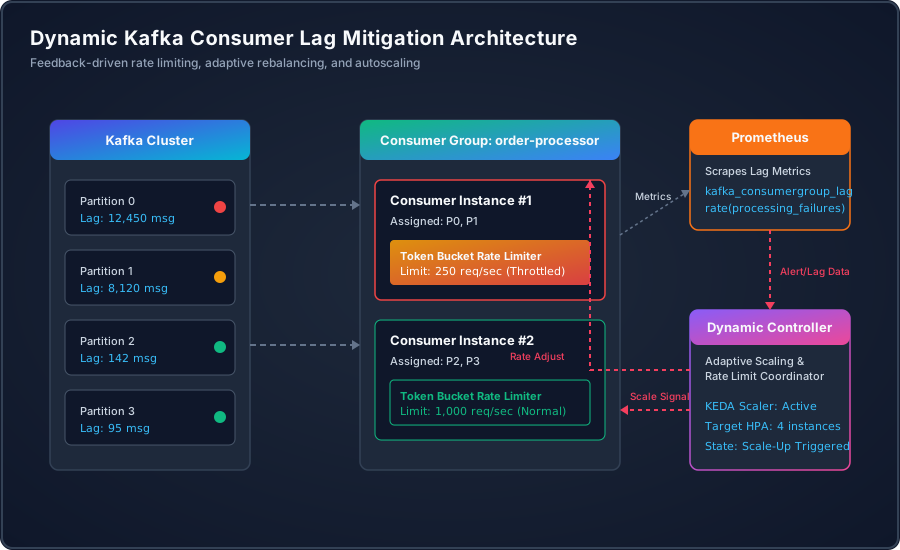
The Anatomy of a Consumer Lag Crisis: Why Classic Mitigation Fails
When consumer lag rises, naive engineering teams often react by increasing the consumer replica count or scaling up CPU limits. In a critical incident, this reaction often makes the outage worse. To understand why, we must look at the internal mechanics of Kafka’s coordinator-consumer handshake.
Kafka manages consumer group membership via two primary configurations:
session.timeout.ms: The timeout used to detect consumer JVM or process crashes. If the broker does not receive a heartbeat within this window (default: 45,000ms), it evicts the consumer.max.poll.interval.ms: The maximum delay between invocations of.poll(). This is the check that ensures the application code processing records is still healthy. If your message processing logic takes too long, this timer expires, and the coordinator triggers a rebalance.
The core failure mode is the Rebalance Storm. Under normal conditions, a consumer fetches max.poll.records (default: 500) and processes them within 2.5 seconds (at 5ms per record). If downstream dependency latency rises to 700ms (due to network degradation, DB locks, or third-party API throttling), processing that same batch of 500 records now takes 350 seconds. Since 350 seconds exceeds the 300-second max.poll.interval.ms limit, the consumer is marked dead.
With traditional eager rebalancing protocols (RangeAssignor or RoundRobinAssignor), a rebalance is a “stop-the-world” event. The group coordinator revokes all partitions from all active consumers. During the sync phase, no messages are processed. Because offsets are committed only after a batch completes, the evicted consumer fails to commit its current offset. When another consumer is assigned the partition, it must re-process the exact same batch of messages from the last committed offset, duplicating the work and instantly triggering the same timeout. The group enters a terminal rebalance loop.
Moving to Cooperative Sticky Assignment: Eliminating the Rebalance Storm
To prevent stop-the-world rebalance storms, you must move away from eager assignment strategies and adopt the CooperativeStickyAssignor. Introduced in Kafka 2.4, the cooperative protocol changes how partition reassignment behaves.
Unlike eager assignment, which revokes all partition assignments before calculating new ones, cooperative sticky assignment uses a two-pass approach:
- First Pass: The coordinator determines which partitions need to move from one consumer instance to another. It only revokes those specific partitions that are changing ownership. Unchanged partitions remain assigned to their current consumers and continue processing data.
- Second Pass: The newly free partitions are assigned to their new owners. The consumers receiving these partitions join the group, while the others never stop processing.
This eliminates the global pause. Under cooperative sticky assignment, if a single consumer chokes and is evicted, only its partitions are temporarily paused and migrated. The rest of the consumer fleet continues draining the queue, preventing a localized slowdown from cascading into a global outage.
Configuring this in production requires adjusting both the consumer properties and the client initialization code. The code block below demonstrates how to configure a production-ready Kafka consumer using the confluent-kafka-go client, explicitly enabling the cooperative sticky assignment strategy along with resilient timeout settings.
Adaptive Rate Limiting: Protecting Downstream Resources
Even with cooperative sticky rebalancing in place, a consumer group can easily overwhelm downstream services if it attempts to drain a massive lag backlog at maximum speed. If your database can handle 2,000 writes per second, and a consumer lag of 1,000,000 messages causes the consumer fleet to pull 10,000 messages per second, you will brown out the database. This creates a feedback loop: database writes slow down, message processing times increase, and consumers violate their max.poll.interval.ms, triggering rebalances despite the sticky assignor.
Static rate limits are a poor solution. If you configure a static limit of 500 messages per second to protect the database, you waste throughput capacity when the database is healthy and capable of handling 2,000 writes per second.
The solution is Adaptive Rate Limiting. The consumer must dynamically adjust its processing throughput based on downstream health indicators:
- Processing Latency: If database transaction times rise, the consumer must decrease its consumption rate.
- Error Rates: If downstream calls return HTTP 429 (Too Many Requests), HTTP 503 (Service Unavailable), or database lock timeouts, the consumer must back off.
- Kafka Poll Keep-Alive: To avoid exceeding
max.poll.interval.mswhile throttled, the consumer must decouple the Kafka poll loop from the worker pool. If the worker pool is saturated and backpressuring, the poll loop must pause partition consumption rather than blocking the.poll()execution.
The following implementation shows how to build a resilient Go consumer worker pool that uses a Token Bucket rate limiter to throttle execution, while keeping the Kafka poll thread active to prevent group evictions.
Implementing Adaptive Latency Feedback Control
To make the rate limiter truly adaptive, we implement a feedback control loop. A common approach is an Additive Increase / Multiplicative Decrease (AIMD) algorithm, similar to TCP congestion control.
The controller monitors two critical metrics over a sliding window:
- P95 Latency of downstream operations: If P95 latency stays below a predefined target (e.g., 50ms), the system gradually increases the rate limit. If it rises above the target, the system immediately cuts the rate limit to protect the database.
- Error Rate: If write operations fail or time out, the system slashes the consumption rate.
The dynamic controller runs as a background routine, collecting metrics from the worker pool and adjusting the token bucket limits in real-time.
Dynamic Scaling based on Telemetry: Integrating KEDA
While adaptive rate limiting protects your database from browning out, it does not solve the root problem of clearing the backlogged queue. To clear the queue, you must scale out the consumer instances so that partitions are distributed across more physical nodes, increasing parallel processing capacity.
In a Kubernetes environment, scaling based on CPU or memory utilization is ineffective for Kafka consumers. A consumer processing lag-heavy queues is often constrained by I/O and database latency rather than local CPU usage. The consumer group might remain at 10% CPU usage while lag grows to millions of messages.
You must scale based on Kafka Consumer Lag telemetry. We achieve this by deploying KEDA (Kubernetes Event-driven Autoscaling). KEDA integrates with Kubernetes Horizontal Pod Autoscaler (HPA) to query Prometheus metrics or query the Kafka brokers directly to obtain lag details.
When configuring Kafka scaling, you must tune two variables to avoid thrashing:
cooldownPeriod: The time to wait before scaling down after the metric drops below the threshold. If you scale down too quickly, you trigger constant partition rebalances as pods terminate. Set this to at least 300 to 600 seconds.lagThreshold: The average lag per partition before a scale-up is triggered. Setting this too low causes scaling actions on minor traffic bursts.
The following Kubernetes YAML manifest defines a KEDA ScaledObject that scales a deployment based on Prometheus metric querying, which retrieves the actual consumer group lag.
Incident Playbook: Triaging Lag in Production
When a consumer lag incident strikes, you must follow a methodical runbook to diagnose and remediate the issue without causing downstream data corruption.
Step 1: Identify the Root Cause
Is the lag spike caused by upstream volume changes or downstream processing failure? Use the following query in your metrics system to evaluate consumer execution rates versus database write latencies.
-- Query to check consumer throughput vs downstream DB lock latency
SELECT
    time_bucket('1 minute', time) AS minute,
    avg(processing_time_ms) AS avg_process_time,
    avg(db_lock_wait_ms) AS avg_db_wait,
    sum(processed_count) AS total_processed
FROM service_telemetry.consumer_metrics
WHERE consumer_group = 'order-processor'
  AND time > now() - INTERVAL '1 hour'
GROUP BY minute
ORDER BY minute DESC;
Step 2: Extract Live Group Information
Run the Kafka command-line administrative tools to identify if partitions are skewing, or if specific consumer instances are stuck in processing loops. Look closely at the CLIENT-ID and HOST columns to pinpoint degraded nodes.
Analysis of the above output reveals a critical clue: partitions 0 and 2 are assigned to the same consumer host (10.244.3.45 / client-1) and are showing massive lag (25k and 35k), while partitions 1 and 3 are healthy. Host client-1 is likely experiencing resource saturation or a thread lock.
Step 3: Apply Remediation Strategies
- Kill the degraded container: If a single node is stuck (as shown in Step 2), delete the pod/container. Because you configured
cooperative-stickyassignment (Snippet 1), the other nodes will assume ownership of partitions 0 and 2 with minimal processing interruption. - Increase downstream DB capacity: If the bottleneck is database write latency, scale up your replica size or temporarily provision more database connections.
- Trigger safe backoff via configurations: If you cannot scale database resources, use dynamic configurations (such as a runtime ConfigMap or Consul KV change) to adjust the target rate limit of your consumers down to a safe value. This protects the database and allows it to recover without shutting down your consumer services.
- Skip corrupted messages (Poison Pills): If a single corrupted message is crashing the workers, identify the offending offset from the logs and skip it by moving the group offset forward manually.
Summary
Mitigating consumer lag requires a multi-layered approach. By moving to CooperativeStickyAssignor, you eliminate the risk of destructive rebalance storms. Implementing an adaptive rate limiter inside your consumer worker loop protects your databases from browning out during catch-up periods. Finally, scaling your fleet dynamically with KEDA using Kafka metrics guarantees that you have the raw compute power when the volume spikes. Implementing these patterns transforms your Kafka architecture from a fragile queue into a highly resilient, self-throttling processing engine.