Message Queues: When to Use Kafka vs RabbitMQ
A practical comparison of Kafka and RabbitMQ to help you choose the right message broker for your use case.
Message queues are the backbone of resilient, decoupled systems. But choosing between Kafka and RabbitMQ can feel overwhelming. This guide cuts through the marketing to give you a practical decision framework.
The Core Difference
RabbitMQ is a traditional message broker. Messages are pushed to consumers, and once consumed and acknowledged, they’re gone.
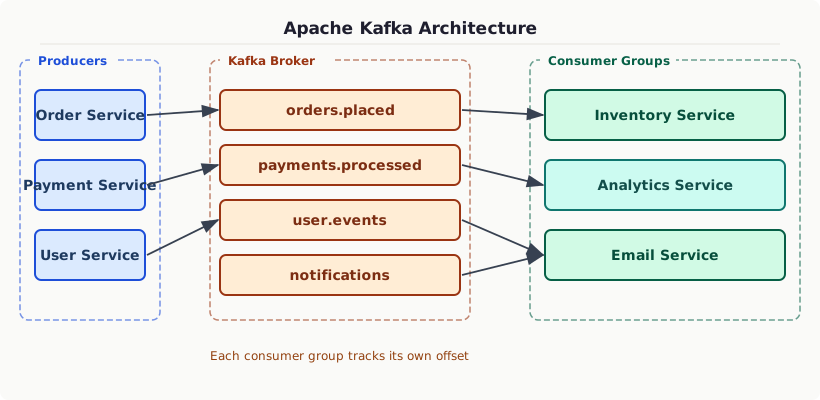
Kafka is a distributed event streaming platform. Messages are written to a log and retained for a configurable time. Consumers read at their own pace and can replay messages.
When to Choose RabbitMQ
RabbitMQ excels at task queues and complex routing:
- Work queue / task distribution — Background jobs, email sending, report generation
- Complex routing logic — Route messages to different queues based on headers, topic, fanout
- Per-message TTL and priority — Dead letter queues built-in
- When you need guaranteed delivery with ack/nack
- Lower message volume (< 50K msg/s)
When to Choose Kafka
Kafka excels at event streaming and high-throughput scenarios:
- Event sourcing — Store a complete history of what happened
- High throughput — Millions of messages per second
- Multiple consumers needing the same messages independently
- Stream processing — Real-time analytics, ETL pipelines
- Audit log — Immutable, replayable event history
- Microservices event bus — Decouple services via events
Kafka Key Concepts
Partitions and Consumer Groups
Kafka scales horizontally via partitions. A topic has N partitions. A consumer group has M consumers, each reading from a subset of partitions.
Rule: # consumers ≤ # partitions in a group. Extra consumers sit idle.
Message Keys for Ordering
Kafka guarantees order within a partition. Use a key to ensure related messages go to the same partition:
Consumer Offsets
Kafka tracks where each consumer group is in each partition via offsets. You can reset to replay:
Comparison Table
| Feature | RabbitMQ | Kafka |
|---|---|---|
| Message retention | Until consumed | Time/size based (days) |
| Message replay | No | Yes |
| Throughput | High (100K/s) | Very high (1M+/s) |
| Consumer model | Push | Pull |
| Routing | Flexible (exchange types) | Topic/Partition |
| Ordering | Per-queue | Per-partition |
| Use case | Task queues | Event streaming |
| Complexity | Lower | Higher |
Decision Framework
Don’t Forget Dead Letter Queues
Both systems support handling messages that can’t be processed. Always configure DLQs:
Messages that fail (after retries) land in the dead letter queue for inspection and manual reprocessing.
Choose based on your actual requirements, not hype. Both are excellent tools for what they’re designed for.