Managing Platform Engineering Migrations: A Framework for Sunsetting Legacy Core APIs
A production-tested technical framework for sunsetting legacy core APIs using Envoy traffic mirroring, CDC-based dual writes, and progressive API brownouts.
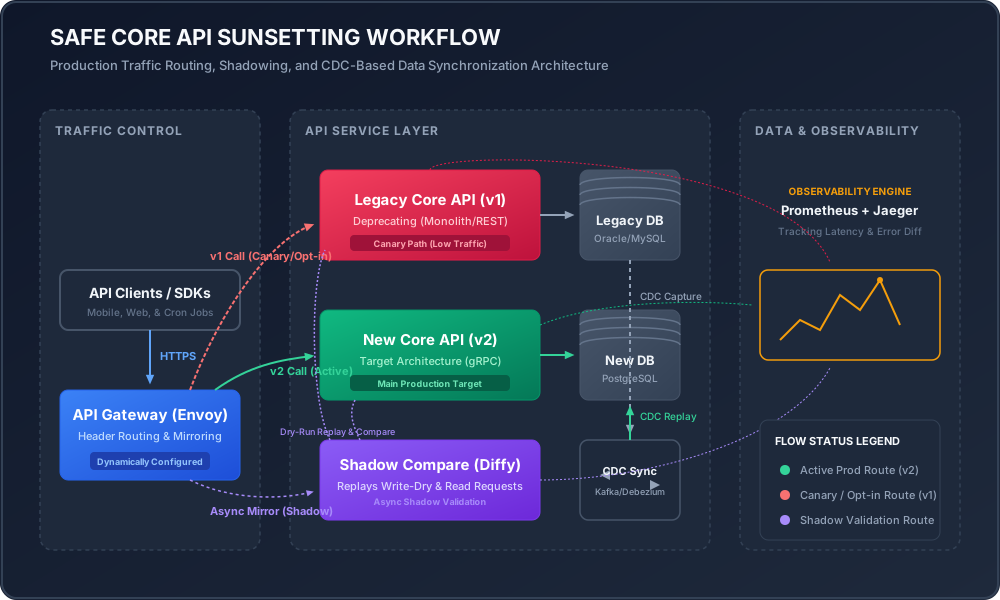
At 03:14 UTC, a legacy billing monolith finally crumbled under the load of a silent, unannounced batch process, taking down the primary checkout flow of a global e-commerce platform. The root cause was not a sudden burst of legitimate customer traffic, but rather a rogue internal microservice that had been hard-coded five years prior to query /v1/core/accounts for daily reconciliation. Such incidents are the tax platform engineering teams pay for failed API deprecations. Deprecating a core API in a complex microservices architecture is never just a matter of changing a DNS record or throwing a 410 Gone status code. It is an intricate, multi-phase migration project that requires precise traffic shadowing, active data synchronization, dynamic routing, and structured resilience patterns. This article details a concrete, production-proven framework for sunsetting legacy core APIs without causing downstream failures, database locking, or silent data corruption.
The Hard Realities of Legacy Coupling
In any organization that has existed for more than three years, core APIs act as gravity wells. They attract undocumented clients, leak database-specific implementation details (such as database auto-incrementing IDs or raw JSON serialized blobs), and bypass api gateways through internal DNS names or direct service-to-service calls.
The challenge of deprecation lies in this coupling. The API contract is not just the OpenAPI schema you published; it is the sum of every implicit assumption your consumers made. They might rely on:
- Latency characteristics: A client might timeout if your v2 API takes 40ms instead of the legacy v1’s 15ms, even if v2 is more consistent.
- Side effects: Undocumented database updates, audit logs, or cache invalidations triggered by the legacy code that are not captured in the new service design.
- Error handling quirks: A client code block that catches
400 Bad Requestbut crashes on a new, more accurate422 Unprocessable Entityresponse.
To decouple these systems safely, you cannot rely on asking developers to update their clients. You must build a migration pipeline that monitors, mirrors, synchronizes, and gradually cuts off traffic while maintaining complete rollback capabilities.
Phase 1: Shadow Traffic and Response Comparators
The first step in deprecation is verifying that the new implementation (v2) behaves identically to the legacy implementation (v1) under real production workloads. We achieve this through Traffic Shadowing (or dark launching), where a proxy clones incoming read traffic and forwards it asynchronously to the new API.
Envoy Proxy Shadowing Configuration
To shadow traffic at the infrastructure level without introducing latency to the active request path, configure Envoy’s request_mirror_policies. The policy clones the request payload, headers, and paths, throwing away the response from the shadowed cluster so the client is unaffected.
static_resources:
  listeners:
  - name: ingress_listener
    address:
      socket_address: { address: 0.0.0.0, port_value: 8080 }
    filter_chains:
    - filters:
      - name: envoy.filters.network.http_connection_manager
        typed_config:
          "@type": type.googleapis.com/envoy.extensions.filters.network.http_connection_manager.v3.HttpConnectionManager
          stat_prefix: ingress_http
          route_config:
            name: local_route
            virtual_hosts:
            - name: core_api_service
              domains: ["api.internal"]
              routes:
              - match:
                  prefix: "/v1/accounts"
                route:
                  cluster: legacy_core_api_v1
                  request_mirror_policies:
                  - cluster: new_core_api_v2
                    runtime_key: "routing.shadow.v2"
                    default_value:
                      numerator: 100
                      denominator: HUNDRED
          http_filters:
          - name: envoy.filters.http.router
            typed_config:
              "@type": type.googleapis.com/envoy.extensions.filters.http.router.v3.Router
  clusters:
  - name: legacy_core_api_v1
    connect_timeout: 0.25s
    type: STRICT_DNS
    lb_policy: ROUND_ROBIN
    load_assignment:
      cluster_name: legacy_core_api_v1
      endpoints:
      - lb_endpoints:
        - endpoint:
            address:
              socket_address: { address: legacy-service.internal, port_value: 80 }
  - name: new_core_api_v2
    connect_timeout: 0.25s
    type: STRICT_DNS
    lb_policy: ROUND_ROBIN
    load_assignment:
      cluster_name: new_core_api_v2
      endpoints:
      - lb_endpoints:
        - endpoint:
            address:
              socket_address: { address: new-service.internal, port_value: 80 }
Implementing Diffy for Differential Testing
Shadowing traffic is useless without comparison. Tools like Diffy sit between the proxy and your services to perform differential analysis on the JSON responses returned by v1 and v2.
When analyzing shadowed responses, you must ignore dynamic fields such as timestamps (created_at, updated_at), randomly generated identifiers (UUIDs), and server-specific headers. Diffy handles this by running two instances of the legacy v1 service alongside one instance of v2. This setup allows it to learn which fields are naturally dynamic (differing between the two v1 instances) and filter them out before flagging discrepancies in v2.
Incoming Request (Cloned)
       │
       ├──> Legacy API v1 (Instance A) ──> Response A  ──┐
       │                                                 ├──> Compare Dynamic Fields
       ├──> Legacy API v1 (Instance B) ──> Response B  ──┘    (Noise Filtering)
       │                                                          │
       └──> New API v2    (Instance C) ──> Response C  ───────────┴──> Log Discrepancies
Our goal in Phase 1 is to achieve a 99.99% match rate (excluding known dynamic fields) over a continuous 72-hour period.
Handling Writes in Shadow Mode
You cannot blindly mirror HTTP POST, PUT, or DELETE requests, as doing so would cause duplicate mutations, double-billing, or corrupted database states. To validate mutation endpoints, apply one of the following strategies:
- Write-Dry-Run Mode: Modify the v2 service code to accept a
X-Dry-Run: trueheader. When present, the service performs validation, deserializes payloads, evaluates authorization logic, and queries databases, but rolls back the database transaction before committing. - Shadow Database Isolation: Route shadow writes to a completely isolated copy of the database. This database must be pre-populated with a snapshot of production data and synchronized out-of-band. While resource-intensive, this is the only way to validate write performance, constraints, and trigger execution at scale.
Phase 2: Dual-Writing and CDC-Based Data Synchronization
Core migrations usually involve changing database tables or completely switching database technologies (e.g., migrating from Oracle to PostgreSQL). Simply routing traffic to a new service while leaving the old data layer active causes immediate split-brain issues.
Avoid client-side dual-writing. Implementing logic where the client writes to both API versions introduces distributed transaction issues. If the write to v1 succeeds but the write to v2 fails due to a network partition, the system enters an inconsistent state.
The Change Data Capture (CDC) Architecture
The most resilient pattern is asynchronous database-level replication using Change Data Capture (CDC) with tools like Debezium and Apache Kafka.
Legacy Database ──> Transaction Log (binlog/WAL)
                          │
                          ▼
                  Debezium Connector
                          │
                          ▼
                     Kafka Topic (e.g., mysql.accounts)
                          │
                          ▼
                  CDC Consumer Service (Transforms & Writes)
                          │
                          ▼
                    New Database
- Transaction Log Mining: Debezium reads the database transaction logs (MySQL binary log or PostgreSQL write-ahead log) directly. This avoids any performance impact on the application layer.
- Event Streaming: Database mutations (Insert, Update, Delete) are streamed as structured events into Kafka topics.
- Consumer Transformation: A dedicated CDC consumer service reads events from Kafka, maps the legacy schema into the new PostgreSQL schema, and writes directly to the new database.
Reconciliation and Drift Detection
Because asynchronous replication is subject to network partitions and eventual consistency lag, you must build a continuous Reconciliation Loop to identify and fix data drift.
Run a daily offline Spark job or a custom Go service that runs checksums on table shards. The reconciliation script queries primary keys in blocks of 10,000, hashes the fields, and compares hashes between the legacy database and the new database:
-- Legacy DB Hash Query
SELECT MD5(CONCAT(id, email, status, balance))
FROM accounts
WHERE id BETWEEN 100000 AND 110000;
If hashes mismatch, the tool pulls the specific records, compares them field-by-field, and writes the missing data to the target DB. Do not transition traffic until your daily data drift rate remains at 0% for five consecutive days.
Phase 3: Gradual Routing and Envoy Header Injection
With data synchronized and read mismatches resolved, you can begin shifting live traffic from the legacy v1 endpoint to the new v2 service. This shift must be progressive, reversible, and controlled by dynamic configurations.
Weighted Envoy Clusters
Rather than switching all traffic at once, configure Envoy to route traffic proportionally using weighted cluster assignments. This allows you to run canary deployments on the API layer.
routes:
- match:
    prefix: "/v1/accounts"
  route:
    weighted_clusters:
      clusters:
      - name: legacy_core_api_v1
        weight: 90
      - name: new_core_api_v2
        weight: 10
    runtime_key_prefix: "routing.v2_migration"
Using dynamic runtime keys, platform engineers can modify weights on the fly via Consul, ZooKeeper, or Control Plane configurations without restarting Envoy instances.
Opt-In Header Routing
Before shifting public traffic, allow internal teams and specific pilot customers to opt-in to the new API. Envoy can evaluate incoming request headers and route traffic accordingly:
routes:
- match:
    prefix: "/v1/accounts"
    headers:
    - name: "X-Route-Target"
      exact_match: "v2-canary"
  route:
    cluster: new_core_api_v2
Tracking Unmigrated Clients
You must identify every client still sending requests to the legacy API. Do not rely on documentation or email notifications to internal teams. Use Telemetry Injection to log client identities directly from production traffic.
Inject an Envoy Lua filter or application middleware to extract identity markers (User-Agent, JWT claims, X-API-Key, or source IP addresses) and output them to your observability stack (e.g., Prometheus metrics, OpenSearch, or Grafana Loki).
-- Envoy inline Lua filter to track deprecated endpoint usage
function envoy_on_request(request_handle)
  local path = request_handle:headers():get(":path")
  if string.match(path, "^/v1/accounts") then
    local client_id = request_handle:headers():get("x-client-id") or "unknown-client"
    local user_agent = request_handle:headers():get("user-agent") or "unknown-agent"

    -- Increment Prometheus Deprecation Metric
    request_handle:logInfo(string.format("DEPRECATION_WARNING: Client '%s' using '%s' on %s", client_id, user_agent, path))
  end
end
Create a dashboard visualizing active client IDs calling /v1/accounts. This gives you a clear checklist of team owners who must be contacted to rewrite their client libraries.
Phase 4: Brownouts and Hard Deprecation
No matter how many Slack announcements, emails, or Jira tickets you send, some clients will not migrate. To uncover hidden dependencies and force action, you must execute API Brownouts (also known as Chaos Deprecation).
A brownout is the intentional, temporary degradation or interruption of the legacy API. It simulates a permanent decommissioning of the endpoint, prompting unmigrated applications to fail loudly during controlled business hours, rather than silently during a weekend on-call shift.
The Scheduled Brownout Framework
Do not shut down the API immediately. Design a progressive brownout calendar:
| Timeline | Action | Error Rate | Latency Injected | Duration |
|---|---|---|---|---|
| T-Minus 90 Days | Soft warnings in logs and API headers | 0% | None | Continuous |
| T-Minus 60 Days | Weekly 1-hour brownouts (Tuesdays at 14:00 UTC) | 5% (HTTP 503) | +200ms | 1 Hour |
| T-Minus 30 Days | Twice-weekly 4-hour brownouts | 20% (HTTP 503) | +1000ms | 4 Hours |
| T-Minus 14 Days | Daily 6-hour brownouts (including HTTP 410) | 50% (HTTP 410) | +3000ms | 6 Hours |
| T-Day (Zero) | Complete removal of route / DNS target | 100% | N/A | Permanent |
Injecting Latency and Faults via Envoy
To automate the injection of HTTP failures and latency during brownout hours, apply Envoy’s http_filters.fault filter. This configuration can be enabled and disabled dynamically using Envoy’s runtime engine:
http_filters:
- name: envoy.filters.http.fault
  typed_config:
    "@type": type.googleapis.com/envoy.extensions.filters.http.fault.v3.HTTPFault
    delay:
      percentage:
        numerator: 20
        denominator: HUNDRED
      fixed_delay: 2.0s
    abort:
      percentage:
        numerator: 10
        denominator: HUNDRED
      http_status: 503
- name: envoy.filters.http.router
  typed_config:
    "@type": type.googleapis.com/envoy.extensions.filters.http.router.v3.Router
In the configuration above, Envoy injects a 2-second delay into 20% of requests, and fails 10% of requests with an HTTP 503 Service Unavailable status code. This will expose poorly written client code that lacks retry mechanisms, backoff strategies, or circuit breakers.
Production Incident Playbooks: Dealing with the Fallouts
Even with extensive planning, migrations can fail. Platform engineering teams must run playbooks for common failure modes to maintain system stability.
Playbook 1: Downstream Latency Cascades
- Symptom: During a brownout or routing change, downstream services begin exhausting their HTTP client connection pools, causing cascading timeouts in unrelated user flows.
- Root Cause: A service calling the legacy API does not set appropriate timeouts or retries, causing thread pools to block while waiting for the injected latency.
- Mitigation:
- Immediately disable the Envoy fault injection policy via Consul runtime configurations:
set routing.fault.active = false. - Implement aggressive rate limiting on the legacy service to protect upstream databases.
- Force client pods to restart with updated connection pool timeout configurations (e.g., reducing
connect_timeoutto 250ms andread_timeoutto 500ms).
- Immediately disable the Envoy fault injection policy via Consul runtime configurations:
Playbook 2: Data Desynchronization (CDC Out-of-Order Execution)
- Symptom: The reconciliation loop flags thousands of rows with inconsistent data states between the legacy and new databases.
- Root Cause: The CDC pipeline encountered database deadlocks or out-of-order Kafka message delivery, causing updates to be processed before inserts.
- Mitigation:
- Halt the traffic migration scale-up. Keep the routing weight constant.
- Scale up the CDC consumer group to clear partition lag.
- Trigger the out-of-band reconciliation tool to resynchronize the database state from the source database (the source of truth) using primary key range updates.
- Ensure your Kafka messages are keyed by the table’s primary key (
AccountID) to guarantee that all mutations for a specific row are processed sequentially on the same partition.
Framework Summary
A successful migration is not measured by the speed of the deployment, but by the safety of the decommission. By following this progressive pipeline, platform teams can eliminate the risk of legacy API sunsetting:
[Phase 1: Shadowing] ──> [Phase 2: Sync & Validate] ──> [Phase 3: Route Canary] ──> [Phase 4: Brownouts] ──> [Decommission]
  - 100% Read Mirror        - Kafka/Debezium CDC           - Weighted Envoy Routing     - Injected Failures      - Clean Up Code
  - Response Compare        - 0% Data Drift Target         - Telemetry Collection       - Permanent Cutoff       - Drop Databases
By enforcing strict verification gates, verifying data consistency with CDC pipelines, and exposing coupled clients early with dynamic brownouts, you ensure your platform continues running smoothly during major architecture upgrades.