LLM Inference Quantization: GGUF, AWQ, and GPTQ Trade-offs for Production Serving
A production-focused breakdown of GGUF, AWQ, and GPTQ quantization formats — when to use each, real throughput numbers, and failure modes to avoid.
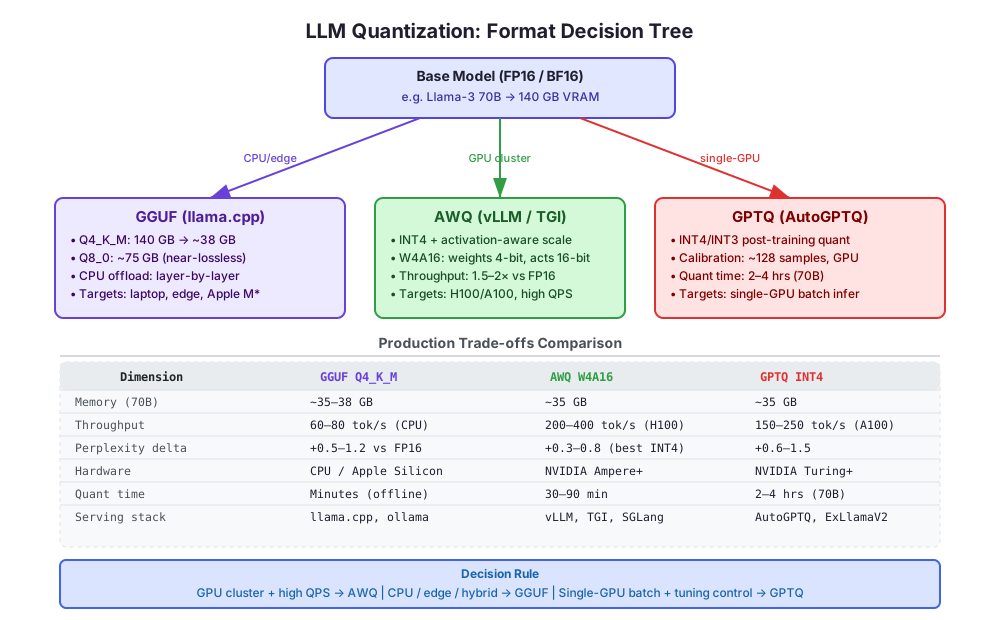
You get a 70B model approved for production. It’s 140 GB in FP16. Your A100 cluster has 80 GB cards. You can’t fit it on a single GPU, and spinning up a two-card NVLink setup triples your serving cost per request. Quantization is the answer — but which format? GGUF, AWQ, and GPTQ all promise to get you to 4-bit, all hover around the same ~35–38 GB footprint, and all lose a measurable but manageable amount of quality. The difference is where they run well, how fast they are, and which failure modes they hide from you until 3 AM.
What Quantization Actually Does (and What It Destroys)
All three formats reduce weight precision — most commonly from 16-bit floats to 4-bit integers — cutting memory by roughly 4×. The mechanism varies, but the core trade-off is the same: you’re converting a continuous distribution of weight values into a discrete set of ~16 buckets per group, and you’re hoping the model doesn’t care about the values you threw away.
It doesn’t care, until it does. The failure mode is non-linear: a model might score within 2% of FP16 on MMLU, then catastrophically fail on a specific task that relied on precision in a particular attention layer. Benchmarks aggregate this out. Your production workload exposes it.
The metric to watch is perplexity delta on your own dataset, not general benchmarks. Run your representative eval set against FP16 and your chosen quantized format before shipping. A perplexity increase of 0.5–0.8 is acceptable for most instruction-following tasks. Above 1.5, you’re likely to see measurable regression in structured output tasks (JSON generation, code completion, tool call formatting).
GGUF: The Format That Runs Where Your GPUs Don’t
GGUF (successor to GGML) is the format of llama.cpp and the entire CPU-capable ecosystem — ollama, LM Studio, Jan, text-generation-webui in CPU mode. Its defining characteristic is not compression efficiency; it’s hardware flexibility.
GGUF supports per-layer quantization types. A Q4_K_M model uses Q6_K for attention layers (higher precision, more memory) and Q4_K for FFN layers (lower precision, less memory), trading overall size for quality in the layers that matter most. This mixed-precision approach is baked into the format spec and handled transparently by llama.cpp — you pick a preset (Q4_K_M, Q5_K_S, Q8_0) and the partitioning is done for you.
The practical implication: on a machine with 24 GB of VRAM and 64 GB of system RAM, llama.cpp can offload a 70B model by assigning the first N layers to GPU and the rest to CPU. You configure this with --n-gpu-layers. Throughput drops significantly — expect 40–80 tok/s vs 200+ tok/s on a full-GPU stack — but the model runs, which is the entire point for edge deployments.
When GGUF wins in production:
- Self-hosted inference on machines without A100/H100 — workstation GPUs, Mac Pro with M2 Ultra/M3 Max, ARM servers
- Latency-tolerant batch jobs where you’d rather not pay for GPU instances
- Air-gapped environments where you can’t pull HuggingFace at runtime and need a single portable file
GGUF failure modes to know:
- Throughput is not competitive on NVIDIA GPUs. If you have the hardware, AWQ or GPTQ will outperform GGUF by 2–4× on the same card. GGUF is not optimized for GPU tensor cores.
- The
Q4_0preset (older, simpler) is meaningfully worse thanQ4_K_M. If you’re using GGUF and not using K-quants, you’re leaving quality on the table for no gain. - Context scaling is expensive. GGUF’s KV cache is not compressed by default. At 32K context, a 70B model with Q4_K_M can eat more memory in KV cache than the weights themselves. Use
--cache-type-k q8_0in llama.cpp >= 0.3 to quantize the KV cache separately.
AWQ: Activation-Aware and Actually Fast
AWQ (Activation-Aware Weight Quantization, Lin et al. 2023) is the format you use when you have NVIDIA GPUs and you care about throughput. The key insight is that not all weights contribute equally to quantization error. A small percentage of weights — those associated with large activation magnitudes — cause most of the degradation when quantized. AWQ identifies these “salient” weights through calibration and protects them.
In practice, AWQ doesn’t keep those weights at FP16. Instead, it applies a per-channel scaling factor before quantization that compresses the dynamic range, making the INT4 representation more accurate for the weights that matter. The result is a W4A16 format: 4-bit weights, 16-bit activations, GEMM kernels that are highly optimized for modern NVIDIA SM architectures.
vLLM’s AWQ support (via autoawq for quantization, awq as the quantization flag in vLLM) gives you access to PagedAttention, continuous batching, and tensor parallelism on top of the quantized model. This is the production-grade serving path. On an H100 80 GB, a Llama-3 70B AWQ model can serve 200–400 tok/s throughput under real batched load, compared to 120–180 tok/s for the FP16 version on two H100s. The cost profile flips: you’re doing more with less hardware.
AWQ calibration requires a small dataset (~128 samples, representative of your workload) and runs in 30–90 minutes on a single GPU. The autoawq library handles this:
from awq import AutoAWQForCausalLM
from transformers import AutoTokenizer

model = AutoAWQForCausalLM.from_pretrained("meta-llama/Meta-Llama-3-70B-Instruct")
tokenizer = AutoTokenizer.from_pretrained("meta-llama/Meta-Llama-3-70B-Instruct")

quant_config = {"zero_point": True, "q_group_size": 128, "w_bit": 4, "version": "GEMM"}
model.quantize(tokenizer, quant_config=quant_config, calib_data=your_calib_dataset)
model.save_quantized("llama3-70b-awq-w4")
The q_group_size=128 parameter controls granularity. Smaller groups (64) improve quality at the cost of slightly higher memory overhead from group-wise scales. For most 70B models, 128 is the right default.
When AWQ wins in production:
- GPU-only serving with real traffic (high QPS, continuous batching)
- Multi-turn API backends where you need low P99 latency under load
- Models you’re running long-term and want the best quality-per-VRAM-dollar ratio
AWQ failure modes to know:
- AWQ is not a drop-in for AMD or CPU backends. The GEMM kernels are CUDA-specific. If your deployment ever needs to fall back to CPU or run on ROCm, you have no path without reconverting.
- Calibration data matters more than you’d expect. If your calibration set is generic (WikiText-2 is the lazy default) and your production workload is domain-specific (medical, legal, code), you’re leaving quality on the table. Always calibrate on a sample of your actual production traffic.
- The
GEMMkernel variant is faster for high batch sizes;GEMVis faster for batch size 1. For latency-sensitive single-stream inference, verify which vLLM is using and profile withtorch.profilerbefore declaring victory.
GPTQ: Precision Control at the Cost of Setup Complexity
GPTQ (Frantar et al. 2022) was the first practically usable post-training quantization method for LLMs at scale. It operates layer by layer, solving a second-order optimization problem to minimize the reconstruction error when quantizing each weight block. It’s more mathematically rigorous than AWQ’s scaling approach but requires GPU memory during quantization and takes significantly longer.
For a 70B model, GPTQ quantization takes 2–4 hours on a single A100 80 GB. The output is an INT4 model that loads via auto-gptq or ExLlamaV2 (the latter with significantly better throughput via custom Triton/CUDA kernels). On an A100 80 GB, ExLlamaV2 + GPTQ can serve Llama-3 70B at 150–250 tok/s — slower than AWQ on H100 but comparable on older hardware.
The configuration surface is larger with GPTQ. The bits, group_size, desc_act, and damp_percent parameters all interact:
from auto_gptq import AutoGPTQForCausalLM, BaseQuantizeConfig

quantize_config = BaseQuantizeConfig(
    bits=4,
    group_size=128,
    desc_act=True,      # reorder activations by magnitude — better quality, slower quant
    damp_percent=0.01,  # regularization; increase if quantization diverges
)
desc_act=True consistently improves quality on instruction-following tasks but makes quantization ~30% slower and is not supported by all serving backends. ExLlamaV2 handles it; some older AutoGPTQ builds don’t. Check your serving stack’s compatibility before enabling it.
When GPTQ wins in production:
- Fine-tuned models where you want tight control over the quantization procedure
- Workflows that already use ExLlamaV2 (tabbyAPI, text-generation-webui) which have deep GPTQ optimization
- Situations where you need INT3 — GPTQ at 3-bit is viable on ExLlamaV2 and can fit a 70B model in ~26 GB; AWQ INT3 support is experimental
GPTQ failure modes to know:
- The AutoGPTQ library has had significant API churn. Pin your version.
auto-gptq==0.7.1andtransformers==4.40.0is a known-good combination for Llama-3; mixing versions produces silent loading errors. - GPTQ models on vLLM are officially supported but have lower throughput than AWQ on the same hardware. vLLM’s internal benchmarks show AWQ at roughly 1.2–1.4× GPTQ throughput at high batch sizes.
- If you’re using GPTQ for a LoRA fine-tuned model, ensure the base model quantization precedes fine-tuning or you’re applying QLoRA correctly. Quantizing after fine-tuning a LoRA-merged model is valid; quantizing a base model and then attempting to merge a standard (non-quantization-aware) LoRA is not — you’ll see nonsense outputs.
The Deployment Decision in Practice
Given a concrete setup question — “I have 2× A100 80 GB and need to serve Llama-3 70B with 200 concurrent users” — the answer is AWQ on vLLM. PagedAttention + continuous batching + AWQ’s kernel efficiency will saturate those GPUs more effectively than any alternative.
Given “I need this running on a customer’s on-prem server that has an RTX 3090 and 128 GB RAM” — the answer is GGUF Q4_K_M with llama.cpp, setting --n-gpu-layers to push as many layers to the 24 GB card as fit (~35 layers for a 70B), and accepting the 50–70 tok/s throughput that results.
Given “we fine-tuned this model with QLoRA, it has 12 LoRA adapters merged, and we need to squeeze it onto a single A100 for a batch pipeline that runs overnight” — GPTQ with ExLlamaV2, desc_act=True, group_size=64 for maximum quality.
The decision is not about which format is “best.” It’s about hardware topology, serving stack, and whether the quantization toolchain supports your customization requirements. All three formats can get you a 70B model under 40 GB with perplexity degradation under 1.0 vs FP16. The difference is what they do with the hardware you actually have.
Evaluating Quality Before You Ship
Don’t rely on leaderboard perplexity numbers. Quantization quality is task-sensitive. Run your model through at minimum:
- Perplexity on your domain corpus — sample 500–1000 tokens from recent production data, compute perplexity against FP16 baseline and your quantized model
- Structured output rate — if you use JSON mode or function calling, measure the parse success rate across 200 samples. Quantized models fail structured output at higher rates, especially at INT4
- Instruction following regression — compare outputs on 50–100 representative prompts side-by-side, or use an LLM judge eval with GPT-4 as judge
A 5% drop in structured output success rate will cause silent failures in your pipeline. Measure it before it becomes a 3 AM incident.
Conclusion
GGUF is your escape hatch from GPU dependency. AWQ is your throughput maximizer on NVIDIA hardware. GPTQ is your precision instrument for fine-tuned models and non-standard bit widths. The formats are converging — vLLM now supports all three — but their heritage and optimization targets diverge in ways that show up at production scale. Pick the format that fits your hardware, run your own quality eval, and build a benchmark into your deployment pipeline so quantization regressions surface before users find them.