Kubernetes for Backend Engineers: From Zero to Deployed
A practical Kubernetes guide for backend engineers who want to deploy, scale, and manage their services like a pro.
Kubernetes (K8s) can feel overwhelming at first. Pods, Services, Deployments, Ingress — it’s a lot. But once you understand the mental model, everything clicks. This guide cuts through the noise and gives you what you actually need as a backend engineer.
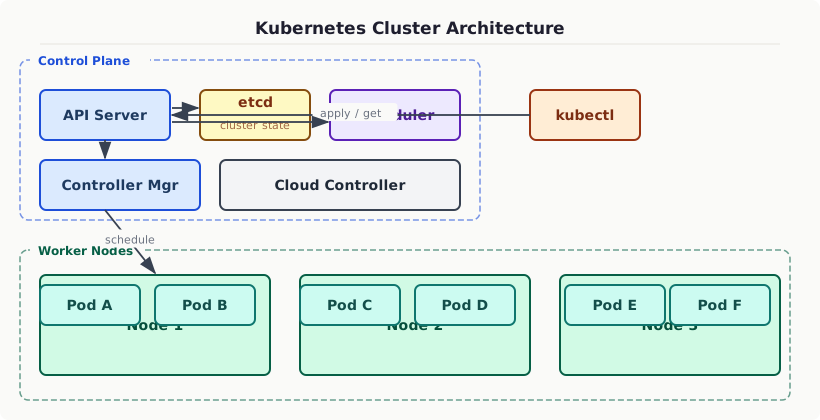
The Core Mental Model
Think of Kubernetes as a desired state machine. You tell it what you want (e.g., “run 3 replicas of my API”), and Kubernetes constantly works to make that reality. It’s declarative, not imperative.
Key Primitives
Pod
The smallest deployable unit. A pod wraps one (or more) containers that share network and storage.
You almost never create bare Pods — use Deployments instead.
Deployment
Manages a ReplicaSet which manages Pods. This is how you run your application.
Service
Services give your pods a stable network identity. Pods die and restart with new IPs — Services provide a stable endpoint.
ConfigMap and Secret
Decouple configuration from your container image:
Reference them in your deployment:
Rolling Updates with Zero Downtime
By default, Kubernetes does rolling updates — replacing old pods one by one:
Combined with readiness probes, this gives you true zero-downtime deployments.
Horizontal Pod Autoscaler
Scale based on CPU/memory automatically:
Essential kubectl Commands
Takeaway
Start simple: Deployment → Service → ConfigMap/Secret. Add Ingress when you need HTTP routing. Add HPA when you need autoscaling. Build up complexity only as needed.