Kafka Tiered Storage: S3 Offloading, Fetch Proxying, and Cold Data Access Patterns
How Kafka's tiered storage (KIP-405) offloads cold segments to S3 while keeping fetch semantics transparent to consumers.
You’ve been running Kafka in production for three years. Storage costs are a line item that keeps growing on the infrastructure bill, and every time you try to extend retention beyond 7 days, you’re provisioning more NVMe across the entire broker fleet — even though 95% of that data is never accessed after the first 48 hours. The problem isn’t that Kafka is expensive. The problem is that Kafka historically treats all data the same: bytes on local disk, with the same replication, the same IOPS budget, the same hardware tier. Tiered storage, introduced in KIP-405 and made production-ready in Kafka 3.6, breaks this model. Cold segments live in S3 at roughly $0.023/GB-month; hot segments stay on local NVMe where millisecond-latency reads actually matter. You extend retention from 7 days to 90 days without touching broker disk capacity, and consumers see no difference in the fetch API — the broker proxies S3 reads transparently.
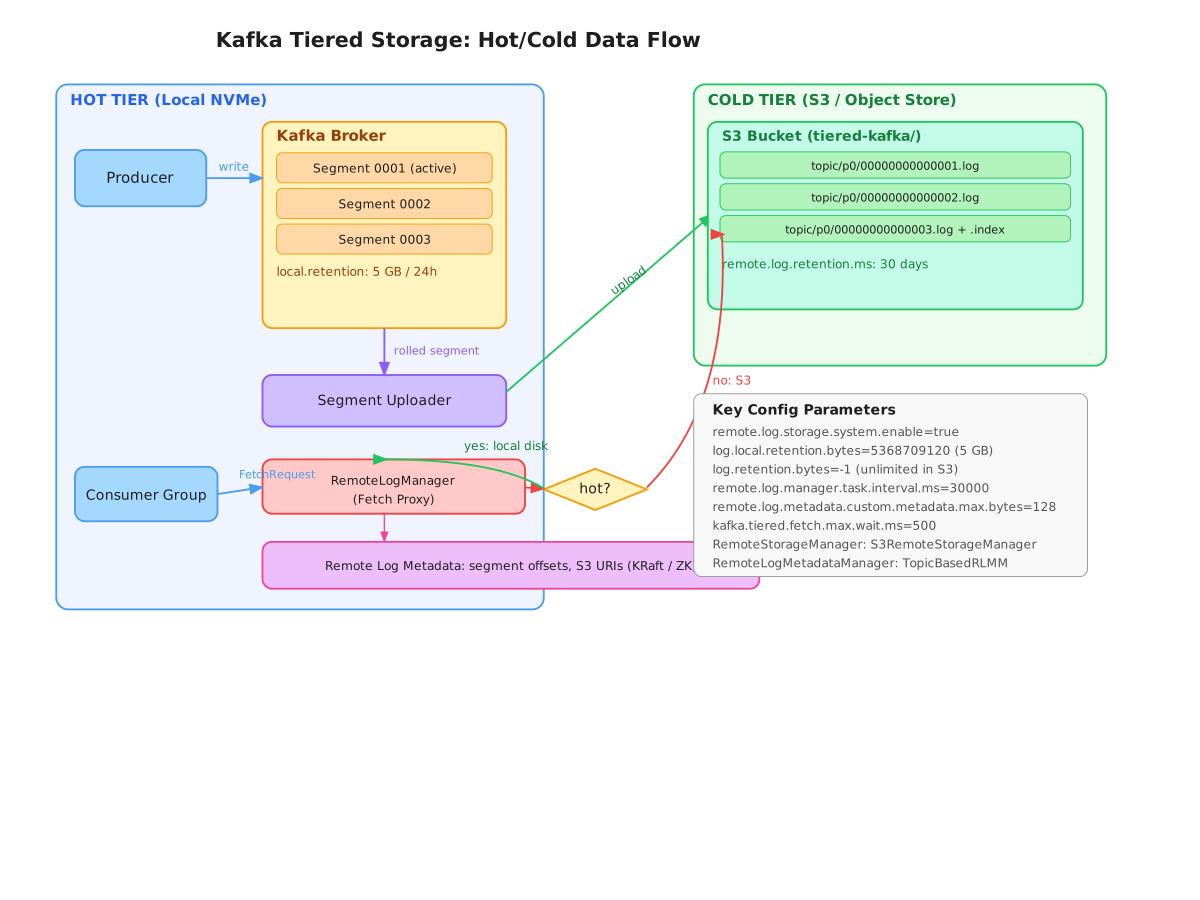
What Actually Gets Offloaded
Kafka’s log is a sequence of segment files. A segment is a pair: a .log file (the actual messages) and an .index file (sparse offset → byte position index). When a segment is rolled — either by reaching segment.bytes (default 1 GB) or segment.ms — tiered storage’s RemoteLogManager picks it up and uploads both files to object storage under a deterministic key path.
The key structure matters. Confluent’s implementation and Apache’s reference implementation both use a layout like:
// snippet-1
# S3 key structure for a tiered segment
s3://your-bucket/
  <cluster-id>/
    <topic>/
      <partition>/
        <leader-epoch>-<base-offset>-<end-offset>-<epoch>.log
        <leader-epoch>-<base-offset>-<end-offset>-<epoch>.index
        <leader-epoch>-<base-offset>-<end-offset>-<epoch>.timeindex
        <leader-epoch>-<base-offset>-<end-offset>-<epoch>.txnindex

# Example
s3://tiered-kafka/prod-cluster-1/orders/12/0-00000000000017830-00000000000024610-5.log
The leader epoch prefix is critical — it allows the metadata layer to detect and discard stale uploads from a previous leader after a partition reassignment. Without it, a new leader could serve data uploaded by a failed leader that was mid-transaction.
Broker Configuration: The Two Retention Windows
The core mental model is two independent retention policies stacked on top of each other. log.local.retention.bytes controls how much data stays hot on local disk. log.retention.bytes controls total retention including remote. The broker enforces local retention by deleting local copies of segments already confirmed uploaded to remote storage.
# snippet-2
# server.properties — tiered storage configuration
remote.log.storage.system.enable=true

# Local hot tier: keep 5 GB or 24h on local NVMe
log.local.retention.bytes=5368709120
log.local.retention.ms=86400000

# Total retention: 90 days in S3 (local + remote combined)
log.retention.bytes=-1
log.retention.ms=7776000000

# RemoteStorageManager plugin (S3 implementation)
remote.log.storage.manager.class.name=org.apache.kafka.rsm.s3.S3RemoteStorageManager
remote.log.storage.manager.class.path=/opt/kafka/plugins/s3-rsm/*

# How often the RLM task runs to find and upload eligible segments
remote.log.manager.task.interval.ms=30000

# Metadata storage: topic-based (uses internal __remote_log_metadata topic)
remote.log.metadata.manager.class.name=org.apache.kafka.server.log.remote.metadata.storage.TopicBasedRemoteLogMetadataManager
remote.log.metadata.manager.listener.name=PLAINTEXT

# S3-specific config (passed via remote.log.storage.manager.impl.prefix)
remote.log.storage.manager.impl.prefix=kafka.rsm.s3.
kafka.rsm.s3.s3.region=ap-southeast-1
kafka.rsm.s3.s3.bucket.name=tiered-kafka-prod
kafka.rsm.s3.s3.multipart.upload.part.size.bytes=67108864
One nuance: log.local.retention.bytes=-2 means “inherit from log.local.retention.ms”. Setting it to -1 is a footgun — it means unlimited local retention, defeating the purpose. The default behavior is to keep data locally until both the local AND the upload confirmation are verified.
The Fetch Proxy: How Cold Reads Work
When a consumer issues a FetchRequest with an offset that falls in a remote segment, the broker doesn’t return an error or redirect. It intercepts the request in RemoteLogManager, resolves the S3 URI from the RemoteLogMetadataManager, fetches the relevant byte range from S3, and returns data in the same FetchResponse format as a local read.
// snippet-3
// Simplified fetch path in RemoteLogManager (Kafka broker internals)
// File: core/src/main/scala/kafka/log/remote/RemoteLogManager.scala

public RemoteLogReadResult read(RemoteLogSegmentMetadata remoteLogSegmentMetadata,
                                 int maxBytes,
                                 long startOffset,
                                 boolean minOneMessage) throws RemoteStorageException {
    // 1. Resolve byte offset within the remote segment using the remote index
    int startPos = lookupPositionForOffset(remoteLogSegmentMetadata, startOffset);

    // 2. Fetch from remote storage — this is where S3 GET with Range header fires
    InputStream inputStream = remoteStorageManager.fetchLogSegment(
        remoteLogSegmentMetadata,
        startPos,
        startPos + maxBytes
    );

    // 3. Build RecordBatch from stream — identical format to local log
    return new RemoteLogReadResult(
        Optional.of(new FetchDataInfo(
            new LogOffsetMetadata(startOffset),
            MemoryRecords.readableRecords(ByteBuffer.wrap(inputStream.readAllBytes()))
        )),
        Optional.empty()
    );
}
The latency hit is real. A local read from NVMe is sub-millisecond. An S3 GET with a Range header in the same region is typically 10–50ms for small payloads, up to 200ms for a cold 64 MB segment fetch. For consumers doing live streaming this is invisible — they’re reading from the hot tier anyway. For consumers doing historical replay (data pipelines, audit queries, incident replay), the latency is acceptable because they’re bounded by throughput, not latency.
Remote Log Metadata Manager: The Lookup Table
The RemoteLogMetadataManager (RLMM) is the component that maps offsets to S3 URIs. The default implementation uses an internal Kafka topic (__remote_log_metadata) with one partition per data topic partition, replicated at the broker’s default replication factor. Each broker subscribes to the partitions it leads, keeping an in-memory index.
# snippet-4
# Monitoring the remote log metadata topic
# Useful for debugging missing offsets or upload lag

import json
from confluent_kafka import Consumer, KafkaException

def inspect_remote_metadata(bootstrap_servers: str, topic_partition: int):
    """
    Read the __remote_log_metadata topic to see what segments
    are registered as uploaded for a given data partition.
    """
    consumer = Consumer({
        'bootstrap.servers': bootstrap_servers,
        'group.id': 'debug-rlmm-inspector',
        'auto.offset.reset': 'earliest',
        'enable.auto.commit': False,
    })

    consumer.assign([TopicPartition('__remote_log_metadata', topic_partition)])

    segments = {}
    while True:
        msg = consumer.poll(timeout=1.0)
        if msg is None:
            break
        if msg.error():
            raise KafkaException(msg.error())

        record = json.loads(msg.value().decode('utf-8'))

        if record['type'] == 'REMOTE_LOG_SEGMENT_METADATA':
            seg_id = record['remoteLogSegmentId']
            segments[seg_id] = {
                'base_offset': record['startOffset'],
                'end_offset': record['endOffset'],
                'leader_epoch': record['leaderEpoch'],
                'state': record['state'],  # COPY_SEGMENT_STARTED, COPY_SEGMENT_FINISHED, DELETE_SEGMENT_STARTED
                's3_path': record.get('customMetadata', {}).get('s3Key'),
            }
            print(f"Segment {seg_id}: offsets {record['startOffset']}-{record['endOffset']} state={record['state']}")

    consumer.close()
    return segments
The state machine per segment is: COPY_SEGMENT_STARTED → COPY_SEGMENT_FINISHED → (optionally) DELETE_SEGMENT_STARTED → DELETE_SEGMENT_FINISHED. A segment is only eligible for local deletion after it transitions to COPY_SEGMENT_FINISHED. If an upload hangs or the broker crashes mid-upload, the segment stays COPY_SEGMENT_STARTED indefinitely — a monitoring alert on this state transition age is essential in production.
S3 Access Patterns and Cost Model
A tiered storage deployment fundamentally changes your S3 access pattern. You get:
- PUT requests: one per segment per upload (~$0.005 per 1000 PUTs)
- GET requests: one per consumer fetch of a cold segment range (~$0.0004 per 1000 GETs)
- Storage: $0.023/GB-month (S3 Standard) or $0.01/GB-month (S3 Intelligent-Tiering after 30+ days)
- Data transfer: $0.09/GB within the same region when the broker fetches from S3 (intra-AZ is free if using VPC endpoints)
The critical optimization is using S3 Intelligent-Tiering for the remote bucket and configuring the multipart upload threshold to match your segment size:
# snippet-5
# S3 bucket policy and lifecycle for tiered Kafka segments

aws s3api create-bucket \
  --bucket tiered-kafka-prod \
  --region ap-southeast-1 \
  --create-bucket-configuration LocationConstraint=ap-southeast-1

# Enable Intelligent-Tiering for segments older than 30 days
aws s3api put-bucket-intelligent-tiering-configuration \
  --bucket tiered-kafka-prod \
  --id kafka-tiered-auto \
  --intelligent-tiering-configuration '{
    "Id": "kafka-tiered-auto",
    "Status": "Enabled",
    "Tierings": [
      { "Days": 90, "AccessTier": "ARCHIVE_ACCESS" },
      { "Days": 180, "AccessTier": "DEEP_ARCHIVE_ACCESS" }
    ]
  }'

# Block public access
aws s3api put-public-access-block \
  --bucket tiered-kafka-prod \
  --public-access-block-configuration \
    "BlockPublicAcls=true,IgnorePublicAcls=true,BlockPublicPolicy=true,RestrictPublicBuckets=true"

# VPC endpoint to avoid cross-region data transfer charges
aws ec2 create-vpc-endpoint \
  --vpc-id vpc-xxxxxxxx \
  --service-name com.amazonaws.ap-southeast-1.s3 \
  --route-table-ids rtb-xxxxxxxx
In practice, on a 1 TB/day ingest cluster with 90-day retention, tiered storage cuts broker EBS costs by ~85% (you keep ~2 days local instead of 90) while adding roughly $700-900/month in S3 costs — a net saving of several thousand dollars per month at typical EBS pricing.
Failure Modes and What Actually Goes Wrong
Upload lag accumulation: The RLM upload task runs every 30 seconds by default. Under write load spikes, the queue of segments waiting for upload grows. If log.local.retention.bytes is set aggressively, the broker can attempt to delete local segments before they’re confirmed uploaded — which Kafka prevents with a guard check, but it does mean local storage can temporarily exceed your target. Monitor RemoteLogManager.UploadLag JMX metric.
Leader epoch mismatch during partition reassignment: If a partition moves to a new broker while a segment is mid-upload, the new leader discovers a COPY_SEGMENT_STARTED entry in RLMM. It must complete or abandon the upload from the previous leader. The reference implementation handles this by having the new leader re-upload the segment with its own epoch, then mark the old entry for deletion — resulting in double S3 storage temporarily.
Consumer offset reset into archive tier: If you configure ARCHIVE_ACCESS or DEEP_ARCHIVE_ACCESS on S3 Intelligent-Tiering, a consumer seeking to a 120-day-old offset will trigger a Glacier restore request, which takes 3-5 hours. Your broker will surface this as a timeout. The mitigation is setting a fetch timeout in the RSM and surfacing a clear error to the consumer:
// snippet-6
// Custom S3RemoteStorageManager with Glacier restore handling
@Override
public InputStream fetchLogSegment(RemoteLogSegmentMetadata metadata,
                                    int startPosition,
                                    int endPosition) throws RemoteStorageException {
    String key = buildS3Key(metadata);
    try {
        GetObjectRequest request = GetObjectRequest.builder()
            .bucket(bucketName)
            .key(key)
            .range(String.format("bytes=%d-%d", startPosition, endPosition))
            .build();

        return s3Client.getObject(request).asInputStream();

    } catch (S3Exception e) {
        if (e.statusCode() == 403 && e.getMessage().contains("InvalidObjectState")) {
            // Object is in Glacier — initiate restore and surface as retriable error
            initiateGlacierRestore(key, glacierRestoreDays);
            throw new RemoteStorageException(
                "Segment " + key + " is in Glacier archive tier. " +
                "Restore initiated, retry after " + glacierRestoreDays + " hours.",
                e
            );
        }
        throw new RemoteStorageException("S3 fetch failed for " + key, e);
    }
}
RLMM topic replication lag: The __remote_log_metadata topic must have enough partitions (one per data topic partition) and the broker subscribing to it must stay caught up. A broker restart that’s slow to replay the RLMM topic will temporarily serve incorrect responses for cold reads — reporting offsets as non-existent rather than remote.
Observing Cold vs. Hot Read Ratio
Knowing your hot-to-cold read ratio helps right-size the local retention window. Too much local retention wastes disk; too little pushes too many reads to S3, increasing latency and cost.
# snippet-7
# JMX metrics to track in Prometheus via kafka-exporter or kminion

# Upload metrics
kafka_server_remote_log_manager_upload_lag_bytes     # backlog of unuploaded data
kafka_server_remote_log_manager_upload_rate          # segments/sec being uploaded
kafka_server_remote_log_manager_failed_segment_uploads_total

# Fetch metrics
kafka_server_remote_fetch_requests_total             # cold reads from S3
kafka_network_request_metrics_request_total{request="Fetch"}  # all fetches
# Ratio: remote_fetch_requests / total_fetch_requests -> cold read fraction

# Latency percentiles (critical: cold reads are 20-100x slower)
kafka_server_remote_fetch_latency_ms{quantile="0.99"}
kafka_server_fetch_request_total_time_ms{quantile="0.99"}

# S3 storage accounting
kafka_log_remote_log_size_bytes{topic="orders",partition="0"}

# Prometheus alert: upload lag exceeding 2x the local retention window
- alert: KafkaRLMUploadLagCritical
  expr: kafka_server_remote_log_manager_upload_lag_bytes > 10737418240  # 10 GB
  for: 10m
  labels:
    severity: warning
  annotations:
    summary: "Tiered storage upload lag exceeding 10 GB on "
What Tiered Storage Doesn’t Fix
Tiered storage is not a silver bullet. It doesn’t reduce network egress costs for live consumers — those still come from local disk. It doesn’t change the replication factor of hot data; your local tier is still 3x replicated on disk. It doesn’t help with partition-level throughput limits; those are still constrained by the leader’s disk and network bandwidth.
It also introduces a new operational component — the RSM plugin and its S3 credentials — that must be managed, monitored, and secured. An RSM misconfiguration that loses S3 write access doesn’t surface as a hard error immediately; it surfaces as growing upload lag, eventually causing local retention to bloat past its limits as the broker refuses to delete un-uploaded segments.
The sweet spot for tiered storage is: topics with high write volume, long retention requirements, and access patterns that decay sharply after 24-48 hours. Event logs, audit trails, CDC topics, clickstreams. For topics where consumers regularly replay from day 30+ (batch ETL, ML feature pipelines), budget for the S3 read latency in your SLA and ensure you’re not accidentally hitting archive tiers. For topics with 1-hour retention, the overhead of tiered storage adds complexity with negligible benefit.
When it fits, it fits well. 90-day retention on a 500 GB/day topic went from requiring 45 TB of replicated broker storage to 3 TB local plus S3. That’s the kind of operational change that makes the complexity worth carrying.