Implementing OIDC-Based AWS IAM Federation for GitHub Actions Without Long-Lived Credentials
Eliminate long-lived AWS IAM access keys in your CI/CD pipelines by implementing keyless OIDC-based federation with GitHub Actions.
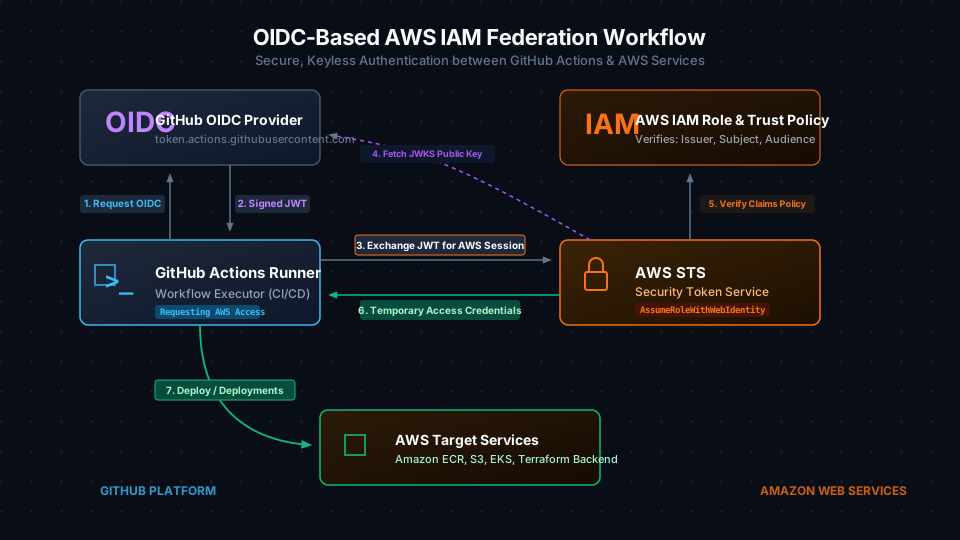
Storing long-lived AWS IAM access keys in GitHub repository secrets is a high-severity incident waiting to happen. In typical production environments, security teams frequently find themselves auditing compromised pipelines, cleaning up public S3 buckets, and responding to five-figure AWS bills run up by cryptominers who harvested a leaked AWS_ACCESS_KEY_ID and AWS_SECRET_ACCESS_KEY pair. Once these static credentials are saved as secrets, they are vulnerable to exposure via accidental echo statements in debugging scripts, malicious pull request modifications by external contributors, or breaches of third-party CI dependency packages. Furthermore, complying with modern compliance standards like SOC 2, PCI-DSS, or ISO 27001 requires rotating credentials every 90 days or less—a task that is often neglected because it manualizes CI/CD maintenance and risks breaking active build scripts. The industry-standard solution is to completely eliminate static credentials in favor of keyless OpenID Connect (OIDC) federation. By configuring AWS Identity and Access Management (IAM) to trust GitHub’s OIDC Identity Provider (IdP), GitHub Actions runners can dynamically request short-lived, cryptographically signed JSON Web Tokens (JWTs) and exchange them via AWS Security Token Service (STS) for temporary AWS credentials that automatically expire after a maximum of one hour.
The Mechanics of OIDC Federation with AWS STS
Federated authentication between GitHub Actions and AWS relies on an asymmetric cryptographic trust relationship. The workflow removes the necessity of storing any secret inside GitHub, relying instead on a sequence of API handshakes:
- Token Generation: When a GitHub Actions workflow starts, the runner contacts GitHub’s internal token service and requests an OIDC token containing specific metadata (claims) about the current run, such as the repository name, runner actor, branch name, and commit SHA.
- OIDC Signature: The GitHub token service signs this payload with its private key and issues a JWT token.
- STS Exchange: The runner invokes the AWS Security Token Service (STS)
AssumeRoleWithWebIdentityAPI, passing the JWT and the target IAM Role ARN. - Validation and Trust Verification: AWS STS intercepts the request. It fetches GitHub’s public JSON Web Key Set (JWKS) from
https://token.actions.githubusercontent.com/.well-known/jwks.json(or uses a cached version) to verify that the token’s cryptographic signature is authentic. - Claims Evaluation: STS evaluates the verified claims inside the JWT against the target IAM Role’s trust policy. It checks that the token’s issuer (
iss) matches GitHub, the audience (aud) matchessts.amazonaws.com, and the subject (sub) matches the specific GitHub repository and branch allowed by the role. - Credential Issuance: If the policies align, STS returns temporary security credentials (access key, secret key, and session token) to the runner. The credentials automatically expire within a default window of 1 hour, rendering them useless if exfiltrated after the pipeline run completes.
Establishing the AWS Identity Provider for GitHub
To implement this workflow, you must first register GitHub as an OpenID Connect Identity Provider within your AWS account. This registration tells IAM to trust tokens issued by GitHub’s domain name.
The following Terraform configuration defines the OIDC provider. While AWS IAM historically required hardcoded thumbprints of the GitHub OIDC root certificate authority (CA) to prevent man-in-the-middle attacks, AWS STS now automatically manages certificate validation against Amazon’s trust store. However, the IAM API still requires a thumbprint list to be sent during provider creation. We pass the SHA-1 thumbprint of the root CA (6938fd4d98bab03faadb97b34396831e3780aea1) to satisfy the API.
// snippet-1
# Configure the GitHub OIDC Identity Provider in AWS IAM
resource "aws_iam_openid_connect_provider" "github" {
  url             = "https://token.actions.githubusercontent.com"
  client_id_list  = ["sts.amazonaws.com"]
  thumbprint_list = ["6938fd4d98bab03faadb97b34396831e3780aea1"]
}
Designing a Secure IAM Role Trust Policy
The core of your OIDC security posture resides in the IAM Role’s trust relationship policy. If your trust policy is too permissive—for instance, using wildcards that accept any token issued by GitHub—any user with a GitHub account can assume your IAM role and access your AWS resources.
To prevent cross-organization tenant attacks, your trust policy must restrict access based on the token.actions.githubusercontent.com:sub (subject) claim. The subject claim contains the repository path and the Git reference triggering the workflow. In the configuration below, we enforce that only workflows running inside the mohashari/production-deploy-service repository can assume this role. We also use a conditional rule to ensure the audience (aud) matches sts.amazonaws.com.
// snippet-2
# Define the IAM Role Trust Policy restricting access to a specific repository
data "aws_iam_policy_document" "github_actions_assume_role" {
  statement {
    actions = ["sts:AssumeRoleWithWebIdentity"]
    effect  = "Allow"

    principals {
      type        = "Federated"
      identifiers = [aws_iam_openid_connect_provider.github.arn]
    }

    condition {
      test     = "StringEquals"
      variable = "token.actions.githubusercontent.com:aud"
      values   = ["sts.amazonaws.com"]
    }

    # Restrict role assumption strictly to the production-deploy-service repository
    condition {
      test     = "StringLike"
      variable = "token.actions.githubusercontent.com:sub"
      values   = ["repo:mohashari/production-deploy-service:ref:refs/heads/main"]
    }
  }
}

resource "aws_iam_role" "github_actions_role" {
  name               = "github-actions-production-deployer"
  assume_role_policy = data.aws_iam_policy_document.github_actions_assume_role.json
  description        = "IAM role assumed by GitHub Actions for deploying production code"
}
Orchestrating the GitHub Actions Workflow
To allow the GitHub Actions runner to negotiate with the OIDC provider, your workflow configuration file must be explicitly granted token writing privileges. By default, GitHub Actions runs jobs with read-only scopes. You must declare permissions: id-token: write in either the global workflow scope or the specific deployment job. Without this permission, the GitHub runner agent will not generate the ACTIONS_ID_TOKEN_REQUEST_TOKEN environment variable, causing STS authentication calls to fail with token initialization errors.
We utilize the official aws-actions/configure-aws-credentials action to execute the credential exchange. It parses the environment, pulls the signed JWT from GitHub’s runtime API, communicates with AWS STS, and exports the resulting temporary credentials to the runner’s shell environment.
// snippet-3
name: Production Deployment Pipeline

on:
  push:
    branches:
      - main

permissions:
  id-token: write # Required to fetch the OIDC JWT token
  contents: read  # Required for checking out repository contents

jobs:
  deploy-infrastructure:
    runs-on: ubuntu-latest
    steps:
      - name: Checkout Code
        uses: actions/checkout@v4

      - name: Authenticate to AWS via OIDC
        uses: aws-actions/configure-aws-credentials@v4
        with:
          role-to-assume: arn:aws:iam::123456789012:role/github-actions-production-deployer
          aws-region: us-east-1
          audience: sts.amazonaws.com

      - name: Validate Cloud Credentials
        run: |
          aws sts get-caller-identity --query "Arn" --output text
Anatomy of the GitHub Actions OIDC JWT Payload
To construct accurate and secure trust policies, you need to understand the structural properties of the JWT token issued by GitHub. The token is a standard RFC 7519 payload containing claims metadata.
When AWS STS parses the token, it validates the structure and evaluates the claim mappings against the conditions in the IAM trust policy. The example JSON block below shows a decoded payload from a GitHub workflow run. The sub field is particularly important: it consolidates the org name, repo name, git reference, and event type. Notice the presence of the job_workflow_ref, which can be validated to ensure the code was built by a specific deployment template rather than an ad-hoc runner script.
// snippet-4
{
  "iss": "https://token.actions.githubusercontent.com",
  "sub": "repo:mohashari/production-deploy-service:ref:refs/heads/main",
  "aud": "sts.amazonaws.com",
  "exp": 1782042182,
  "nbf": 1782041582,
  "iat": 1782041582,
  "jti": "a1b2c3d4-e5f6-7a8b-9c0d-e1f2a3b4c5d6",
  "actor": "mohashari",
  "repository": "mohashari/production-deploy-service",
  "repository_owner": "mohashari",
  "ref": "refs/heads/main",
  "sha": "a1b2c3d4e5f6a7b8c9d0e1f2a3b4c5d6e7f8a9b0",
  "workflow": "Production Deployment Pipeline",
  "job_workflow_ref": "mohashari/production-deploy-service/.github/workflows/deploy.yml@refs/heads/main",
  "event_name": "push"
}
Debugging OIDC Claim Mismatch and Retrieval Failures
A recurring failure mode in production is the cryptic error:
AccessDenied: An error occurred (AccessDenied) when calling the AssumeRoleWithWebIdentity operation: Not authorized to perform AssumeRoleWithWebIdentity.
This occurs because of a mismatch between the claims in the JWT token and the conditions written in the AWS IAM trust policy. Because GitHub rotates token values dynamically, diagnosing these mismatches requires extracting the raw token inside the pipeline container, decoding it, and comparing it manually against your Terraform rules.
The Bash script below can be run within a workflow step to extract the GitHub Actions JWT token directly from the local runner agent’s service port, decode the Base64 payload, and print the parsed JSON claims for troubleshooting.
// snippet-5
#!/usr/bin/env bash
# Dump and inspect GitHub Actions OIDC JWT claims to debug IAM trust mismatches

set -euo pipefail

# Ensure the local OIDC provider endpoints are present in the runner environment
if [[ -z "${ACTIONS_ID_TOKEN_REQUEST_URL:-}" ]] || [[ -z "${ACTIONS_ID_TOKEN_REQUEST_TOKEN:-}" ]]; then
  echo "[-] ERROR: GitHub OIDC runner environment variables are not available."
  echo "[-] Validate that 'permissions: id-token: write' is present in your workflow YAML."
  exit 1
fi

# Request the JWT from the local runner endpoint using the authorization token
JWT_RAW_RESPONSE=$(curl -s \
  -H "Authorization: Bearer ${ACTIONS_ID_TOKEN_REQUEST_TOKEN}" \
  -H "Accept: application/json; api-version=2.0" \
  "${ACTIONS_ID_TOKEN_REQUEST_URL}&audience=sts.amazonaws.com")

JWT_TOKEN=$(echo "${JWT_RAW_RESPONSE}" | jq -r '.value // empty')

if [[ -z "${JWT_TOKEN}" || "${JWT_TOKEN}" == "null" ]]; then
  echo "[-] ERROR: Failed to retrieve JWT token. Response: ${JWT_RAW_RESPONSE}"
  exit 1
fi

echo "[+] Successfully retrieved GitHub OIDC JWT."
echo "[+] Decoded JWT payload:"

# Split JWT into segments (header.payload.signature) and decode the payload segment
echo "${JWT_TOKEN}" | cut -d'.' -f2 | base64 --decode 2>/dev/null | jq .
Custom Runner Access and AWS SDK Integration
If your CI/CD workflow invokes compiled backend binaries (e.g., custom deployment scripts, schema migrations, or artifact upload utilities), you do not need to rely on the wrapper AWS CLI to assume roles. The AWS SDK natively supports OIDC token assumption via standard environment variables: AWS_ROLE_ARN, AWS_WEB_IDENTITY_TOKEN_FILE, and AWS_REGION.
When using the aws-actions/configure-aws-credentials action, it writes the retrieved web identity token to a file on the runner container’s disk and sets these variables. Any downstream process written in Go, Python, or Java will automatically detect these configurations and execute the STS handshake implicitly without manual developer integration.
The Go application snippet below demonstrates how the AWS SDK V2 automatically loads configuration and uses the web identity token path to establish authenticated client contexts.
// snippet-6
package main

import (
	"context"
	"fmt"
	"log"
	"os"

	"github.com/aws/aws-sdk-go-v2/config"
	"github.com/aws/aws-sdk-go-v2/service/sts"
)

func main() {
	// Verify variables exported by configure-aws-credentials are set in the runner context
	roleArn := os.Getenv("AWS_ROLE_ARN")
	tokenPath := os.Getenv("AWS_WEB_IDENTITY_TOKEN_FILE")
	region := os.Getenv("AWS_REGION")

	if roleArn == "" || tokenPath == "" {
		log.Fatalf("[-] Configuration error: AWS_ROLE_ARN and AWS_WEB_IDENTITY_TOKEN_FILE must be set in env")
	}

	ctx := context.Background()

	// LoadDefaultConfig resolves credentials automatically via the Web Identity Token provider
	cfg, err := config.LoadDefaultConfig(ctx,
		config.WithRegion(region),
	)
	if err != nil {
		log.Fatalf("[-] Failed to load SDK config: %v", err)
	}

	stsClient := sts.NewFromConfig(cfg)
	identity, err := stsClient.GetCallerIdentity(ctx, &sts.GetCallerIdentityInput{})
	if err != nil {
		log.Fatalf("[-] Verification failed: unable to assume role via STS: %v", err)
	}

	fmt.Printf("[+] STS Handshake Verification Successful!\n")
	fmt.Printf("[+] Assumed Role ARN: %s\n", *identity.Arn)
	fmt.Printf("[+] Target Account:   %s\n", *identity.Account)
	fmt.Printf("[+] Session ID:       %s\n", *identity.UserId)
}
Critical Production Failure Modes and Mitigation Strategies
While implementing OIDC-based IAM federation eliminates static credential storage, running this setup in high-throughput enterprise pipelines exposes unique operational limits and failure vectors.
Failure Mode 1: Branch Naming and Subject Claim Mismatches
When teams transition to GitFlow or trunk-based development with short-lived feature branches, they often find their pipelines breaking with AccessDenied errors. If your trust policy condition uses a strict equality test like "StringEquals" on the sub claim (as in snippet-2) mapping only to repo:mohashari/production-deploy-service:ref:refs/heads/main, then developers attempting to run test deployments or infrastructure validation steps from feature branches (e.g., ref:refs/heads/feature/add-rds-read-replica) will be locked out.
The Mitigation: You must separate deployments to staging and production by defining distinct IAM Roles, each configured with target conditions matching specific Git refs. For example, assign a read-only testing role to feature branches using wildcard operators, and reserve the write-privileged role for the main branch.
// snippet-7
# Conditional logic matching branches using wildcards (StringLike operator)
# Add this block to your IAM trust policy to support feature branch validation roles
condition {
  test     = "StringLike"
  variable = "token.actions.githubusercontent.com:sub"
  values   = [
    "repo:mohashari/production-deploy-service:ref:refs/heads/feature/*",
    "repo:mohashari/production-deploy-service:ref:refs/heads/hotfix/*"
  ]
}
Failure Mode 2: Global STS Endpoint Throttling in High-Volume Workflows
By default, the configure-aws-credentials action communicates with the global AWS STS endpoint (https://sts.amazonaws.com). In high-volume software engineering organizations executing hundreds of CI/CD pipeline builds concurrently, you can quickly hit API request limits on the global STS namespace, triggering throttling alerts like Rate exceeded (503 Service Unavailable) on your builds.
The Mitigation: Route authentication requests to regional AWS STS endpoints, which have higher quota limits and lower network latency. To implement this, pass the regional configuration switch (AWS_STS_REGIONAL_ENDPOINTS: regional) to your runner container’s environment variables.
// snippet-8
# Configure workflow to target regional STS endpoints instead of global
env:
  AWS_STS_REGIONAL_ENDPOINTS: regional

jobs:
  deploy:
    runs-on: ubuntu-latest
    steps:
      - name: Authenticate to AWS
        uses: aws-actions/configure-aws-credentials@v4
        with:
          role-to-assume: arn:aws:iam::123456789012:role/github-actions-production-deployer
          aws-region: us-west-2
          audience: sts.amazonaws.com
Failure Mode 3: OIDC Clock Drift in Self-Hosted Runner Infrastructure
If you operate self-hosted GitHub Actions runners inside a Kubernetes cluster or on private EC2 instances, you will periodically encounter random authentication rejections. AWS STS enforces a strict validation of the OIDC token’s expiration (exp) and not-before (nbf) claims. If your runner VM’s system clock drifts by more than 5 minutes relative to the GitHub token generator time, AWS will reject the token handshake as expired or not yet valid.
The Mitigation: Install and configure an NTP synchronization daemon (such as chronyd or systemd-timesyncd) on your host VM images to guarantee clock skew remains under 100 milliseconds.
Conclusion
Transitioning to OIDC-based federation is the single most impactful security enhancement you can apply to your AWS-integrated CI/CD pipelines. By establishing a direct cryptographic trust between GitHub’s Identity Provider and AWS STS, you completely eliminate the security risk of compromised access keys, simplify audit logs, and automate rotation compliance. Designing strict trust policies that filter by specific repository refs, troubleshooting claim matches with direct JWT extraction scripts, and utilizing regional STS endpoints will ensure your infrastructure remains secure, observable, and highly available.