Implementing Ephemeral WireGuard VPN Tunnels for Secure Cross-Cloud Database Replication
Discover how to build secure, low-latency, and cost-effective cross-cloud database replication using ephemeral WireGuard tunnels and programmatic control.
Replicating terabytes of production database state across cloud providers—such as syncing an AWS-hosted primary PostgreSQL node to a standby disaster recovery replica in GCP—frequently forces engineering teams into a compromising architectural corner. Traditional managed VPN options like AWS Site-to-Site VPN or GCP Cloud VPN are sluggish to establish, require complex IKEv2 configuration, and introduce continuous monthly baseline costs, while dedicated leased links like AWS Direct Connect coupled with GCP Cloud Interconnect cost thousands of dollars per month and take weeks to provision. Worst of all, opening database ports directly to the public internet and relying solely on IP-whitelisting is a compliance failure that exposes critical database engines to active zero-day exploits, route-spoofing, and DNS hijacking. To address these vulnerabilities without dedicated hardware costs, modern infrastructure platforms leverage ephemeral, programmatically driven WireGuard VPN tunnels that establish sub-second secure data tunnels only when replication cycles require them, maintaining an extremely tight security posture and eliminating persistent cross-cloud network attack surfaces.
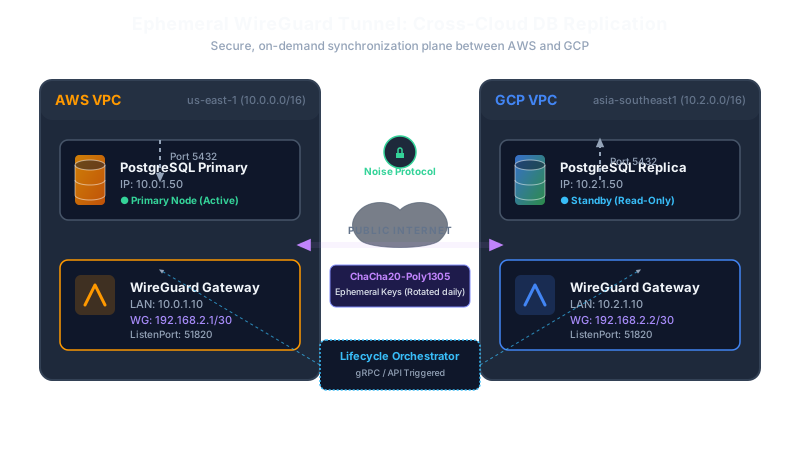
The Cross-Cloud Replication Trap: Cost, Complexity, and Risk
For senior backend engineers and system architects, managing multi-cloud database topologies presents a constant battle between security, operational complexity, and network performance. Database engines like PostgreSQL, MySQL, and MongoDB are notoriously sensitive to packet loss and latency jitter. When configuring replication streams across different public clouds, the underlying transport layer must be robust, encrypted, and isolated.
Typically, teams fall into one of three traps:
- Public IP Whitelisting (The Anti-Pattern): The primary database instance is assigned a public IP, and firewall security groups are configured to accept connections on port
5432only from the replica’s static public IP in the other cloud. This approach is highly fragile. Any IP reassignment on the replica side breaks replication, leading to accumulated replication lag. More importantly, this leaves the database port exposed to the internet. Port scanners constantly target these ports, and an exploit in the database wire protocol (like a remote code execution vulnerability) instantly compromises the host. - Heavyweight Enterprise IPSec VPNs: Provisioning managed cloud VPN gateways on both AWS and GCP. While secure, this setup is slow. IPSec negotiation (IKEv1/IKEv2) is mathematically heavy and stateful, meaning any transient network disruption can lead to prolonged tunnel re-negotiation phases. From a financial perspective, keeping these managed tunnels open 24/7 incurs continuous base charges ($0.05 per hour per tunnel on AWS, plus GCP side costs) even when the database is fully in sync and traffic is idle.
- Dedicated Physical Leases: Direct Connect and Cloud Interconnect connected via a third-party exchange (e.g., Megaport or Equinix Fabric). This is the gold standard for enterprise predictability but is economically unjustifiable for startup or mid-market recovery sites. It also introduces massive operational overhead, requiring physical cross-connect coordination and complex BGP routing configuration.
WireGuard represents a paradigm shift. Operating directly within the Linux kernel, it implements the Noise protocol framework using state-of-the-art cryptography (ChaCha20, Poly1305, Curve25519, and BLAKE2s). Its codebase is under 4,000 lines of C code—vastly smaller than OpenVPN or IPsec implementations—which dramatically minimizes the exploit surface area. By applying an “ephemeral” lifecycle model to these tunnels, we only spin up the virtual interface during active data-sync windows or continuously cycle keys programmatically, reducing the time a static tunnel endpoint is exposed to zero.
Preparing the Host: Kernel Optimization and Bootstrapping
To handle high-throughput database replication streams, the gateway instances running WireGuard must be optimized at the kernel level. Standard Linux distributions are tuned for general-purpose workloads, not high-speed packet forwarding across clouds.
First, we must enable IPv4 packet forwarding to allow the gateway instance to route traffic between the local VPC subnet and the WireGuard interface. Additionally, we must configure reverse path filtering. By default, Linux uses strict reverse path filtering (rp_filter = 1) to drop incoming packets if their source IP is not reachable via the interface the packet arrived on. Because cross-cloud routing path asymmetries are common, strict filtering will cause the kernel to silently drop valid replication packets. We must set this to loose mode (rp_filter = 2) to maintain routing sanity.
The following script performs host-level configuration, installs the WireGuard tools, and persists the network optimizations in /etc/sysctl.d/99-wireguard-replication.conf:
One critical setting is the Maximum Transmission Unit (MTU). The standard MTU for Ethernet on physical networks and cloud VPCs is 1500 bytes. However, WireGuard encapsulates traffic in UDP packets, introducing cryptographic and routing headers. For IPv4, the overhead includes:
- Outer IPv4 header: 20 bytes
- Outer UDP header: 8 bytes
- WireGuard message header: 32 bytes
- Poly1305 Message Authentication Code (MAC): 16 bytes
This sums to an overhead of 76 bytes (or 96 bytes if using IPv6). If the MTU of the underlying physical interface is 1500, setting the WireGuard interface MTU to 1420 prevents IP packet fragmentation. If MTU is left at 1500, packets will exceed the physical network’s MTU, forcing routers to fragment the UDP packets. Because many firewalls and cloud routers drop IP fragments for security reasons, this leads to the infamous “PMTUD Black Hole” where small pings succeed, but large replication payloads stall the database stream indefinitely.
WireGuard Interface Configuration with Post-Quantum Security
With the host initialized, we define the static interface configuration. To elevate the system’s cryptographic strength, we introduce a symmetric pre-shared key (PSK) to the standard Curve25519 key exchange. This provides post-quantum resistance, ensuring that even if quantum computers become capable of decrypting Curve25519 traffic in the future, the recorded replication streams remain secure due to the pre-shared entropy.
The config file /etc/wireguard/wg0.conf handles the interface setup and leverages iptables hooks (PostUp and PostDown) to dynamically manage routing tables, NAT masquerading, and TCP Maximum Segment Size (MSS) clamping:
The configuration enforces a narrow subnet mapping: /30 yields only two usable addresses, ensuring no other nodes can join the peer-to-peer transit network. The AllowedIPs directive dictates routing rules; any traffic targeting the 10.2.0.0/16 range (the GCP database VPC) will be routed directly through the tunnel.
The PersistentKeepalive = 25 parameter is essential for cloud environments. Because Cloud NAT and AWS NAT Gateways track connections statefully, they silently prune idle UDP port bindings after a brief timeout (usually between 60 and 350 seconds). By sending an empty authenticated packet every 25 seconds, WireGuard keeps the stateful NAT mappings active, allowing unidirectional database connections to traverse the tunnel even during low-throughput periods.
Programmatic Tunnel Control via Go
To achieve true ephemerality and avoid leaving static configuration files on the local filesystem, the tunnel lifecycle should be managed programmatically. We want an orchestration agent that generates keypairs in memory, retrieves peers’ endpoints from cloud APIs, writes parameters directly into the kernel network space, and destroys the interface once the replication replication target is reached.
The program below demonstrates how to achieve this in Go using the netlink.GenericLink interface to manipulate virtual Linux network devices and the wgtypes.Config structure to configure encryption keys programmatically:
By leveraging netlink.LinkAdd and netlink.LinkSetUp alongside the wgctrl.New client, configuration changes occur completely in-memory inside the kernel’s virtual networking subsystems. No configuration files are written to persistent storage, removing the risk of key leakages via host filesystem vulnerabilities or container layer leakages.
Establishing Secure PostgreSQL Cross-Cloud Replication
Once the WireGuard interface is online and routing traffic between the gateways, we must configure PostgreSQL to use this secure tunnel for active synchronization. The primary database should listen specifically on its local IP and the WireGuard IP to prevent exposing PostgreSQL to public interfaces.
The configuration updates inside postgresql.conf and pg_hba.conf configure replication traffic constraints:
This configuration ensures that replication requests are rejected unless they originate from the specific /32 IP address assigned to the GCP replica over the WireGuard tunnel.
To bootstrap the replication standby instance in GCP, we run an initialization script. The script stops the local PostgreSQL server, purges its local standby data directory, and initiates a secure physical block copy from the primary node via the tunnel. It relies on the -R parameter to write the necessary standby.signal configuration automatically, ensuring that PostgreSQL starts up as a read-only replica tracking the primary:
Using the stream flag ensures that Write-Ahead Logging (WAL) files generated during the backup process are streamed concurrently through the same connection. Without this, the backup could fail if the database experiences heavy write workloads during the seed phase.
Enforcing Zero-Trust Network Isolation
Establishing a VPN tunnel creates a private pathway between clouds, but it also creates security risk: if the database replica in GCP is compromised via application-level vulnerabilities, an attacker could potentially traverse the tunnel and attack the primary database host or scan internal networks in AWS.
To achieve network isolation, we must implement a zero-trust packet filtering policy on the gateway nodes. The gateway must drops all forwarded traffic by default, explicitly whitelisting TCP port 5432 only between the database nodes:
These rules prevent lateral network movement. An attacker on the replica network who attempts to perform SSH scanning, ICMP sweeps, or access other internal VPC resources through the tunnel will find their packets dropped.
Production Failure Modes and Mitigation Strategies
Operating this architecture in production requires understanding its failure modes and implementing monitoring for them.
1. Path MTU Discovery (PMTUD) Black Holes
- Symptom: Small replication commands succeed, but the initialization backup hangs indefinitely. Checking database processes shows the backup connection is stuck in a
readstate. - Root Cause: The cloud provider’s physical routers drop fragmented packets that exceed the path MTU, while also filtering ICMP “Destination Unreachable (Fragmentation Needed)” packets. The client host never learns that its packet sizes are too large.
- Mitigation: Ensure that the WireGuard interface MTU is strictly capped at
1420bytes on both endpoints. Add the iptables TCPMSS rule to clamp the maximum segment size to the path MTU:iptables -t mangle -A POSTROUTING -p tcp --tcp-flags SYN,RST SYN -o wg0 -j TCPMSS --clamp-mss-to-pmtud.
2. Silent Handshake Failures
- Symptom: WireGuard is running, but the replication stream is stalled. Checking interface logs shows no errors.
- Root Cause: WireGuard is designed to be stealthy and stateless; it does not respond to unauthenticated packets and does not send connection termination handshakes. If a key rotates incorrectly or a remote public IP changes, the connection fails silently.
- Mitigation: Deploy a daemon that monitors connection health by querying the last handshake age using the
wgtool:LAST_HANDSHAKE=$(wg show wg0 latest-handshake | awk '{print $2}') CURRENT_TIME=$(date +%s) AGE=$((CURRENT_TIME - LAST_HANDSHAKE)) if [ "$AGE" -gt 180 ]; then echo "WireGuard handshake has stalled (last handshake $AGE seconds ago). Restarting interface..." systemctl restart wg-quick@wg0 fi
3. PostgreSQL WAL Segment Recycling
- Symptom: The WireGuard tunnel is restored after a network outage, but PostgreSQL replication fails to resume, logging:
requested WAL segment XXX has already been removed. - Root Cause: During the network outage, the primary database continued to process writes. The replication lag grew, and because the write volume exceeded the primary’s
max_wal_sizelimit, the database recycled old WAL segments before the replica could fetch them. - Mitigation: Implement physical replication slots on the primary database. Physical replication slots force the primary database to preserve all WAL files required by the replica until the replica explicitly confirms receipt.
-- On primary database node:
SELECT pg_create_physical_replication_slot('gcp_standby_slot');
Update the replica’s configuration to use this slot:
# On replica node, add to connection options: primary_slot_name = 'gcp_standby_slot'Caution: If the replica remains offline for a long period, the primary’s disk will fill up with un-recycled WAL files. Set
wal_keep_sizeor monitor disk usage closely to mitigate this risk.
4. Kernel Queue Memory Exhaustion under High Replication Loads
- Symptom: High system CPU usage in the
ksoftirqdkernel thread, accompanied by packet drops on the WireGuard interface under heavy write workloads. - Root Cause: The default network receive queue length (
net.core.netdev_max_backlog) is too small to handle high-throughput database replication streams, causing the kernel to drop packets. - Mitigation: Increase the receive queue length and configure higher transmit queue lengths on the virtual WireGuard interface:
sudo sysctl -w net.core.netdev_max_backlog=10000
sudo ip link set dev wg0 txqueuelen 10000
By combining WireGuard’s light kernel footprint with zero-trust firewall configurations, automated MTU adjustments, and programmatic link control, backend infrastructure teams can maintain a robust disaster recovery database replica in a separate cloud environment. This setup avoids the cost of dedicated fiber circuits and the security risks of public IP exposures. The resulting replication pipeline is simple, highly secure, and optimized for performance. Let’s make this the standard pattern for cross-cloud databases.