Hardening Kubernetes Container Runtimes: Implementing gVisor for Sandbox Isolation
Protect host kernels and enforce strong multi-tenant sandbox isolation in Kubernetes using gVisor (runsc) to prevent container breakout exploits.
Imagine running a multi-tenant SaaS platform where users submit untrusted scripts to be executed dynamically on your Kubernetes cluster. One script, disguised as a PDF generator, exploits a zero-day use-after-free vulnerability in the host Linux kernel’s namespace management. Because the container runs on a default OCI runtime like runc, it shares the host kernel directly. Within milliseconds, the attacker escapes container namespaces, gains root access on the worker node, and extracts the cloud provider’s IAM metadata credentials—compromising the entire infrastructure. While security profiles like seccomp, AppArmor, and running as a non-root user raise the bar, they are ultimately soft gates. They restrict which system calls can be made, but do not prevent a malicious actor from exploiting bugs in permitted syscalls. To build a resilient multi-tenant environment, you must decouple container execution from the host kernel. Hardening your runtime environment requires migrating from a shared-kernel model to an emulated sandbox model like gVisor (runsc), which intercepts and emulates system calls in user-space, shielding the host kernel from direct execution.
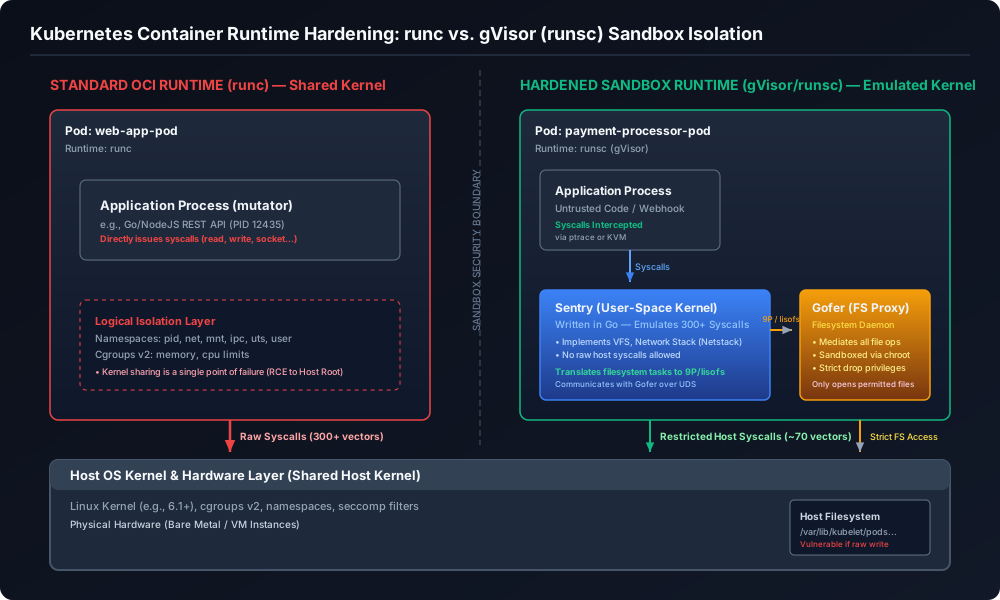
The Shared-Kernel Paradigm: The Core Container Security Flaw
To understand why default container configurations are vulnerable to breakout attacks, you must look at how standard containers are structured. A container is not a virtual machine. Under a default runtime like runc, a container is simply a standard Linux process decorated with logical isolation primitives: namespaces, cgroups, LSMs (AppArmor/SELinux), and seccomp filters.
Despite these layers, the containerized application shares the host operating system kernel. When an application process executes a system call (like reading a file or opening a socket), it is processed directly by the host kernel.
The Linux kernel contains millions of lines of complex C code. If an attacker can trigger a kernel panic, memory corruption, or privilege escalation bug through a system call, they can bypass namespaces and cgroups entirely. Vulnerabilities like Dirty Pipe (CVE-2022-0847) allowed local users to write to read-only files, including root-owned binaries. Another exploit, CVE-2024-21626, exposed a container breakout vulnerability in runc where an attacker could access the host directory structure via leaked file descriptors. Because container runtimes execute as root on the host node, a directory traversal exploit immediately compromises the parent OS.
Standard mitigations rely on seccomp profiles to restrict the syscall attack surface. However, modern runtime engines (like Go or Node.js) require dozens of system calls just to spawn threads, handle asynchronous I/O, or allocate memory. You cannot block system calls that your application needs to function, yet those exact system calls are often the vectors used to exploit the kernel. The shared-kernel model is fundamentally insufficient for untrusted workloads.
Sandbox Runtimes compared: runc, gVisor, and Kata Containers
Securing container runtimes requires balancing isolation strength, resource overhead, and performance. The three primary runtimes in the Kubernetes ecosystem represent distinct architectural paradigms:
1. runc (Standard Container)
The default runtime used by containerd and Docker. It relies entirely on Linux namespaces, cgroups, and direct host kernel execution.
- Pros: Near-native CPU and memory performance, sub-second boot times, and support for all Linux system calls and device drivers.
- Cons: Weakest isolation boundary. A single kernel vulnerability allows complete host compromise.
2. gVisor (runsc)
A user-space kernel (written in Go) that acts as an OCI-compliant container runtime. It implements a user-space kernel called the Sentry and a filesystem proxy called the Gofer. System calls are intercepted and emulated inside the user-space Sentry, never touching the host kernel directly.
- Pros: Strong isolation boundary. The host kernel’s exposed system call interface is reduced to around 70 syscalls. Excellent memory efficiency compared to virtual machines.
- Cons: High syscall overhead, resulting in performance penalties for syscall-heavy (I/O or network) workloads.
3. Kata Containers
Executes containers inside lightweight virtual machines (microVMs) running on a hypervisor. Each Pod runs its own dedicated guest Linux kernel.
- Pros: Maximum isolation boundary. Isolation is enforced at the hardware level using CPU virtualization extensions.
- Cons: High memory footprint (~100–250 MiB baseline per Pod VM), slower boot times (seconds), and requires nested virtualization support in cloud instances.
| Architectural Vector | Standard Container (runc) |
gVisor Sandbox (runsc) |
Kata Containers (microVM) |
|---|---|---|---|
| Isolation Mechanism | Kernel namespaces, cgroups, seccomp | User-space kernel emulation (Sentry) | Hardware virtualization (QEMU/Cloud Hypervisor) |
| Kernel Model | Shared host kernel | Emulated user-space kernel (Go) | Dedicated guest kernel (Linux) |
| Syscall Overhead | Direct execution (near-native, <1% penalty) | Emulated execution (15-40% penalty on syscall-heavy tasks) | Near-native within VM, high VM entry/exit latency |
| Memory Baseline Overhead | < 1 MiB per container | ~15–30 MiB per sandbox instance | ~100–250 MiB per pod VM |
| Container Boot Time | ~10–50 ms | ~50–150 ms | ~1–3 seconds |
| Hardware Virtualization Req | No | Optional (KVM mode is faster, but can run on ptrace) | Yes (Requires nested virtualization or bare-metal host) |
| File I/O Throughput | Native host speed | High latency (mediated by Gofer) | High latency (mediated by virtio-9p or virtio-fs) |
Anatomy of a Sandbox: Sentry and Gofer
gVisor achieves isolation by splitting kernel emulation into two primary components: the Sentry and the Gofer.
- The Sentry (User-Space Kernel): Written in Go for memory safety, Sentry acts as the kernel for the application. It manages memory, scheduling, signals, and implements the POSIX system call interface, including its own network stack (Netstack). When the application process executes a system call, gVisor intercepts it. On the KVM platform, Sentry acts as a hypervisor, and the application process runs as a guest virtual machine. By leveraging
/dev/kvmon the host, CPU context switches are handled at the hardware level. KVM mode is significantly faster than the alternative ptrace platform, which relies on slowerPTRACE_SYSCALLsoftware hooks. Sentry emulates over 300 system calls, mutating its internal state without interacting with the host kernel. Only a highly restricted set of system calls (such asfutexormmap) are passed from Sentry to the host kernel. - The Gofer (Filesystem Proxy): Filesystem operations are a common target for privilege escalation exploits. To prevent the Sentry from having direct access to host files, gVisor offloads all filesystem actions to a separate process called the Gofer. Sentry cannot open, read, or write host files. When the application executes an
open()system call, Sentry forwards the request to the Gofer over a Unix domain socket using a highly optimized version of the 9P protocol (orlisofsin newer versions). The Gofer runs as a separate host process inside a highly restricted jail (configured using namespaces,chroot, and a custom seccomp profile that limits it to raw file descriptor operations). The Gofer acts as a mediator: it opens the file on the host filesystem on behalf of Sentry, verifies permissions, and passes the raw file descriptor back to the Sentry.
Deploying gVisor: Step-by-Step Implementation in Kubernetes
To implement gVisor sandboxing in a production Kubernetes cluster, you must install the runsc binary on your worker nodes, configure your container runtime (typically containerd) to recognize the runtime handler, and define a Kubernetes RuntimeClass resource.
Step 1: Install runsc on Worker Nodes
Execute the following commands on your worker nodes to download and install runsc and the containerd-shim-runsc-v1 plugin:
# Set up CPU architecture variable
ARCH=$(uname -m)

# Download the gVisor runsc binaries
curl -LO https://storage.googleapis.com/gvisor/releases/release/latest/${ARCH}/runsc
curl -LO https://storage.googleapis.com/gvisor/releases/release/latest/${ARCH}/runsc.sha256
curl -LO https://storage.googleapis.com/gvisor/releases/release/latest/${ARCH}/containerd-shim-runsc-v1
curl -LO https://storage.googleapis.com/gvisor/releases/release/latest/${ARCH}/containerd-shim-runsc-v1.sha256

# Verify and install binaries
sha256sum -c runsc.sha256
sha256sum -c containerd-shim-runsc-v1.sha256
chmod a+rx runsc containerd-shim-runsc-v1
sudo mv runsc containerd-shim-runsc-v1 /usr/local/bin/
Step 2: Configure containerd
Modify /etc/containerd/config.toml on your worker nodes. Under the plugins."io.containerd.grpc.v1.cri".containerd.runtimes section, register the runsc handler:
[plugins."io.containerd.grpc.v1.cri".containerd.runtimes.runsc]
  runtime_type = "io.containerd.runsc.v1"
  privileged_without_host_devices = false

  [plugins."io.containerd.grpc.v1.cri".containerd.runtimes.runsc.options]
    Type = "kvm"
    BinaryPath = "/usr/local/bin/runsc"
[!IMPORTANT] If your worker nodes run inside cloud VMs without nested virtualization (meaning
/dev/kvmis missing), you must changeType = "kvm"toType = "ptrace". Running in ptrace mode will cause a significant performance degradation for syscall-heavy workloads.
Restart containerd to apply the changes:
sudo systemctl restart containerd
Step 3: Define the Kubernetes RuntimeClass
Create a manifest named runtimeclass-gvisor.yaml to register the gVisor handler in your cluster:
apiVersion: node.k8s.io/v1
kind: RuntimeClass
metadata:
  name: gvisor
handler: runsc
Apply the manifest: kubectl apply -f runtimeclass-gvisor.yaml
Step 4: Deploy a Sandboxed Workload
To schedule pods inside the gVisor sandbox, reference the runtimeClassName in the pod specification. Create a file named deployment-untrusted.yaml:
apiVersion: apps/v1
kind: Deployment
metadata:
  name: untrusted-file-processor
  namespace: default
  labels:
    app: untrusted-file-processor
spec:
  replicas: 3
  selector:
    matchLabels:
      app: untrusted-file-processor
  template:
    metadata:
      labels:
        app: untrusted-file-processor
    spec:
      runtimeClassName: gvisor
      securityContext:
        runAsNonRoot: true
        runAsUser: 10001
        runAsGroup: 10001
        fsGroup: 10001
      containers:
      - name: processor
        image: python:3.11-slim
        command: ["python3", "-c", "import time; print('Running sandboxed...'); time.sleep(3600)"]
        resources:
          limits:
            cpu: "1"
            memory: "512Mi"
          requests:
            cpu: "200m"
            memory: "256Mi"
        securityContext:
          allowPrivilegeEscalation: false
          readOnlyRootFilesystem: true
          capabilities:
            drop:
            - ALL
Apply the deployment: kubectl apply -f deployment-untrusted.yaml
Verify the isolation boundary by checking the kernel version reported inside the container:
POD_NAME=$(kubectl get pods -l app=untrusted-file-processor -o jsonpath='{.items[0].metadata.name}')
kubectl exec -it $POD_NAME -- uname -a
The output will return a static kernel version signature indicating gVisor:
Linux untrusted-file-processor-6b7dc4cbf8-abcde 4.4.0 #1 SMP Sun Jan 10 15:06:54 PST 2016 x86_64 GNU/Linux
Performance Dynamics: Syscalls, Netstack, and Gofer Latency
Deploying applications in gVisor introduces architectural overhead that must be understood and mitigated before moving workloads to production.
Syscall Interception Penalty
In a standard container, a system call takes around 100 to 200 nanoseconds. In gVisor running on the KVM platform, a system call takes 1.5 to 3 microseconds due to the VM-exit transition from the application guest state to the Sentry host state. On the ptrace platform, this latency rises to 5 to 10 microseconds due to multiple OS-level context switches. This latency manifests as CPU overhead. For CPU-bound tasks, the impact is negligible (<1%). However, for system call heavy tasks (such as a database performing frequent small read/write operations), throughput can drop by 20% to 50%.
Netstack vs. hostinet
By default, gVisor uses Netstack, a complete TCP/IP protocol stack written in Go. Netstack is highly secure because it processes raw packets in user-space, preventing a compromised container from exploiting vulnerabilities in the host kernel’s socket layer. However, Netstack must handle TCP window calculations and packet reassembly in user-space, creating a throughput bottleneck. If your sandboxed application requires high-speed network connections, you can switch the networking mode to hostinet in the containerd options:
[plugins."io.containerd.grpc.v1.cri".containerd.runtimes.runsc.options]
  Type = "kvm"
  Args = ["--net=host"]
hostinet bypasses Netstack and passes network system calls directly to the host’s network stack, improving network throughput and lowering CPU usage, but exposing the host kernel’s network socket stack to the sandbox.
Filesystem Performance and Gofer Latency
Filesystem access is the most significant bottleneck in gVisor. Every filesystem operation goes from the application process to the Sentry, which translates it into 9P/lisofs requests sent over a Unix socket to the Gofer. This pipeline introduces massive latency. For applications that read or write thousands of files (such as npm installations), execution can be 5 to 10 times slower than a native container.
To mitigate filesystem latency in production:
- Use Memory-backed mounts (
emptyDir): Mount temporary directories (/tmp,/cache) asemptyDirwithmedium: Memory. These filesystems are managed entirely within Sentry’s RAM cache, bypassing the Gofer socket path completely. - Utilize Read-Only Mounts: Set
readOnlyRootFilesystem: truein your pod security context. This allows gVisor to aggressively cache directory trees and file metadata, reducing Gofer roundtrips. - Avoid Mounted Volumes for Hot Paths: Do not mount host directories or remote volumes for paths that require high-throughput read/write.
Production Troubleshooting: Unsupported Syscalls, Memory Scaling, and KVM Permissions
Running gVisor at scale requires understanding its unique failure modes and operational constraints.
1. Unsupported Syscalls (ENOSYS)
gVisor implements a significant portion of the Linux system call interface, but it is not complete. Esoteric system calls, specific ioctl commands, raw sockets (like AF_PACKET), and performance-monitoring calls (like perf_event_open) are unimplemented, returning ENOSYS (Function not implemented) and potentially causing crashes.
How to debug unsupported system calls:
To identify which system call is causing a crash, enable strace logging in your containerd runtime settings. Under the containerd config (/etc/containerd/config.toml), configure the runtime arguments:
[plugins."io.containerd.grpc.v1.cri".containerd.runtimes.runsc.options]
  Type = "kvm"
  Args = ["--debug", "--debug-log=/var/log/runsc/", "--strace=true"]
Restart containerd. Once the application crashes, inspect the files in /var/log/runsc/. The log files will contain a detailed trace of every system call executed by the application up to the point of failure. Look for entries ending in ENOSYS or warning lines like: sys_perf_event_open: unimplemented system call.
2. Memory Overhead and Node Density Limits
Each gVisor sandbox runs its own Sentry process. The Sentry consumes approximately 15 to 30 MiB of RAM as a baseline footprint. If you run a dense node architecture with hundreds of small containers, this overhead scales linearly. Scheduling 150 pods on a single worker node will consume 2.2 to 4.5 GiB of RAM just to run the Sentry processes.
Furthermore, Kubernetes is blind to the internal memory structure of the Sentry. When you define a container memory limit (e.g., limits.memory: 256Mi), the Linux cgroup limit is applied to the entire Pod boundary, which includes both the application process and the Sentry. If the Sentry consumes 30 MiB, your application only has 226 MiB of actual headroom.
[!TIP] When migrating workloads to gVisor, adjust your container memory requests and limits upward by 10% to 15% (or a flat 32 MiB) to absorb the Sentry’s memory overhead and prevent premature OOM kills.
3. KVM Virtualization Group Permissions
A common deployment failure occurs when worker nodes are configured with Type = "kvm", but the containerd system user does not have permission to access /dev/kvm. When containerd attempts to start a sandboxed container, the initialization fails, and the pod remains stuck in ContainerCreating or returns a container_start_error. Checking the system logs (journalctl -u containerd) will reveal an error: failed to start sandbox: open /dev/kvm: permission denied.
To resolve this, verify the ownership of /dev/kvm on your worker nodes: ls -l /dev/kvm. Typically, /dev/kvm is owned by root with the group kvm. You must add the user under which containerd runs (usually containerd or root) to the kvm group:
# Add containerd user to the kvm group
sudo usermod -aG kvm containerd

# Restart containerd to apply changes
sudo systemctl restart containerd
By understanding these performance characteristics and failure modes, you can design a secure, isolated execution environment that protects your underlying host systems without compromising the stability of your production services.