Fine-Tuning LoRA Adapters at Scale: Memory Layout and Multi-GPU Orchestration with DeepSpeed
A deep dive into multi-GPU memory layout, DeepSpeed ZeRO-3 partitioning, and production orchestration for fine-tuning 70B LLMs using LoRA adapters.
You kick off a fine-tuning run for a Llama 3 70B parameter model on a cluster of four A100 80GB GPUs. You are using Parameter-Efficient Fine-Tuning (PEFT) via LoRA, expecting that freezing 99% of the model will keep memory usage low. Ten seconds in, the training script crashes with the dreaded CUDA out of memory (OOM) error. The root cause is not the size of your LoRA adapters; it is a fundamental misunderstanding of the GPU memory layout under distributed orchestration. While LoRA reduces trainable parameter size, the massive 140 GB base model weights, standard optimizer states, gradients, and activation tensors still easily overwhelm single-node architectures if not correctly partitioned. To run these workloads without expensive infrastructure scaling, you must master the mechanics of DeepSpeed ZeRO-3 parameter partitioning and NCCL-based inter-GPU orchestration.
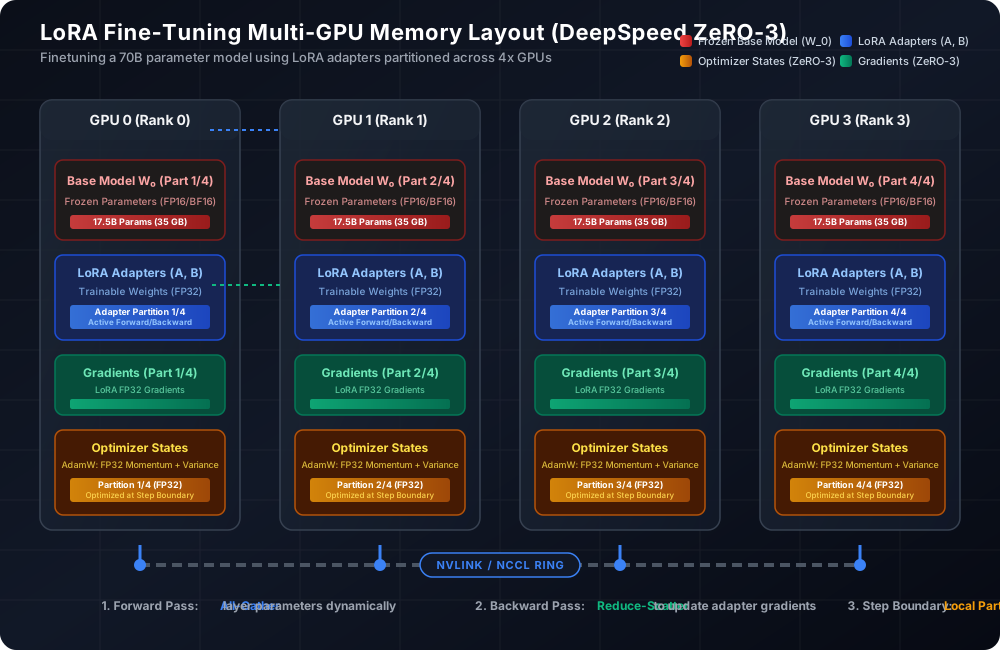
The GPU Memory Equation: Where Does the VRAM Go?
To scale fine-tuning without blindly throwing H100 nodes at the problem, you must calculate the exact byte-level allocation of your training stack. GPU memory is consumed by four distinct components: static model parameters, optimizer states, gradients, and activation memory.
Let’s walk through the numbers for a 70-billion parameter model (Llama 3 70B) trained in half-precision (BF16) using LoRA adapters (FP32) targeting the attention projection layers.
1. Frozen Base Model Weights
The base model requires $70 \times 10^9$ parameters. In BF16, each parameter consumes 2 bytes. \(\text{Memory}_{\text{base}} = 70 \times 10^9 \times 2 \text{ bytes} \approx 140 \text{ GB}\) If we replicate the base model on each GPU (as in standard Distributed Data Parallel training), a single GPU with 80GB VRAM is instantly ruled out. Even before loading a batch or computing gradients, we are 60 GB over budget.
2. Trainable LoRA Adapters
Suppose we target the attention projection layers (q_proj, k_proj, v_proj, o_proj) with a rank $r = 16$ and scaling alpha $\alpha = 32$. This introduces roughly 200 million parameters. Unlike the frozen base model, we train these in FP32 to avoid precision issues and numerical underflow in low-rank updates.
\(\text{Memory}_{\text{adapters}} = 200 \times 10^6 \times 4 \text{ bytes} \approx 800 \text{ MB}\)
3. Gradients
Gradients are calculated only for trainable parameters. They are stored in FP32 during backpropagation to maintain numerical stability during accumulation steps. \(\text{Memory}_{\text{gradients}} = 200 \times 10^6 \times 4 \text{ bytes} \approx 800 \text{ MB}\)
4. Optimizer States
Using the standard AdamW optimizer requires storing two FP32 states (momentum and variance) for each trainable parameter, plus a master copy of the weights. \(\text{Memory}_{\text{optimizer}} = (2 + 1) \times 200 \times 10^6 \times 4 \text{ bytes} \approx 2.4 \text{ GB}\)
5. Activation Memory
Activation memory stores the intermediate tensors computed during the forward pass, which are required for the backward pass. Unlike weights, activation memory scales quadratically with sequence length and linearly with batch size. For a 4096 context window and a micro-batch size of 2, activations can easily exceed 30 GB per GPU if activations checkpointing (gradient checkpointing) is not enabled.
Here is the implementation of a custom parameter-efficient linear layer in PyTorch to show how base weights are frozen and low-rank matrices are initialized.
Next, we need a diagnostic utility to calculate VRAM requirements statically prior to running training workloads. This prevents runtime OOM crashes.
DeepSpeed ZeRO Partitioning: Fitting 140 GB into 80 GB GPUs
DeepSpeed’s Zero Redundancy Optimizer (ZeRO) partitions training memory across the distributed data-parallel process groups. Understanding the trade-offs of ZeRO-1, ZeRO-2, and ZeRO-3 is essential when training with parameter-efficient adapters.
- ZeRO-Stage 1: Partitions optimizer states. For our LoRA training run, optimizer states take only 2.4 GB. Partitioning this across 4 GPUs yields a reduction of only 1.8 GB per GPU. The 140 GB base model remains replicated on each GPU, making this stage useless for scale.
- ZeRO-Stage 2: Partitions both optimizer states and gradients. Gradients for our LoRA layers require 800 MB. The reduction here is negligible. The model still OOMs.
- ZeRO-Stage 3: Partitions the entire model parameter state (both frozen base model and trainable adapters) across the multi-GPU topology. For Llama 3 70B, the 140 GB weights are sliced evenly across our 4 GPUs, resulting in $35\text{ GB}$ per GPU.
ZeRO-3 introduces a communications overhead during the forward and backward passes. Instead of keeping the entire model in memory, a GPU only holds its assigned partition.
- During the Forward Pass: When layer $l$ is computed, the host GPU uses a NCCL
All-Gatheroperation to pull the weight partitions of layer $l$ from all other GPUs. Once layer $l$ executes, its parameters are immediately discarded, and the memory is freed before layer $l+1$ is gathered. - During the Backward Pass: The GPU dynamically gathers the parameters of layer $l$ again to compute the gradients. Once the gradients of the trainable layers are computed, they are reduced across GPUs using
Reduce-Scatter, keeping only the local gradient partition.
To orchestrate this, you must construct a production-ready DeepSpeed config specifying ZeRO-Stage 3 configuration.
DeepSpeed Orchestration: PyTorch Initialization
To load the model and data properly in a distributed context, you cannot rely on simple single-process loaders. You must initialize the process group, instantiate the DistributedSampler to partition datasets without duplicating data, and wrap the model and trainable parameters inside the DeepSpeed engine.
Below is the orchestration code for setting up distributed processes and launching the DeepSpeed training engine.
Real-World Production Failure Modes and Diagnostics
When running LoRA at scale, you will encounter failure modes that do not occur in standard backend systems. Here is how to diagnose and resolve them.
1. Asymmetric VRAM Consumption (The Rank 0 Bottleneck)
A common issue in distributed training is seeing GPU 0 run out of memory while GPUs 1, 2, and 3 sit comfortable at 60% utilization. This asymmetric load occurs because Rank 0 is responsible for coordinating logging, running validation computations, and handling data packaging before sending it to other processes.
If your logging calls trigger CPU-GPU synchronizations or if you evaluate metrics on Rank 0 using non-partitioned tensors, Rank 0 will store duplicate data, resulting in OOM crashes.
To debug memory distribution across nodes, you must implement a rank-aware distributed logging script.
2. Saving Trainable Adapters Under ZeRO-3 Without OOMing
Under ZeRO-3, model weights are sliced. If you call PyTorch’s native torch.save(model.state_dict()), you encounter two major failure modes:
- You save the entire 140 GB weights dictionary on Rank 0, which is redundant because 99% of it is frozen and has not changed.
- If the parameters are partitioned, Rank 0 does not have the parameters of other partitions, resulting in incomplete state dictionaries or runtime errors.
To fix this, you must run model checkpoints using partition-aware contexts. Use DeepSpeed’s GatheredParameters context to dynamically pull partitioned weights for saving on Rank 0, and save only the adapter keys.
3. NCCL Ring Communication Timeouts and Hangs
If any process in your distributed training network blocks while others continue executing, your NCCL ring bus will hang. The entire job freezes, VRAM usage stays locked, and GPU utilization drops to 0%.
This occurs when evaluation runs are conditional (e.g. if rank == 0:), and they perform blocking data loader operations or model forward passes. The processes assigned to Ranks 1, 2, and 3 are left waiting at an implicit synchronization barrier, eventually resulting in NCCL timeout crashes.
Always design operations to execute across all ranks. If you only want to compute evaluation metrics on GPU 0, you must still run the model forward pass and loss calculations on all ranks, and then run a global reduce operation (dist.all_reduce) to collect values on Rank 0.
Activation Checkpointing: The VRAM Release Valve
While ZeRO-3 handles parameter storage, intermediate activation layers computed during forward passes are the primary source of runtime OOMs during batch execution. By default, PyTorch saves every intermediate activation tensor for backward gradient calculations.
To mitigate this, you must enable Activation Checkpointing (Gradient Checkpointing).
Instead of storing all activation tensors from the forward pass, activation checkpointing stores only the inputs to major transformer layers (e.g. self-attention blocks). During the backward pass, the system recomputes the discarded intermediate activations on the fly.
- Trade-off: You save up to 70% in activation memory at the expense of an approximate 33% increase in compute overhead.
- Action: For context windows larger than 4096 tokens, activation checkpointing is mandatory to fit training batches in memory.
Combine activation checkpointing with FlashAttention-2. FlashAttention-2 avoids computing the full intermediate $N \times N$ attention matrix in GPU global memory, replacing it with an online softmax reduction algorithm running directly inside the GPU SRAM. This drops attention memory scaling from $O(N^2)$ to $O(N)$, unlocking sequence scales of 32k+ tokens on standard multi-GPU configurations.