Automating TLS Rotation at the Edge: Envoy Gateway Secret Discovery Service with Let's Encrypt
Eliminate downtime and volume-mount latency during TLS certificate rotation at the edge by deploying Envoy Gateway's Secret Discovery Service with cert-manager.
It is 3:00 AM on a Tuesday, and your edge API gateway has just dropped 100% of incoming traffic. The cause is a classic production pathology: a critical wildcard TLS certificate expired. Although cert-manager successfully renewed the certificate in Kubernetes and updated the underlying Secret hours ago, the ingress controllers failed to pick up the change. In traditional setups, mounting secrets as volume paths means relying on the kubelet sync loop—which can take up to 120 seconds—followed by a filesystem watcher executing a hard process reload of the proxy. Under high traffic, this reload either drops in-flight HTTP/2 and gRPC streams or triggers connection-draining memory spikes that crash-loop the container. Automating TLS rotation at the edge requires a fundamental architectural shift away from static file polling. By leveraging Envoy Gateway’s Secret Discovery Service (SDS), the data plane streams certificate payloads directly from the control plane over a persistent gRPC channel, swapping cryptographic contexts in memory in milliseconds without terminating active TCP connections.
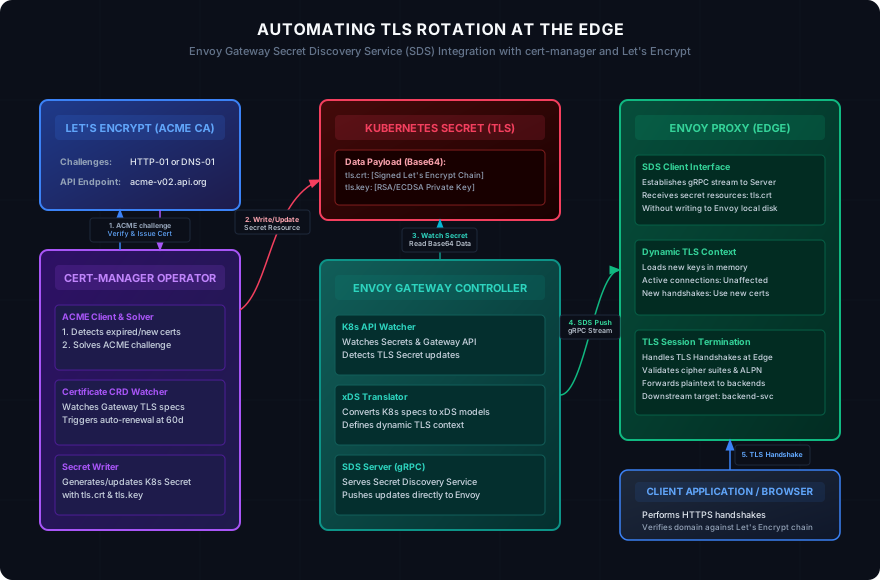
The Evolution of Secret Discovery: Volumes vs. SDS API
Historically, edge proxies like NGINX and HAProxy managed certificates by reading them from local directories. When Kubernetes became the standard runtime, engineers naturally adapted this pattern by mounting v1/Secret resources as files inside the proxy containers. This approach introduces two critical points of failure:
- Propagation Delay: The
kubeletdoes not immediately write secret updates to container file systems. It updates its local cache via a periodic synchronization loop (controlled by thesyncFrequencyandconfigMapAndSecretChangeDetectionStrategysettings), which defaults to 60 seconds. In large clusters, this propagation delay can stretch to over 2 minutes. - Reload Penalties: Once the file is updated on disk, the proxy must ingest the new keys. While Envoy supports filesystem-based dynamic reloading via the runtime config, minor kernel events or file-system locking discrepancies on container runtimes (such as
containerdorCRI-O) can cause the watch to fail entirely, leaving the proxy running on stale, expiring certificates.
Envoy’s xDS (Discovery Service) API solves this bottleneck through the Secret Discovery Service (SDS). SDS treats TLS certificates, private keys, and trusted CA certificates as dynamic resources fetched from a central control plane.
Instead of watching the disk, Envoy establishes a bidirectional gRPC stream to the Envoy Gateway controller. When a Kubernetes Secret is updated, Envoy Gateway detects the API server event within milliseconds, translates the raw secret payload into an Envoy xDS Secret resource, and pushes it over the gRPC stream. Envoy receives the update, allocates a new SslSocketFactory configuration, and registers it with the active listeners. New TLS handshakes immediately negotiate using the updated certificate chain, while existing connections continue to drain gracefully on the old cryptographic context.
Deploying Envoy Gateway and cert-manager on Kubernetes
To implement this pattern in production, we deploy Envoy Gateway as our ingress controller and configure cert-manager to coordinate ACME challenges with Let’s Encrypt. The Gateway API (gateway.networking.k8s.io) acts as our configuration interface.
First, we define our Gateway resource. This manifest declares a public-facing HTTPS listener on port 443, using a Kubernetes Secret named edge-gateway-tls to terminate SSL traffic.
Next, we establish a ClusterIssuer to negotiate with Let’s Encrypt. For high-scale edge systems, HTTP-01 challenges are preferred over DNS-01 unless wildcard domains are strictly required. Using the Gateway API integration, cert-manager dynamically provisions temporary routing rules to solve ACME validation requests directly through the active Envoy proxy instances.
With our issuer defined, we construct the Certificate resource. In a production environment, we specify the private key algorithm to use ECDSA with a P-256 curve. ECDSA certificates have significantly smaller signatures than RSA counterparts, leading to faster TLS handshakes, lower latency, and reduced CPU utilization under high concurrent load.
Deep Dive into the Dynamic TLS Rotation Flow
When cert-manager detects that the certificate has reached its renewal threshold (which is by default 30 days before the 90-day Let’s Encrypt expiration), it executes the ACME flow.
- ACME Challenge Solution:
cert-managergenerates a temporary HTTPRoute that maps the path/.well-known/acme-challenge/*to a challenge-solver pod. Envoy Gateway instantly updates Envoy’s routing table. - Secret Writing: After Let’s Encrypt verifies the token and issues the certificate,
cert-managerupdates theedge-gateway-tlsKubernetes Secret. - Secret Discovery Stream: Envoy Gateway’s internal controller watches for modifications to the Secret. It reads the new Base64-encoded values of
tls.crtandtls.keyand constructs an SDS dynamic resource. - Envoy Handover: The Envoy proxies receive the new SDS payload via their active gRPC connections.
Under the hood, the raw Envoy configuration generated by Envoy Gateway maps the listener to a dynamic SDS config source rather than loading files from disk. The dynamic context is configured as shown below:
When this configuration updates, Envoy executes an atomic pointer swap. The listener transitions from the old SSL context factory to the new one. Outstanding TCP connections established prior to this change are not interrupted; they remain bound to the file descriptors and memory spaces of the older configuration. Only newly initiated TLS handshakes are directed to the new context. This prevents connection termination spikes, eliminating the risk of cascading microservice timeouts.
Production Failure Modes and Edge Cases
While SDS eliminates file-system reload issues, deploying automated edge TLS rotation at scale introduces a new class of production failure modes that must be monitored.
1. Intermediate Certificate Omissions
Let’s Encrypt certificates require a complete certificate chain. If the Kubernetes Secret generated by cert-manager lacks the intermediate CA (e.g., Let’s Encrypt R10 or R11), modern desktop web browsers might still pass the handshake using local caches or Authority Information Access (AIA) fetching. However, non-browser clients (such as mobile applications, legacy Java services, or CLI utilities) will immediately throw SSLHandshakeException or certificate verify failed errors.
To prevent this, ensure cert-manager is configured to output the full chain, and run automated edge verification loops.
2. API Server Watch Latency
In highly active Kubernetes environments containing thousands of services and secrets, the API server can experience significant resource contention. If the Kubernetes control plane is bottlenecked, the watch event notifying Envoy Gateway of the secret update can be delayed.
If this delay extends past the expiration window of the old certificate, Envoy will continue serving the expired certificate. Engineers must monitor the replication delay between the Kubernetes secret creation time and the actual load time in Envoy.
3. CPU Starvation during Cryptographic Initialization
When Envoy receives a new SDS payload containing a certificate update, it performs intensive cryptographic validation of the new private and public key pair. If the Envoy proxy pod is running in a CPU-throttled cgroup (such as when Kubernetes CPU limits are set too tight), this initialization process can stall the worker threads. Since Envoy is single-threaded per event loop, a stalled thread spikes request latency for active HTTP/2 and gRPC streams sharing that thread.
[!IMPORTANT] Always set high CPU requests for your edge Envoy pods, or disable CPU limits entirely and rely on node-level scheduling to prevent throttling during dynamic TLS rotations.
Diagnostics and Monitoring
To verify that your edge certificates are rotating correctly, we must query Envoy’s internal state directly rather than relying on external browser checks.
The following script targets the Envoy Proxy admin endpoint (/certs), extracts the active serial numbers and expiration dates of the certificate chains loaded in memory, and compares them with the Kubernetes API server configuration.
For continuous verification within CI/CD pipelines or automated canary deployment scripts, we can run a dedicated Go utility. This program connects to Envoy’s admin port, parses the certificate topology, and alerts on discrepancies.
Envoy SDS Hardening Checklist
Deploying SDS in production requires configuring defensive defaults. Run through the following configuration checklist to ensure operational resilience:
- Configure Active Grace Periods: Set
cert-manager’srenewBeforevalue to at least 30 days (default). This provides a substantial buffer if the ACME HTTP-01 challenge fails due to DNS outages or Let’s Encrypt API rate-limiting. - Implement Downstream Connection Draining: Ensure the Envoy Gateway
GatewayClasshas a defined connection draining timeout of at least 30 seconds. This ensures long-lived connections (such as WebSockets or server-sent events) have time to migrate to new pods during rollouts. - Isolate Admin Interfaces: Never expose the Envoy admin endpoint (
19000) or the Envoy Gateway metrics interface to public routes. Bind them strictly to127.0.0.1or internal service networks. - Prometheus Alerting Integration: Define alerts targeting Envoy’s native TLS metric
listener.admin.ssl.certificate_expirationandcertmanager_certificate_ready_statusto notify your DevOps team before certificates reach the critical 14-day threshold.
By implementing Envoy Gateway’s SDS API with cert-manager, you transform a high-risk operational task into a silent, self-healing background process, ensuring your edge infrastructure remains secure and online.