Docker Containerization Best Practices for Production
Level up your Docker skills with proven patterns for writing lean, secure, and production-ready container images.
Docker has become the de-facto standard for packaging and shipping applications. But running containers in production requires more than just docker run. Here are the practices that separate hobby projects from production-grade deployments.
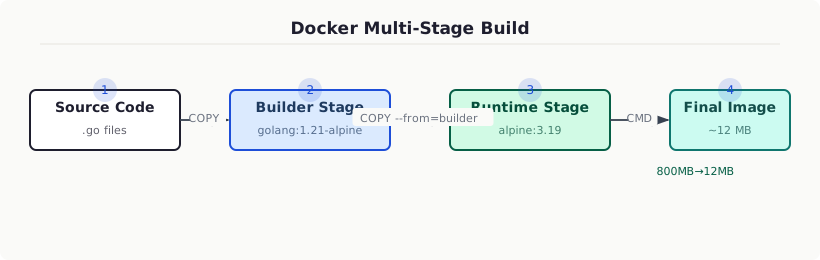
1. Use Multi-Stage Builds
Multi-stage builds dramatically reduce final image size by separating the build environment from the runtime environment.
The result? A final image of ~15MB instead of 800MB.
2. Pin Your Base Image Versions
Never use latest in production. Pin to specific digest hashes for reproducibility:
This prevents unexpected breakage when upstream images change.
3. Run as Non-Root
By default containers run as root — a massive security risk. Always create and switch to a non-root user:
4. Layer Your COPY Instructions Wisely
Docker caches layers. Put things that change less frequently earlier:
5. Use .dockerignore
Always include a .dockerignore to keep your build context lean:
6. Set Resource Limits
Don’t let one container eat all your host resources:
7. Health Checks
Define health checks so orchestrators know your container’s true state:
8. Use Read-Only Filesystems
Mount the container filesystem as read-only and explicitly allow writable paths:
9. Scan Images for Vulnerabilities
Integrate image scanning in CI:
10. Keep Secrets Out of Images
Never bake secrets into images. Use Docker secrets or environment variables injected at runtime:
Summary
| Practice | Impact |
|---|---|
| Multi-stage builds | Smaller images |
| Non-root user | Security |
| Layer caching | Faster builds |
| Health checks | Reliability |
| Image scanning | Security posture |
Following these practices means your containers are lean, secure, and battle-hardened for the real world.