A Data-Driven Framework for Deprecating Distributed Monolith Features Without Customer Impact
A production-tested, telemetry-first guide to safely deprecating and removing legacy features from distributed monoliths without triggering outages.
Deleting code in a single-instance, monolithic codebase is a solved problem; deleting code in a distributed monolith is an operational minefield. Every senior backend engineer has experienced the terror of hitting delete on a seemingly unused legacy endpoint, only to watch the API gateway cascade into 504 Gateway Timeouts at 3 AM because an undocumented internal cron job or a customer’s custom shell script had hardcoded that exact path. In distributed systems, static code analysis is insufficient—if you cannot see the traffic flowing through your system at runtime, you do not actually know if an endpoint is safe to delete. To retire legacy features without causing silent client failures or database-locking outrages, engineering organizations need a structured, data-driven framework that treats deprecation as a multi-phase traffic routing and validation problem rather than a simple code-cleanup task.
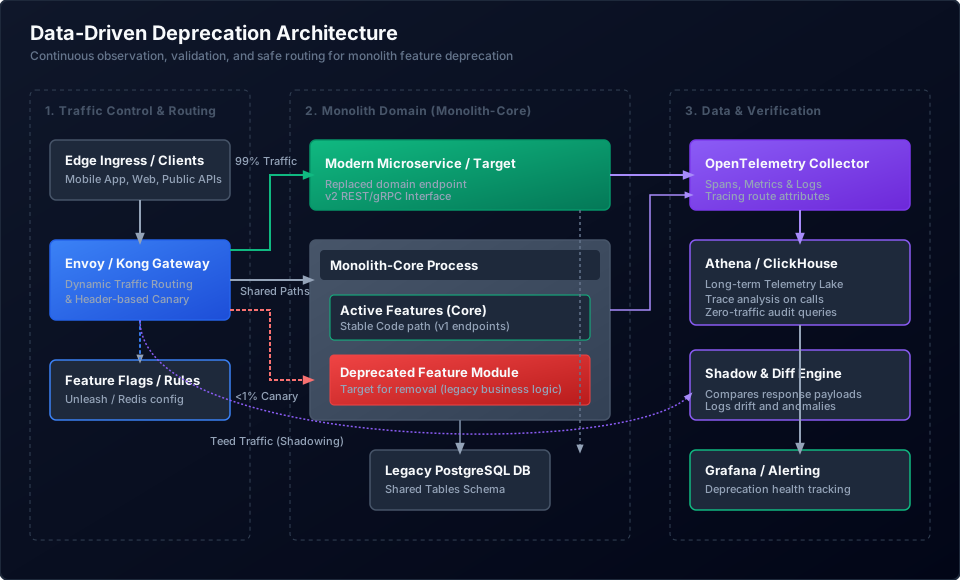
The Myth of the Clean Codebase: Why Static Analysis Fails
Static analysis is the first tool engineers reach for when identifying deprecation targets. We run grep or use AST parsers to search for route declarations, method names, or class references across our repositories. While this works well for monolithic applications sharing a single compiler context, it fails catastrophically in distributed systems.
In a distributed monolith, services communicate across network boundaries via HTTP, gRPC, or message brokers. This decoupling introduces several blind spots for static analysis tools:
- Dynamic URL Construction: Client applications, particularly mobile apps and frontend SPAs, frequently construct URLs dynamically. A search for
/api/v1/checkout/legacy-processwill miss code that constructs paths using string interpolation:`/api/v1/${serviceName}/${actionType}`. - Third-Party and Legacy SDKs: Old versions of client-side SDKs may contain hardcoded endpoints. Even if your current frontend repository does not reference an endpoint, customers who have not updated their mobile apps or desktop clients in two years will continue to hit those legacy paths.
- Internal Cascading Dependencies: In a distributed monolith, Service A might expose an endpoint called by Service B, which is in turn called by a batch cron script on Service C. Without runtime visibility, tracing the flow of traffic back to the original client request is nearly impossible.
- Dark Traffic: Shadow systems, legacy integrations, and internal utility scripts (e.g., database verification scripts or old monitoring probes) bypass standard code review processes but still rely on legacy endpoints to function.
Relying on static analysis to deprecate features is not engineering; it is gambling. To safely decommission a feature, you must prove that traffic is zero at the network layer.
Phase 1: Dynamic Telemetry and Dark Traffic Discovery
To deprecate a feature safely, you must first shine a light on all traffic hitting it. This requires comprehensive telemetry that captures the context of every incoming request. We use OpenTelemetry (OTel) to instrument our API gateways and the monolith’s HTTP/gRPC middleware.
Capturing High-Cardinality Metadata
Standard HTTP request logging is insufficient. To identify the exact consumers of a deprecated feature, your tracing spans must include high-cardinality metadata. Ensure your middleware injects the following attributes into every OpenTelemetry span:
http.route: The parameterized route template (e.g.,/api/v1/users/{userId}/legacy-action) rather than the raw URL. This prevents path variables from polluting your telemetry database.client.id/client.name: A unique identifier for the calling application or customer account.service.name/caller.service: The name of the upstream service making the call, extracted from trace headers (traceparent/baggage).user_agent: To identify legacy web browsers, outdated mobile app builds, or custom automation scripts.
Establishing the Telemetry Lake
Traditional Application Performance Monitoring (APM) tools often sample tracing data to save on storage costs (e.g., keeping only 1% or 5% of traces). For deprecation, sampling is a fatal flaw. If a critical billing system hits a legacy endpoint once a month, a sampled tracing pipeline will likely miss it entirely.
Instead, route your API gateway and service access logs to a high-throughput, columnar database like ClickHouse or an AWS S3 data lake queryable via Athena. By processing 100% of request logs, you ensure no client call goes unnoticed.
Here is a concrete ClickHouse query to identify active consumers of a deprecated route over the last 30 days:
SELECT
    JSONExtractString(attributes, 'client.id') AS client_id,
    JSONExtractString(attributes, 'caller.service') AS caller_service,
    JSONExtractString(attributes, 'user_agent') AS user_agent,
    count() AS request_count,
    max(timestamp) AS last_seen
FROM otel_spans
WHERE http_route = '/api/v1/users/{userId}/legacy-action'
  AND timestamp >= subtractDays(now(), 30)
GROUP BY client_id, caller_service, user_agent
ORDER BY request_count DESC;
This query outputs a list of every distinct consumer still hitting the target endpoint. Armed with this data, your engineering team can transition from guessing to proactive outreach.
Phase 2: Establishing the 30-Day Zero-Traffic Baseline
The golden rule of feature deprecation is simple: A feature is not ready for code deletion until its active traffic has remained at absolute zero for 30 consecutive days.
Why 30 Days?
Many microservices and internal cron tasks run on cyclical schedules. A common failure mode is deleting an endpoint after seeing zero traffic for a week, only to discover that a monthly financial reconciliation job fails on the first day of the next month. The 30-day baseline captures:
- Monthly billing runs and invoice generation crons.
- End-of-month compliance and auditing exports.
- Monthly data backup and archival scripts.
- Quarterly reporting tools (which often show up in the final week of a 30-day window).
Continuous Monitoring and Alerting
Do not manually query your telemetry database to check traffic. Set up continuous alerting using Prometheus and Grafana. If any request hits the deprecation target (and returns a status code other than the planned deprecation responses), an alert should trigger immediately.
Here is an example Prometheus Alerting Rule configuration to detect traffic on a deprecated endpoint:
groups:
  - name: feature_deprecation_alerts
    rules:
      - alert: DeprecatedFeatureTrafficDetected
        expr: sum(rate(http_requests_total{path="/api/v1/users/{userId}/legacy-action", status!~"410|404"}[5m])) > 0
        for: 1m
        labels:
          severity: critical
          team: core-platform
        annotations:
          summary: "Active traffic detected on deprecated path"
          description: "Traffic has been detected on the deprecated endpoint '/api/v1/users/{userId}/legacy-action' within the last 5 minutes. Audit the tracing pipeline to identify the caller."
If this alert fires, the 30-day countdown timer resets to zero. You must identify the calling client, work with their team to migrate them to the new endpoint, and begin the 30-day observation window again once their traffic ceases.
Phase 3: The Interceptor Pattern and Controlled Degradation
Once your telemetry shows that traffic has dropped significantly, do not immediately drop the code. Instead, use an interceptor layer at your API gateway (Envoy, Kong, or a Cloudflare Worker) to implement controlled degradation. This is the process of shaking loose remaining legacy clients by introducing warning signals and artificial failures.
Step 1: Warning Headers
RFC 7234 and RFC 9421 define HTTP headers that can convey deprecation context to client applications. Introduce a gateway plugin that appends these headers to all responses from the deprecated endpoint:
HTTP/1.1 200 OK
Content-Type: application/json
Warning: 299 - "Deprecation Warning: The endpoint /api/v1/users/{userId}/legacy-action is deprecated and will be decommissioned on 2026-09-01. Please migrate to /api/v2/users/{userId}/action."
Deprecation: @1788220800
Sunset: Sun, 01 Sep 2026 00:00:00 GMT
Well-behaved clients with logging instrumentation will surface these warning headers in their error tracking tools (like Sentry or Datadog), alerting client engineers to take action.
Step 2: Chaos Engineering via Brownouts
Many legacy integrations are unmaintained; their owner teams may have left the company, or the client applications are run by customers who ignore emails and headers. To force these consumers to migrate, you must introduce synthetic failures, commonly known as “brownouts.”
Use Envoy’s fault injection filter to introduce latency and transient errors specifically for the deprecated path. This tests the resilience of the client applications and forces their operators to investigate.
Here is an Envoy configuration snippet to inject a 500ms delay and a 10% rate of 503 Service Unavailable status codes to traffic hitting the deprecated route:
- match:
    prefix: "/api/v1/users/{userId}/legacy-action"
  route:
    cluster: monolith_legacy_cluster
  typed_per_filter_config:
    envoy.filters.http.fault:
      "@type": type.googleapis.com/envoy.extensions.filters.http.fault.v3.HTTPFault
      delay:
        fixed_delay: 0.500s
        percentage:
          numerator: 100
          denominator: HUNDRED
      abort:
        http_status: 503
        percentage:
          numerator: 10
          denominator: HUNDRED
Run these brownouts in scheduled windows (e.g., 2 hours on Tuesday afternoon, then 4 hours on Thursday morning). If an business-critical process breaks, you can disable the fault injection instantly at the gateway level without needing to redeploy the monolith.
Step 3: Hard Failing with HTTP 410 Gone
When the sunset date arrives, configure your gateway to intercept all traffic to the route and respond with an HTTP 410 Gone.
HTTP/1.1 410 Gone
Content-Type: application/json

{
  "error": "Gone",
  "message": "This endpoint has been permanently retired. Please consult the API documentation for the modern alternative."
}
Returning a 410 Gone is superior to returning a 404 Not Found. A 410 explicitly indicates that the resource is permanently unavailable and that clients should cease querying it. By handling this failure at the gateway proxy layer, you prevent the request from ever hitting your monolith process, saving valuable CPU cycles and completely decoupling the legacy code from incoming traffic.
Phase 4: Traffic Shadowing and Payload Differential Analysis
If you are deprecating a legacy feature in the monolith because you have rewritten it as a modern microservice (Service v2), you must verify that the new service behaves exactly like the old one before routing production traffic. This is achieved via traffic shadowing.
Setting Up the Request Mirror
Configure your API gateway to duplicate incoming requests. The gateway routes the primary request to the legacy monolith endpoint and returns its response to the client. Simultaneously, it sends a copy of the request to the new Service v2. The response from Service v2 is discarded by the gateway, ensuring no latency is added to the client’s request.
Here is an Envoy routing configuration that mirrors 100% of traffic from the deprecated route to the new microservice:
- match:
    prefix: "/api/v1/checkout/process"
  route:
    cluster: monolith_legacy_cluster
    request_mirror_policies:
      - cluster: service_checkout_v2
        runtime_fraction:
          default_value:
            numerator: 100
            denominator: HUNDRED
The Payload Diff Engine
To ensure the new service behaves identically to the legacy implementation, set up a background comparison worker (a Diff Engine). The gateway or a background messaging queue routes both responses to this worker.
The worker performs a structural comparison of the payloads:
- JSON Schema Validation: Verifies that all expected fields are present and that data types match.
- Value Equivalence: Compares values, accounting for benign differences (like floating-point precision or timestamp formatting differences).
- Performance Delta: Measures the latency difference between the legacy monolith endpoint and the new microservice.
Any payload discrepancies must be logged as anomalies. Do not cut traffic over to the new service until your payload differential analysis shows a 99.99% match rate over a 7-day period.
Handling State-Mutating Writes
Shadowing read-only endpoints (GET requests) is straightforward. Shadowing write operations (POST, PUT, DELETE) that mutate database state is highly complex. If you naive-shadow a POST /api/v1/orders request, the database will attempt to create duplicate orders, leading to constraint violations or double-charging customers.
To shadow state-mutating writes safely:
- Transactional Sandboxing: Configure the shadowed microservice to write to a staging/shadow database instance that is populated with a replica of the production schema.
- Dual-Write with Reconciliation: Implement a dual-write mechanism in the application code where both writes occur in a single distributed transaction, followed by an immediate rollback on the shadow database once the comparison completes.
- Read-Only Dry-Run Mode: Expose a
dry-runflag in the new microservice’s API. The shadow gateway appends anX-Dry-Run: trueheader to the mirrored request, prompting the microservice to run all business logic, validation, and database queries, but roll back its database transaction before returning the response.
Phase 5: Executing the Safe Cut-off and Database Schema Decommissioning
Once traffic has remained at zero for 30 consecutive days and the new service has been validated, you can safely delete the code. However, the final hurdle is often the most dangerous: decommissioning the legacy database tables and columns.
The Database Lock Queue Hazard
In high-throughput PostgreSQL or MySQL databases, running a naive schema migration to drop a legacy table can bring down your entire application.
-- DANGER: This will block your database in production
DROP TABLE legacy_user_data;
Why is this dangerous? A DROP TABLE or ALTER TABLE DROP COLUMN command requires an AccessExclusiveLock on the table. This lock blocks all other transactions, including simple SELECT queries.
If your database has long-running queries or high concurrent traffic, the DROP TABLE statement enters the lock queue and waits for active queries to finish. While it waits, all subsequent queries hitting that table are queued behind it, rapidly exhausting your application’s database connection pool and causing a cascading outage.
The Safe Database Decommissioning Process
To drop database schemas safely under heavy production load, execute migrations in three distinct phases:
1. Revoke Privileges
First, revoke all permissions from the application database role. This guarantees that even if a legacy code path is accidentally triggered, it cannot query the table. It also confirms that no external services are query-sharing your database tables.
REVOKE ALL PRIVILEGES ON TABLE legacy_user_data FROM application_user;
2. Remove Constraints and Indexes Concurrently
Drop foreign key constraints and indexes. In PostgreSQL, dropping an index blocks writes, but dropping it using CONCURRENTLY prevents lock queueing.
-- Drop indexes without locking the table for writes
DROP INDEX CONCURRENTLY IF EXISTS idx_legacy_user_data_email;

-- Drop foreign keys during off-peak hours
ALTER TABLE orders DROP CONSTRAINT fk_legacy_user_data;
3. Rename and Drop with a Low Lock Timeout
Before dropping the table, rename it to verify that no latent queries are targeting it. Always wrap your migration commands in a statement that sets a strict lock_timeout. If the lock cannot be acquired within 2 seconds, the migration aborts, preventing connection pool exhaustion.
-- Rename phase
SET lock_timeout = '2s';
ALTER TABLE legacy_user_data RENAME TO legacy_user_data_deprecated;

-- Wait 72 hours, then execute the final drop
SET lock_timeout = '2s';
DROP TABLE IF EXISTS legacy_user_data_deprecated;
By ensuring that database changes are isolated, timed out, and executed incrementally, you eliminate the risk of database lock cascades.
The Deprecation Playbook Checklist
Print this checklist or import it into your team’s RFC template before initiating any feature deprecation:
| Phase | Task | Verification Method | Status |
|---|---|---|---|
| Discovery | Instrument route with OpenTelemetry metadata (client.id, caller.service). |
Query ClickHouse/Athena logs for all active callers. | [ ] |
| Observation | Establish a Prometheus alert for any traffic hitting the target route. | Verify the alert fires in a staging environment. | [ ] |
| Baseline | Maintain traffic at absolute zero for 30 consecutive days. | Grafana dashboard showing zero calls over 30 days. | [ ] |
| Degradation | Add Warning, Deprecation, and Sunset headers at the API Gateway. |
Verify headers are present in response payloads. | [ ] |
| Chaos | Schedule 2-hour brownout windows (introducing 500ms latency & 10% 503s). | Confirm legacy clients trigger retry alerts. | [ ] |
| Cut-off | Change Gateway routing to return 410 Gone. |
Gateway intercepts request; monolith code is unreachable. | [ ] |
| Deletion | Delete code files, routes, and logic from the repository. | Compile and deploy the clean application. | [ ] |
| Database | Revoke DB privileges, drop indexes concurrently, and drop table with lock_timeout. |
Verify database connection pool metrics remain stable. | [ ] |