Container Vulnerability Scanning with Trivy in CI/CD
How to integrate Trivy into CI/CD pipelines to catch container vulnerabilities before they reach production.
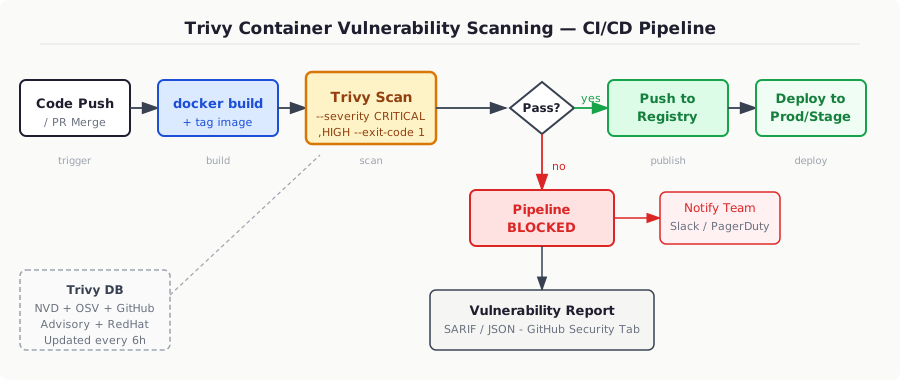
In 2021, a Log4Shell-vulnerable image sat undetected in a major financial institution’s Kubernetes cluster for eleven days after the CVE dropped — not because the team was negligent, but because their image scanning ran only on nightly scheduled jobs and their deployment pipeline had no gate. By the time the security team ran a manual audit, the image had been deployed to seventeen environments. That gap between “vulnerability published” and “image scanned” is exactly what a properly integrated Trivy pipeline closes. The scanner itself takes 8–15 seconds on a typical Go service image; there is no excuse for not running it on every push.
Why Trivy Over Clair, Grype, or Snyk
Grype and Trivy are both solid choices and produce comparable results, but Trivy wins on breadth and operational simplicity. It scans OS packages (Alpine, Debian, RHEL, distroless), language-specific dependencies (Go modules, Python pip, npm, Cargo, Maven), infrastructure-as-code files, and Kubernetes manifests — all with a single binary, no daemon required. Snyk has better developer ergonomics but requires a SaaS call and a paid tier for anything beyond trivial usage. Clair requires you to run a PostgreSQL-backed service, which is operational overhead you don’t want on every CI runner.
Trivy pulls its database from a GitHub-hosted OCI artifact (ghcr.io/aquasecurity/trivy-db) that aggregates NVD, OSV, GitHub Security Advisories, RedHat, Ubuntu, Alpine SecDB, and roughly a dozen more. It refreshes every six hours. The full DB is about 200 MB and is cached between runs; first pull is slow, subsequent ones diff in under a second.
Installing and Running Locally First
Before wiring anything into CI, understand what the output looks like.
// snippet-1
# Install via script (Linux/macOS)
curl -sfL https://raw.githubusercontent.com/aquasecurity/trivy/main/contrib/install.sh | sh -s -- -b /usr/local/bin v0.58.1

# Scan a local image — table output, CRITICAL+HIGH only
trivy image \
  --severity CRITICAL,HIGH \
  --ignore-unfixed \
  myapp:latest

# Scan and produce SARIF for GitHub Security tab upload
trivy image \
  --format sarif \
  --output trivy-results.sarif \
  --severity CRITICAL,HIGH \
  --ignore-unfixed \
  myapp:latest

# Scan the filesystem (catches language deps before docker build)
trivy fs \
  --scanners vuln,secret,misconfig \
  --severity CRITICAL,HIGH \
  .
--ignore-unfixed is non-negotiable in most production setups. Without it, you’ll be blocked by dozens of CVEs in base images that have been acknowledged but have no available fix yet — Alpine is notorious for this with musl libc. Trivy marks these as “affected” even when upstream has no patch. Blocking on unfixed vulnerabilities creates alert fatigue and trains engineers to ignore scan results entirely.
The .trivyignore File
Every real project needs a .trivyignore at the repo root. This is your documented exceptions list — not a way to bury problems, but a way to record deliberate risk acceptance with expiry dates.
# snippet-2
# .trivyignore
# Format: CVE-ID [expiry-date]
# Reason must be documented in a companion comment

# CVE-2023-44487 (HTTP/2 Rapid Reset) — affects our nginx sidecar
# Risk accepted: traffic is behind Cloudflare WAF, patch in progress
# Expires: 2026-04-01 — if not patched by then, escalate
CVE-2023-44487

# CVE-2022-1471 (SnakeYAML) — pulled in by testcontainers-go test dep
# Not reachable in production binary, only in test scope
# Owner: platform-team
# Expires: 2026-06-01
CVE-2022-1471
Treat this file like technical debt — it lives in code review, has an owner, and has a deadline. If your CI runs trivy image --ignorefile .trivyignore, every suppressed CVE is visible in the PR diff.
GitHub Actions Integration
This is the full production-grade workflow, not the five-line demo you find in most tutorials.
# snippet-3
# .github/workflows/container-scan.yml
name: Container Security Scan

on:
  push:
    branches: [main, release/**]
  pull_request:
    branches: [main]

permissions:
  contents: read
  security-events: write   # required for uploading SARIF

jobs:
  build-and-scan:
    runs-on: ubuntu-24.04
    steps:
      - uses: actions/checkout@v4

      - name: Set up Docker Buildx
        uses: docker/setup-buildx-action@v3

      - name: Build image (no push yet)
        uses: docker/build-push-action@v5
        with:
          context: .
          push: false
          load: true
          tags: $:$
          cache-from: type=gha
          cache-to: type=gha,mode=max

      - name: Cache Trivy DB
        uses: actions/cache@v4
        with:
          path: ~/.cache/trivy
          key: trivy-db-$
          restore-keys: trivy-db-

      - name: Run Trivy vulnerability scan
        uses: aquasecurity/trivy-action@0.28.0
        with:
          image-ref: $:$
          format: sarif
          output: trivy-results.sarif
          severity: CRITICAL,HIGH
          ignore-unfixed: true
          trivyignores: .trivyignore
          exit-code: 1         # fail the pipeline on findings

      - name: Upload SARIF to GitHub Security
        if: always()           # upload even when scan fails
        uses: github/codeql-action/upload-sarif@v3
        with:
          sarif_file: trivy-results.sarif
          category: trivy-image-scan

      - name: Push image to registry
        if: success() && github.ref == 'refs/heads/main'
        uses: docker/build-push-action@v5
        with:
          context: .
          push: true
          tags: |
            ghcr.io/$:$
            ghcr.io/$:latest
The critical detail: the image push step only runs if: success(). The Trivy step uses exit-code: 1, so a finding with CRITICAL or HIGH severity will fail the job and the push never happens. The SARIF upload uses if: always() — you want the report in GitHub’s Security tab regardless of whether the scan passed or failed, because that’s how developers actually triage findings.
Caching the Trivy Database in CI
The DB download is the primary source of slowness. Trivy’s DB is a roughly 200 MB OCI artifact that changes every six hours. Without caching, every runner pull adds 15–30 seconds. With the actions/cache setup above, the DB is warm on subsequent runs and the update check is instant.
For self-hosted runners, mount a shared volume. For air-gapped environments, mirror the DB:
# snippet-4
# Mirror Trivy DB for air-gapped CI (run this on a machine with internet access)
trivy image \
  --download-db-only \
  --cache-dir /mnt/shared/trivy-cache

# On the air-gapped runner:
trivy image \
  --skip-db-update \
  --cache-dir /mnt/shared/trivy-cache \
  --severity CRITICAL,HIGH \
  --exit-code 1 \
  myapp:latest
--skip-db-update tells Trivy to use whatever is in the cache without attempting a network call. You’ll need a separate process to refresh the cache on the internet-connected machine on a cron schedule — every 12 hours is fine since the DB publishes every six.
Scanning Kubernetes Manifests and Helm Charts
Most teams stop at image scanning. That’s necessary but not sufficient. Trivy also catches misconfigurations in your deployment manifests — containers running as root, missing resource limits, hostPID: true, writable root filesystems, and a dozen other checks mapped to NSA/CISA hardening guidelines and the CIS Kubernetes Benchmark.
# snippet-5
# Scan a Helm chart rendered output
helm template my-release ./charts/myapp \
  --values ./charts/myapp/values-prod.yaml \
  | trivy config \
    --exit-code 1 \
    --severity HIGH,CRITICAL \
    --misconfig-scanners kubernetes \
    -

# Example output for a misconfigured deployment:
# MEDIUM: Container 'app' of Deployment 'myapp' should set 'securityContext.runAsNonRoot' to true
# HIGH: Container 'app' of Deployment 'myapp' should set 'securityContext.readOnlyRootFilesystem' to true
# CRITICAL: Container 'app' of Deployment 'myapp' has 'hostPID' set to true
Wire this into a separate job that runs after helm template in your release pipeline. It catches the class of misconfigurations that image scanning can’t — you can have a perfectly clean image running in a dangerously misconfigured pod spec.
SBOM Generation and Attestation
If you’re operating under SLSA Level 2 or higher, or your enterprise security team requires a Software Bill of Materials, Trivy can produce one in CycloneDX or SPDX format as a byproduct of scanning.
# snippet-6
# Generate CycloneDX SBOM during CI, alongside the scan
trivy image \
  --format cyclonedx \
  --output sbom.cdx.json \
  myapp:$

# Attest the SBOM using cosign (Sigstore)
cosign attest \
  --predicate sbom.cdx.json \
  --type cyclonedx \
  --key env://COSIGN_PRIVATE_KEY \
  ghcr.io/myorg/myapp:$

# Later, verify before deploying (e.g., in a Kyverno or OPA policy)
cosign verify-attestation \
  --key cosign.pub \
  --type cyclonedx \
  ghcr.io/myorg/myapp:$ \
  | jq '.payload | @base64d | fromjson | .predicate.components | length'
This is what “shift left” actually means in practice: the SBOM is generated at build time, signed with a key that’s verified at deploy time. A Kyverno ClusterPolicy or OPA Gatekeeper constraint can block pods from running if the image lacks a valid cosign attestation — that’s a cryptographic guarantee that Trivy ran and passed for this exact image digest.
Tuning Severity Thresholds by Environment
Not every environment deserves the same bar. A sensible tiered policy:
| Environment | Severity threshold | --exit-code |
--ignore-unfixed |
|---|---|---|---|
| Feature branch PR | CRITICAL only | 1 | true |
| Main branch / staging | CRITICAL, HIGH | 1 | true |
| Production release tag | CRITICAL, HIGH, MEDIUM | 1 | false |
The tighter gate on production release tags reflects a deliberate decision: by the time you’re cutting a release, unfixed vulns should be either patched or formally documented in .trivyignore with an owner and expiry. The CI gate enforces that documentation discipline.
Implement this with a composite action that reads the branch name and sets the right flags:
# snippet-7
# .github/actions/trivy-scan/action.yml
name: Trivy Scan (tiered)
inputs:
  image-ref:
    required: true
  is-release:
    default: "false"
runs:
  using: composite
  steps:
    - name: Set scan policy
      id: policy
      shell: bash
      run: |
        if [[ "$" == "true" ]]; then
          echo "severity=CRITICAL,HIGH,MEDIUM" >> $GITHUB_OUTPUT
          echo "ignore_unfixed=false" >> $GITHUB_OUTPUT
        elif [[ "$" == "refs/heads/main" ]]; then
          echo "severity=CRITICAL,HIGH" >> $GITHUB_OUTPUT
          echo "ignore_unfixed=true" >> $GITHUB_OUTPUT
        else
          echo "severity=CRITICAL" >> $GITHUB_OUTPUT
          echo "ignore_unfixed=true" >> $GITHUB_OUTPUT
        fi

    - name: Run Trivy
      uses: aquasecurity/trivy-action@0.28.0
      with:
        image-ref: $
        severity: $
        ignore-unfixed: $
        exit-code: 1
        trivyignores: .trivyignore
Common Failure Modes
False negatives from stale DB: If your cache TTL is too long, Trivy runs against an old database. A CVE published two days ago won’t appear. Set your CI cache key to include the date (trivy-db-$) so the cache refreshes daily.
Base image pinning drift: Teams pin to FROM golang:1.22-alpine3.19 and forget it. Alpine releases patches to the same tag. Trivy will catch the new CVEs, but only if you’re rebuilding the image. Schedule a weekly rebuild of all images even without code changes — some teams call this “freshness builds.”
Scanning the wrong artifact: trivy image myapp:latest scans what’s in your local Docker daemon. If your build produces a multi-arch manifest list and you’ve only loaded linux/amd64, you’re not scanning the linux/arm64 variant you’re deploying to Graviton. Use trivy image --platform linux/arm64 myapp:latest or scan directly from the registry digest.
Exit code confusion: Trivy exit codes are: 0 = no vulnerabilities found, 1 = vulnerabilities found (when --exit-code 1), 2 = Trivy error (network, DB corruption, etc.). Your CI error handling should treat exit code 2 as a hard failure to investigate, not silently ignore it.
Integrating with Kubernetes Admission Control
CI scanning is a first gate, not the only gate. Images can be pulled from registries directly by operators, Helm upgrades can reference unscanned digests, and CI pipelines can be bypassed during incidents. Add a runtime gate using Kyverno:
# snippet-8
# kyverno-policy-require-trivy-scan.yaml
apiVersion: kyverno.io/v1
kind: ClusterPolicy
metadata:
  name: require-trivy-scan-attestation
spec:
  validationFailureAction: Enforce
  rules:
    - name: check-trivy-sarif-attestation
      match:
        any:
          - resources:
              kinds: [Pod]
              namespaces: [production, staging]
      verifyImages:
        - imageReferences: ["ghcr.io/myorg/*"]
          attestations:
            - predicateType: https://trivy.dev/scan/v2
              attestors:
                - entries:
                    - keyless:
                        subject: "https://github.com/myorg/myapp/.github/workflows/container-scan.yml@refs/heads/main"
                        issuer: "https://token.actions.githubusercontent.com"
This uses Sigstore keyless signing (via GitHub Actions OIDC) to verify that the image was scanned by your specific workflow on your main branch. An image pulled directly from Docker Hub or built outside CI won’t have this attestation and will be rejected by the admission webhook. The predicateType corresponds to the Trivy SARIF attestation format when using cosign attest.
The combination — Trivy in CI blocking bad pushes, SBOM attestation on every built image, and Kyverno enforcing attestation presence at admission time — gives you a pipeline where no unscanned image reaches a production pod. That’s the gap the Log4Shell incident above exposed, and it’s fully closeable with tooling that costs nothing to license.