Configuring Mutual TLS (mTLS) with Envoy Sidecar Proxies without a Service Mesh
A hands-on, production-focused guide to configuring mutual TLS (mTLS) with static Envoy sidecar proxies, bypassing the complexity and overhead of a service mesh.
The security posture of “trusting the internal network” is a ticking time bomb in modern cloud-native infrastructures. In any shared network environment—be it a Kubernetes cluster or a VPC populated with VMs—a single compromised container or application server allows an attacker to pivot laterally, sniffing plaintext HTTP traffic, spoofing internal service identities, and intercepting database credentials. While standard industry advice points toward adopting a full-service mesh like Istio or Linkerd to mandate mutual TLS (mTLS), the operational overhead is massive: a service mesh introduces a heavyweight control plane, adds 2-5ms of latency per network hop, consumes significant CPU and memory per pod, and forces developers to manage complex, ever-evolving Custom Resource Definitions (CRDs). For backend engineering teams that require absolute service-to-service cryptographic security and strict identity assertion without the baggage of a control plane, a decentralized architecture using static Envoy sidecars is the optimal answer. This post details how to configure Envoy sidecars directly for mTLS, implementing dynamic certificate rotation using the Secret Discovery Service (SDS) file-watcher, orchestrating them via container networking namespaces, and solving the critical failure modes encountered when running meshless mTLS in production.
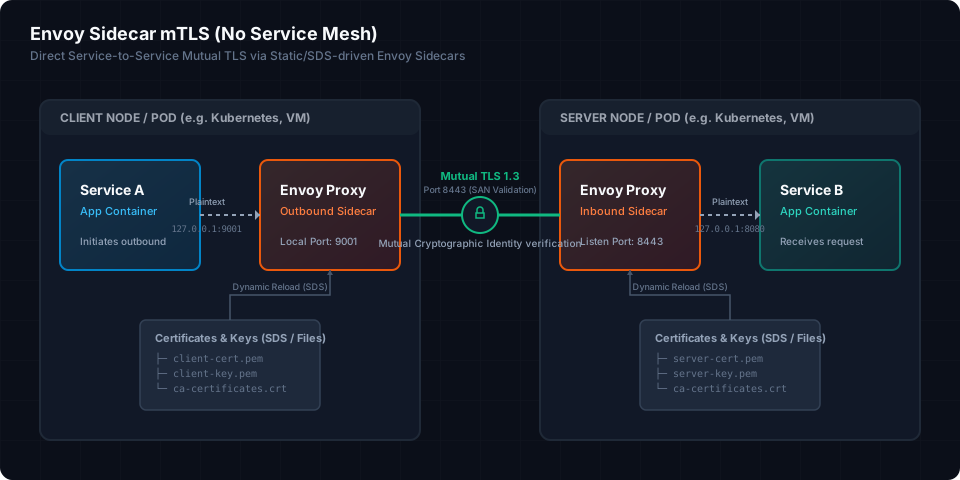
The Architecture of Meshless Envoy Sidecars
To implement mTLS without a service mesh, we run an Envoy instance as a sidecar process immediately alongside each application instance. The Envoy proxy acts as a localized transparent or loopback proxy. All outgoing calls from the application are routed through the outbound sidecar, which wraps the connection in TLS and asserts the client’s identity. Conversely, all incoming calls from external services are received by the inbound sidecar, which terminates the TLS connection, validates the client certificate’s Subject Alternative Name (SAN), and proxies the request as plaintext to the local application over loopback (127.0.0.1).
By locking down the network so that the application container only accepts connections on loopback, we guarantee that no remote service can bypass the Envoy proxy. Under this architecture, the network traffic flow between two services—Service A (Client) and Service B (Server)—follows this sequence:
- Egress Path: Service A initiates an outbound request targeting Service B. Instead of calling Service B directly, Service A redirects the request to Envoy’s local listener on
127.0.0.1:9001. - TLS Upgrade: Envoy A intercepts the plaintext HTTP request, matches the routing table, and initiates a TLS 1.3 handshake with Envoy B. Envoy A presents the client certificate (
client.crt) owned by Service A. - Ingress Path: Envoy B listens on public port
8443. It intercepts the incoming TLS request, presents the server certificate (server.crt), and requests the client certificate. - Mutual Validation: Envoy B validates Envoy A’s certificate against its trusted Root Certificate Authority (CA) and verifies the Subject Alternative Name (SAN). Envoy A validates Envoy B’s certificate similarly.
- Decryption and Forwarding: Once the handshake completes, Envoy B decrypts the traffic and forwards it as plaintext to Service B’s local listener at
127.0.0.1:8080.
Core Egress: Configuring the Outbound Envoy Sidecar
The outbound Envoy proxy runs on the client node. Its sole job is to accept plaintext HTTP/gRPC traffic on a local port, map it to an upstream cluster, and upgrade the connection to mTLS with SAN validation.
The configuration file below (envoy-outbound.yaml) defines a static listener on loopback port 9001 and routes all traffic to an upstream TLS cluster representing Service B (service_b_secure).
// snippet-1
static_resources:
  listeners:
  - name: outbound_http_listener
    address:
      socket_address:
        address: 127.0.0.1
        port_value: 9001
    filter_chains:
    - filters:
      - name: envoy.filters.network.http_connection_manager
        typed_config:
          "@type": type.googleapis.com/envoy.extensions.filters.network.http_connection_manager.v3.HttpConnectionManager
          stat_prefix: egress_http
          route_config:
            name: local_route
            virtual_hosts:
            - name: local_service
              domains: ["*"]
              routes:
              - match:
                  prefix: "/"
                route:
                  cluster: service_b_secure
                  timeout: 15s
          http_filters:
          - name: envoy.filters.http.router
            typed_config:
              "@type": type.googleapis.com/envoy.extensions.filters.http.router.v3.Router
  clusters:
  - name: service_b_secure
    connect_timeout: 0.25s
    type: STRICT_DNS
    dns_lookup_family: V4_ONLY
    lb_policy: ROUND_ROBIN
    load_assignment:
      cluster_name: service_b_secure
      endpoints:
      - lb_endpoints:
        - endpoint:
            address:
              socket_address:
                address: service-b.internal
                port_value: 8443
    transport_socket:
      name: envoy.transport_sockets.tls
      typed_config:
        "@type": type.googleapis.com/envoy.extensions.transport_sockets.tls.v3.UpstreamTlsContext
        common_tls_context:
          tls_certificates:
          - certificate_chain:
              filename: /etc/envoy/certs/client.crt
            private_key:
              filename: /etc/envoy/certs/client.key
          validation_context:
            trusted_ca:
              filename: /etc/envoy/certs/ca.crt
            match_typed_subject_alt_names:
            - san_type: DNS
              matcher:
                exact: service-b.internal
Core Ingress: Configuring the Inbound Envoy Sidecar
The inbound Envoy proxy runs on the server node. It listens on a public interface (typically port 8443) and enforces mutual authentication. It is configured with require_client_certificate: true and validates that the presenting client’s SAN exactly matches the expected caller identity (e.g., service-a.internal).
// snippet-2
static_resources:
  listeners:
  - name: inbound_mtls_listener
    address:
      socket_address:
        address: 0.0.0.0
        port_value: 8443
    filter_chains:
    - filters:
      - name: envoy.filters.network.http_connection_manager
        typed_config:
          "@type": type.googleapis.com/envoy.extensions.filters.network.http_connection_manager.v3.HttpConnectionManager
          stat_prefix: ingress_http
          route_config:
            name: local_route
            virtual_hosts:
            - name: inbound_service
              domains: ["*"]
              routes:
              - match:
                  prefix: "/"
                route:
                  cluster: local_app_service
          http_filters:
          - name: envoy.filters.http.router
            typed_config:
              "@type": type.googleapis.com/envoy.extensions.filters.http.router.v3.Router
      transport_socket:
        name: envoy.transport_sockets.tls
        typed_config:
          "@type": type.googleapis.com/envoy.extensions.transport_sockets.tls.v3.DownstreamTlsContext
          require_client_certificate: true
          common_tls_context:
            tls_certificates:
            - certificate_chain:
                filename: /etc/envoy/certs/server.crt
              private_key:
                filename: /etc/envoy/certs/server.key
            validation_context:
              trusted_ca:
                filename: /etc/envoy/certs/ca.crt
              match_typed_subject_alt_names:
              - san_type: DNS
                matcher:
                  exact: service-a.internal
  clusters:
  - name: local_app_service
    connect_timeout: 0.25s
    type: STATIC
    lb_policy: ROUND_ROBIN
    load_assignment:
      cluster_name: local_app_service
      endpoints:
      - lb_endpoints:
        - endpoint:
            address:
              socket_address:
                address: 127.0.0.1
                port_value: 8080
Production-Grade Certificate Rotation with File-Based SDS
The configuration snippets above load certificates statically from disk. While this works initially, it represents a operational trap. In production, certificates expire and must be rotated (often every 24 to 90 days). If certificates are defined statically, updating them on the filesystem forces a hard restart of the Envoy process. Doing so tears down existing TCP connections, inducing transient errors and pipeline drops.
To solve this, Envoy provides the Secret Discovery Service (SDS). While SDS is typically operated via an external gRPC control plane, Envoy allows a lightweight, control-plane-free alternative: the file-based SDS path configuration source (path_config_source). We define an external YAML file that details the secret resources, and Envoy uses inotify filesystem watches to automatically reload the certificates in memory within milliseconds when the file is rewritten—without dropping active connections.
Here is the updated configuration for the inbound sidecar’s DownstreamTlsContext, utilizing file-based SDS sources:
// snippet-3
# Fragment from envoy-inbound-sds.yaml
# Replaces the static transport_socket inside the listener filter chain:
transport_socket:
  name: envoy.transport_sockets.tls
  typed_config:
    "@type": type.googleapis.com/envoy.extensions.transport_sockets.tls.v3.DownstreamTlsContext
    require_client_certificate: true
    common_tls_context:
      tls_certificate_sds_secret_configs:
      - name: server_cert
        sds_config:
          path_config_source:
            path: /etc/envoy/sds/server_cert_sds.yaml
      validation_context_sds_secret_config:
        name: validation_context
        sds_config:
          path_config_source:
            path: /etc/envoy/sds/validation_context_sds.yaml

# Contents of /etc/envoy/sds/server_cert_sds.yaml:
# resources:
# - "@type": type.googleapis.com/envoy.extensions.transport_sockets.tls.v3.Secret
#   name: server_cert
#   tls_certificate:
#     certificate_chain:
#       filename: /etc/envoy/certs/server.crt
#     private_key:
#       filename: /etc/envoy/certs/server.key

# Contents of /etc/envoy/sds/validation_context_sds.yaml:
# resources:
# - "@type": type.googleapis.com/envoy.extensions.transport_sockets.tls.v3.Secret
#   name: validation_context
#   validation_context:
#     trusted_ca:
#       filename: /etc/envoy/certs/ca.crt
#     match_typed_subject_alt_names:
#     - san_type: DNS
#       matcher:
#         exact: service-a.internal
Whenever the certificate files are rotated, we update /etc/envoy/sds/server_cert_sds.yaml or /etc/envoy/sds/validation_context_sds.yaml with a single atomic write (e.g., using mv). Envoy instantly parses the updated paths, performs a hot swap of the TLS contexts, and applies the new certificates to all incoming handshakes.
Orchestrating the Egress Path: Container Namespace Sharing
For the sidecar pattern to remain secure and transparent, the application must interact with its sidecar seamlessly. The industry standard is sharing network namespaces.
When sharing network namespaces, the application container and the Envoy proxy share the loopback interface (localhost). The application container only listens on 127.0.0.1, which prevents external hosts from accessing the application directly. The Envoy sidecar binds to the host’s public IP address to handle incoming traffic, terminating the mTLS handshake before forwarding the request locally.
Below is a production Go HTTP client snippet demonstrating how the application code initiates outbound calls via its local Envoy sidecar. Notice that the application code remains completely agnostic of TLS: it makes a standard, unencrypted HTTP request to localhost:9001, leaving the Envoy sidecar to manage the mTLS upgrade.
// snippet-4
package main

import (
	"context"
	"io"
	"log"
	"net/http"
	"os"
	"time"
)

func main() {
	logger := log.New(os.Stdout, "[APP-EGRESS] ", log.LstdFlags|log.Lshortfile)

	// Since we are running in a shared network namespace sidecar architecture,
	// our application routes outbound calls through the loopback listener
	// configured on the local Envoy instance.
	client := &http.Client{
		Timeout: 5 * time.Second,
		Transport: &http.Transport{
			MaxIdleConns:        100,
			MaxIdleConnsPerHost: 20,
			IdleConnTimeout:     90 * time.Second,
			DisableKeepAlives:   false,
		},
	}

	ctx, cancel := context.WithTimeout(context.Background(), 6 * time.Second)
	defer cancel()

	// Target local Envoy outbound listener (Port 9001) instead of remote host
	req, err := http.NewRequestWithContext(ctx, http.MethodGet, "http://127.0.0.1:9001/api/v1/data", nil)
	if err != nil {
		logger.Fatalf("Failed to construct HTTP request: %v", err)
	}

	// Propagate request tracing context across network boundaries
	req.Header.Set("X-Request-ID", "req-tx-99201")
	req.Header.Set("X-Forwarded-For", "127.0.0.1")

	logger.Println("Dispatching outbound HTTP call through local Envoy proxy...")
	resp, err := client.Do(req)
	if err != nil {
		logger.Fatalf("Outbound request through sidecar failed: %v", err)
	}
	defer resp.Body.Close()

	body, err := io.ReadAll(resp.Body)
	if err != nil {
		logger.Fatalf("Failed to parse response payload: %v", err)
	}

	logger.Printf("Response Status received: %s", resp.Status)
	logger.Printf("Response Payload: %s", string(body))
}
To run this architecture locally or in a bare-metal/VM-based Docker environment, we use Docker Compose to bind the application containers to their respective Envoy container’s network namespaces.
// snippet-5
version: '3.8'

services:
  service-a:
    image: golang:1.21-alpine
    container_name: service-a-app
    # Share the network namespace of envoy-a. Service-a shares
    # the loopback interface of envoy-a, resolving localhost to envoy-a.
    network_mode: "container:envoy-a"
    volumes:
      - ./client_app:/app
    working_dir: /app
    command: go run main.go
    depends_on:
      - envoy-a

  envoy-a:
    image: envoyproxy/envoy:v1.28.0
    container_name: envoy-a
    volumes:
      - ./envoy-outbound.yaml:/etc/envoy/envoy.yaml:ro
      - ./certs/client:/etc/envoy/certs:ro
      - ./sds/client:/etc/envoy/sds:ro
    ports:
      - "9001:9001"
    networks:
      - mtls_meshless

  service-b:
    image: golang:1.21-alpine
    container_name: service-b-app
    # Share the network namespace of envoy-b
    network_mode: "container:envoy-b"
    volumes:
      - ./server_app:/app
    working_dir: /app
    command: go run server.go
    depends_on:
      - envoy-b

  envoy-b:
    image: envoyproxy/envoy:v1.28.0
    container_name: envoy-b
    volumes:
      - ./envoy-inbound.yaml:/etc/envoy/envoy.yaml:ro
      - ./certs/server:/etc/envoy/certs:ro
      - ./sds/server:/etc/envoy/sds:ro
    ports:
      - "8443:8443"
    networks:
      - mtls_meshless

networks:
  mtls_meshless:
    driver: bridge
Bootstrapping the PKI: Generating Production-Ready Certificates
Mutual TLS is only as secure as the PKI backing it. To establish absolute cryptographic trust, certificates must enforce two specific constraints:
- Extended Key Usage (EKU): The client certificate must declare
clientAuthin its EKU extension, and the server certificate must declareserverAuth. Failing to limit key usage opens up impersonation vectors. - Subject Alternative Name (SAN): Both certificates must contain a DNS or URI SAN matching the internal network addresses used for validation. IP addresses and common names (CN) are deprecated and ignored by modern TLS runtimes.
The Bash script below generates a secure Root CA, a client certificate for Service A, and a server certificate for Service B, complete with modern constraints.
// snippet-6
#!/usr/bin/env bash
set -euo pipefail

# Output directory for certificates
OUT_DIR="./certs"
mkdir -p "${OUT_DIR}/client" "${OUT_DIR}/server"

# 1. Generate Root Certificate Authority (CA)
openssl genrsa -out "${OUT_DIR}/ca.key" 4096
openssl req -x509 -new -nodes -key "${OUT_DIR}/ca.key" -sha256 -days 3650 \
  -out "${OUT_DIR}/ca.crt" \
  -subj "/CN=Internal DevSecOps Root CA/O=Moh Ashari Muklis/C=ID"

# 2. Generate Client Credentials (Service A)
openssl genrsa -out "${OUT_DIR}/client/client.key" 2048
openssl req -new -key "${OUT_DIR}/client/client.key" \
  -out "${OUT_DIR}/client/client.csr" \
  -subj "/CN=service-a.internal/O=Client Service A/C=ID"

cat <<EOF > "${OUT_DIR}/client/client_ext.cnf"
authorityKeyIdentifier=keyid,issuer
basicConstraints=CA:FALSE
keyUsage = digitalSignature, keyEncipherment
extendedKeyUsage = clientAuth
subjectAltName = @alt_names

[alt_names]
DNS.1 = service-a.internal
DNS.2 = localhost
EOF

openssl x509 -req -in "${OUT_DIR}/client/client.csr" \
  -CA "${OUT_DIR}/ca.crt" -CAkey "${OUT_DIR}/ca.key" -CAcreateserial \
  -out "${OUT_DIR}/client/client.crt" -days 365 -sha256 \
  -extfile "${OUT_DIR}/client/client_ext.cnf"

# 3. Generate Server Credentials (Service B)
openssl genrsa -out "${OUT_DIR}/server/server.key" 2048
openssl req -new -key "${OUT_DIR}/server/server.key" \
  -out "${OUT_DIR}/server/server.csr" \
  -subj "/CN=service-b.internal/O=Server Service B/C=ID"

cat <<EOF > "${OUT_DIR}/server/server_ext.cnf"
authorityKeyIdentifier=keyid,issuer
basicConstraints=CA:FALSE
keyUsage = digitalSignature, keyEncipherment
extendedKeyUsage = serverAuth
subjectAltName = @alt_names

[alt_names]
DNS.1 = service-b.internal
DNS.2 = localhost
EOF

openssl x509 -req -in "${OUT_DIR}/server/server.csr" \
  -CA "${OUT_DIR}/ca.crt" -CAkey "${OUT_DIR}/ca.key" -CAcreateserial \
  -out "${OUT_DIR}/server/server.crt" -days 365 -sha256 \
  -extfile "${OUT_DIR}/server/server_ext.cnf"

# Distribute the Root CA certificate to both nodes
cp "${OUT_DIR}/ca.crt" "${OUT_DIR}/client/"
cp "${OUT_DIR}/ca.crt" "${OUT_DIR}/server/"

echo "[PKI] Root CA and signed leaf certificates successfully provisioned."
Verifying and Troubleshooting mTLS Handshakes
When debugging connectivity issues in a meshless mTLS environment, you must bypass the local application containers and interact with Envoy directly. If an application encounters a generic connection drop (e.g. 502 Bad Gateway or EOF), the underlying issue is typically a failed handshake between the two Envoy proxies.
To diagnose these errors, we use openssl s_client to simulate the handshake from inside the network namespace, query Envoy’s local admin endpoint (localhost:19000) to inspect active TLS configurations, and parse connection metrics.
// snippet-7
# 1. Execute an explicit mTLS handshake against the inbound Envoy sidecar
# This isolates network connectivity and certificate trust verification.
openssl s_client -connect service-b.internal:8443 \
  -cert certs/client/client.crt \
  -key certs/client/client.key \
  -CAfile certs/client/ca.crt \
  -state -tls1_3 -verify 5

# 2. Extract active TLS secrets directly from Envoy's config dump
# This confirms if file-based SDS successfully loaded the correct certificates.
curl -s http://127.0.0.1:19000/config_dump?include_secrets | jq '.configs[] |
  select(.["@type"] == "type.googleapis.com/envoy.admin.v3.SecretsConfigDump")'

# 3. Query Envoy's telemetry endpoint for TLS handshake anomalies
# Look for listener and cluster connection errors like 'ssl.handshake_error'
curl -s http://127.0.0.1:19000/stats | grep -E "ssl|tls" | grep -v "0$"
Production Failure Modes and Mitigation Strategies
While a decentralized Envoy configuration eliminates control plane complexity, it places the responsibility for handling runtime failure modes directly on your configuration templates. Here are the three most critical issues encountered when running meshless mTLS in production, along with their solutions.
Failure Mode 1: Certificate Rotation Race Conditions (File Swapping)
The Problem: If a certificate management process (e.g. a custom script or a cron job) rotates certificates by writing them sequentially to disk—such as rewriting server.crt followed by server.key—Envoy’s file watcher will trigger immediately after the first write. This catches the certificates in an inconsistent state: the new public key will not match the old private key.
When this occurs, Envoy logs a validation error (TlsError: TLS certificate and private key mismatch) and refuses to reload the configuration. This leaves Envoy stuck using the old, soon-to-expire credentials.
The Mitigation: You must execute certificate updates atomically.
If you are running in Kubernetes, native Secret mounts handle this automatically: the kubelet writes all updated secret files to a temporary directory (..data_tmp), then renames it to ..data using a single syscall, which triggers a clean, unified reload in Envoy.
In VM or non-Kubernetes environments, write the updated certificates and keys to a new, isolated directory, and update the target file paths using a single symbolic link modification.
// snippet-8
# Atomically swapping certificates in production
# Assuming Envoy SDS is watching '/var/certs/active/server_cert_sds.yaml'
# Never overwrite the monitored file in-place with multi-step commands.

NEW_CERT_DIR="/var/certs/rotation-2026-06"
mkdir -p "$NEW_CERT_DIR"

# Step A: Write keys, certificates, and the new SDS YAML descriptor to the temporary folder
cp new_server.crt "$NEW_CERT_DIR/server.crt"
cp new_server.key "$NEW_CERT_DIR/server.key"

cat <<EOF > "$NEW_CERT_DIR/server_cert_sds.yaml"
resources:
- "@type": type.googleapis.com/envoy.extensions.transport_sockets.tls.v3.Secret
  name: server_cert
  tls_certificate:
    certificate_chain:
      filename: $NEW_CERT_DIR/server.crt
    private_key:
      filename: $NEW_CERT_DIR/server.key
EOF

# Step B: Atomically swap the symlink targets in a single operation
ln -sfn "$NEW_CERT_DIR/server_cert_sds.yaml" /etc/envoy/sds/server_cert_sds.yaml
Failure Mode 2: TCP Connection Pinning and Certificate Expiry
The Problem: By default, Envoy keeps upstream connections open indefinitely using TCP Keep-Alives and HTTP/2 multiplexing to optimize latency. However, if Service A establishes a connection to Service B while using Certificate Version 1, and that connection remains active for weeks, the connection will continue running over Certificate Version 1—even if the certificates are rotated to Version 2 on disk.
If the connection is pinned long enough, Certificate Version 1 will eventually pass its validity window. While Envoy does not tear down active TCP connections immediately upon certificate expiration (allowing active transactions to complete), any network interruption or pool rebalancing that triggers a handshake renegotiation will fail instantly. This causes unpredictable connection drops.
The Mitigation: You must enforce a maximum lifetime for all upstream TCP connections. Configuring max_connection_duration inside your Envoy listeners and clusters forces Envoy to gracefully terminate connections after a set duration (e.g. 1 hour or 12 hours), forcing clients to reconnect and undergo a fresh mTLS handshake with the updated certificates.
Update the inbound Envoy listener and client cluster definition to limit connection lifetimes:
# Fragment to add to inbound listeners and outbound cluster configurations:
# For the inbound listener filter chain:
filter_chains:
- filters:
  - name: envoy.filters.network.http_connection_manager
    typed_config:
      "@type": type.googleapis.com/envoy.extensions.filters.network.http_connection_manager.v3.HttpConnectionManager
      common_http_protocol_options:
        # Enforce recycling of downstream TCP connections every 4 hours
        max_connection_duration: 14400s
Failure Mode 3: Host Header Mismatches and HTTP/2 Routing Errors
The Problem: In HTTP/2, client connections are pooled based on IP address and certificate match. If Service A makes requests to Service B using Host: service-b.internal, but its outbound Envoy routing table maps that traffic to an IP address that also serves Service C, the client’s HTTP library may attempt to reuse the existing HTTP/2 connection.
If Service B’s inbound Envoy listener requires a SAN of service-b.internal but detects a mismatch in incoming metadata (such as an incorrect SNI or an unmapped authority header), it will terminate the stream with a 403 Forbidden or a TCP-level connection reset (503 Service Unavailable).
The Mitigation: You must configure Envoy to explicitly rewrite the SNI and Host headers during egress routing. Add auto_sni: true and configure host_rewrite_literal or auto_host_rewrite in your cluster and route definitions to ensure the target headers match the certificate verification expectations.
# Add to outbound clusters in envoy-outbound.yaml:
upstream_http_protocol_options:
  auto_sni: true
  auto_san_validation: true
Conclusion
Building an mTLS infrastructure using static, decentralized Envoy sidecar proxies provides the security benefits of zero-trust networking without the resource overhead and operational complexity of a service mesh. By using file-based SDS, you achieve seamless, zero-downtime certificate rotation. Using shared network namespaces keeps your application code clean and decoupled from network security details.
By applying these configurations, managing certificate rotation atomically, limiting connection lifetimes, and configuring proper header rewrites, you build a production-grade secure pipeline that is resilient, low-latency, and audit-compliant.