Automating Ephemeral Credential Generation with HashiCorp Vault and Kubernetes Service Account Token Volume Projection
Eliminate static database credentials in production using Kubernetes Projected Service Account Tokens and HashiCorp Vault dynamic secret engines.
Hardcoding database credentials or using long-lived Kubernetes Secrets in production creates a massive blast radius when a container is compromised, a backup is leaked, or config files are accidentally checked into source control. In a zero-trust architecture, credentials should not exist until they are needed, and they should expire automatically within minutes rather than months. By combining HashiCorp Vault’s dynamic secret engines with Kubernetes Service Account Token Volume Projection (PSAT), you can completely eliminate static credentials from your environment. Pods authenticate to Vault using short-lived, single-purpose JWTs, and Vault in turn provisions unique, ephemeral database users on-the-fly, locking down access control and providing a complete audit trail without developer overhead.
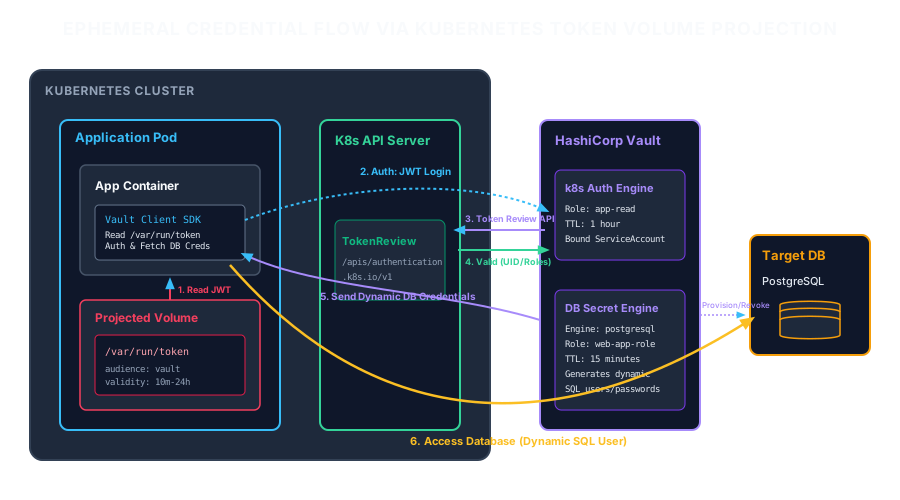
The Problem: The Fragility of Static Credentials
Traditional application setups rely on static database users (e.g., app_prod_user) with passwords that are rotated infrequently, if ever. In Kubernetes, these are typically stored as v1/Secret objects and injected as environment variables. This approach suffers from three critical flaws:
- Broad Blast Radius: If a single pod is compromised via a remote code execution (RCE) vulnerability, the attacker obtains database credentials that can access the database from outside the cluster indefinitely, bypassing all network-level protections if the database port is exposed.
- Lack of Attribution: If five replicas of an API service share the same static database username, database logs cannot distinguish which specific pod executed a destructive query.
- No Automatic Revocation: Rotating a leaked static credential requires redeploying all dependent applications, resulting in coordinated downtime and operational friction.
A common mitigation is utilizing Vault’s static secret mounts. However, this still requires the pod to authenticate to Vault. Historically, this authentication relied on the default Kubernetes Service Account token mounted at /var/run/secrets/kubernetes.io/serviceaccount/token.
The default service account token is a security liability. It does not expire, it lacks an audience restriction (meaning any service that accepts this token can impersonate the pod to the Kubernetes API server), and it is mounted in every pod by default unless automountServiceAccountToken: false is explicitly set. If an attacker extracts this token, they have an indefinite credential to access Vault and the Kubernetes control plane.
The Solution: Token Volume Projection
Kubernetes Projected Service Account Tokens (PSAT) solve this vulnerability by allowing you to project a bound, time-limited, and audience-restricted token into the pod’s file system. Unlike the default service account token, projected tokens:
- Expire Automatically: You can configure the token’s lifetime down to 10 minutes (the default is 1 hour).
- Are Audience-Restricted: The token is only valid for a specific audience (e.g.,
vault). Any other service attempting to authenticate with this token will reject it. - Rotate Automatically: The Kubelet daemon proactively rotates the token file on disk when it reaches 80% of its lifetime or when the token is older than 24 hours.
- Are Bound to the Pod’s Lifecycle: If the pod is deleted, the token is instantly invalidated by the Kubernetes API server.
To implement this, we must configure our Kubernetes Deployment manifest to project the token to a dedicated volume, set the target audience, and disable the default token mounting.
Configuring the Vault Kubernetes Auth Method
Once the pod is projecting the audience-restricted token, we must configure Vault to validate this token using the Kubernetes TokenReview API. When a pod sends its projected token to Vault, Vault calls the Kubernetes API server’s /apis/authentication.k8s.io/v1/tokenreviews endpoint to verify the token’s validity, signature, expiration, and audience.
Vault must run under an identity that has the cluster-wide permission to perform tokenreviews. We establish this by configuring Vault’s Kubernetes auth method using the Vault CLI.
Configuring Dynamic Secret Engines (PostgreSQL Example)
With authentication established, we configure Vault’s Database secret engine. Vault manages the lifecycle of credentials on the target database by connecting to it with administrator privileges and executing raw SQL DDL commands to create and drop users dynamically.
When our Go application requests a credential from /v1/database/creds/payment-service-db-role, Vault generates a unique, random database username (e.g., v-token-payment-serv-abc123xyz) and password. It sets a Time-To-Live (TTL) on this credential. When the TTL expires, Vault logs into the database and drops the user, revoking all access.
Bootstrapping the Client Application (Go Implementation)
The most complex part of dynamic credential architecture is the application runtime logic. When using short-lived credentials (e.g., 15 minutes), the application cannot simply read the database configuration once at startup. It must:
- Read the Projected Token: Load the JWT token from the projected volume.
- Authenticate with Vault: Use the token to acquire a Vault token.
- Fetch Database Credentials: Request dynamic credentials from Vault’s database mount.
- Handle Projected Token Rotation: The projected token on disk is updated by Kubernetes. When Vault’s token expires, the application must read the new token from disk to re-authenticate.
- Update the Connection Pool dynamically: The application’s database driver must swap out credentials on active pools without dropping active web requests.
Below is a complete, production-grade Go implementation leveraging the official Vault Go SDK and the standard pgx library’s connection pool.
Standard SQL connection pools in Go cache the connection credentials established during configuration. If credentials change, the pool will still try to connect to the database with the old username and password once it attempts to scale up or replace dead connections.
To handle dynamic credentials, we leverage the pgx driver connection pool (pgxpool). The pgxpool.Config object exposes a BeforeConnect hook. This hook executes right before the pool dials a new TCP connection to PostgreSQL. We intercept this hook, check if our cached credentials have expired, retrieve new ones from Vault, and update the connection configuration dynamically.
Production Failure Modes and Mitigation Strategies
While this architecture significantly hardens cluster security, operating dynamic credentials at scale introduces a set of complex, distributed failure modes.
1. The Dynamic User Leak / DB Max Connections Crash
When an application deployment scales up rapidly (e.g., during a traffic spike or pod restart loops), Vault generates new credentials for every container start. If pods crash, restart, and recreate connection pools without clean shutdowns, Vault will continue creating users.
In PostgreSQL, the max_connections limit is a finite resource (often set between 100 to 1000 in production). If Vault generates users whose connections pool size exceeds the DB capabilities, the database will reject all connection attempts, taking down the entire cluster.
Mitigation:
- Always configure the database secrets engine
default_ttlto be extremely short (e.g., 10 to 15 minutes) and ensuremax_conn_lifetimein your Go app is lower than the TTL. - Set PostgreSQL resource limits on the generated users. Configure Vault to restrict maximum concurrent open connections for dynamically created users.
2. Token Review API Rate Limiting
If you scale a deployment from 5 to 500 replicas, all 500 pods will concurrently fetch projected tokens and query Vault at startup. Vault, in turn, will issue 500 API calls to the Kubernetes API server for TokenReview. This can trigger rate-limiting on the API server control plane, causing Vault auth requests to time out. The deployment will fail to start because containers will fail their startup and readiness probes.
Mitigation:
- Enable caching in the Vault Kubernetes Auth Method configuration. Set
token_reviewer_jwtcaching via thetoken_cache_durationconfiguration flag in Vault. This configures Vault to cache successful TokenReview results in memory for a specified duration (e.g., 5-10 minutes), reducing Kubernetes API overhead. - Implement jitter and exponential backoff in your application’s bootstrap phase when communicating with Vault.
3. Projected Token Read Race Conditions
Kubelet updates the projected token file dynamically. If an application watches the file via fsnotify and immediately attempts to read it, it can run into a race condition where Kubelet has opened the file descriptor to write, but has not completed flushing the data. The application will read an empty file or a truncated token, causing Vault authentication to fail.
Mitigation:
- Do not rely on file system events to trigger immediate token read operations. Instead, implement a retrying read helper. If the token file is empty or parsing fails, wait 100ms and retry up to 5 times.
- Follow the logic implemented in Snippet 5: fetch credentials on demand through the pool’s
BeforeConnecthook, rather than trying to synchronize file updates precisely with Vault authentication calls.
4. Kubernetes Control Plane Outage Lockout
If Vault cannot communicate with the Kubernetes API server (e.g., during network partitioning, CoreDNS failures, or API server control plane degradation), no new pods will be able to authenticate. Existing pods with active DB connections will function normally until their leases expire, at which point their renewals will fail, taking down the service.
Mitigation:
- Adjust Vault lease TTLs according to your business recovery metrics. A 15-minute lease is highly secure but provides a narrow window to resolve a control plane outage. For critical services, consider a 1-hour lease with a background job that begins renewal attempts at 50% of the lease lifetime (30 minutes remaining).
- Monitor the health of the Kubernetes control plane and configure alerting metrics specifically on Vault’s authentication latency and authentication failure rates.